P003948 Uscan User Manual Page | 29
4. OTHER FUNCTIONS
Annotations
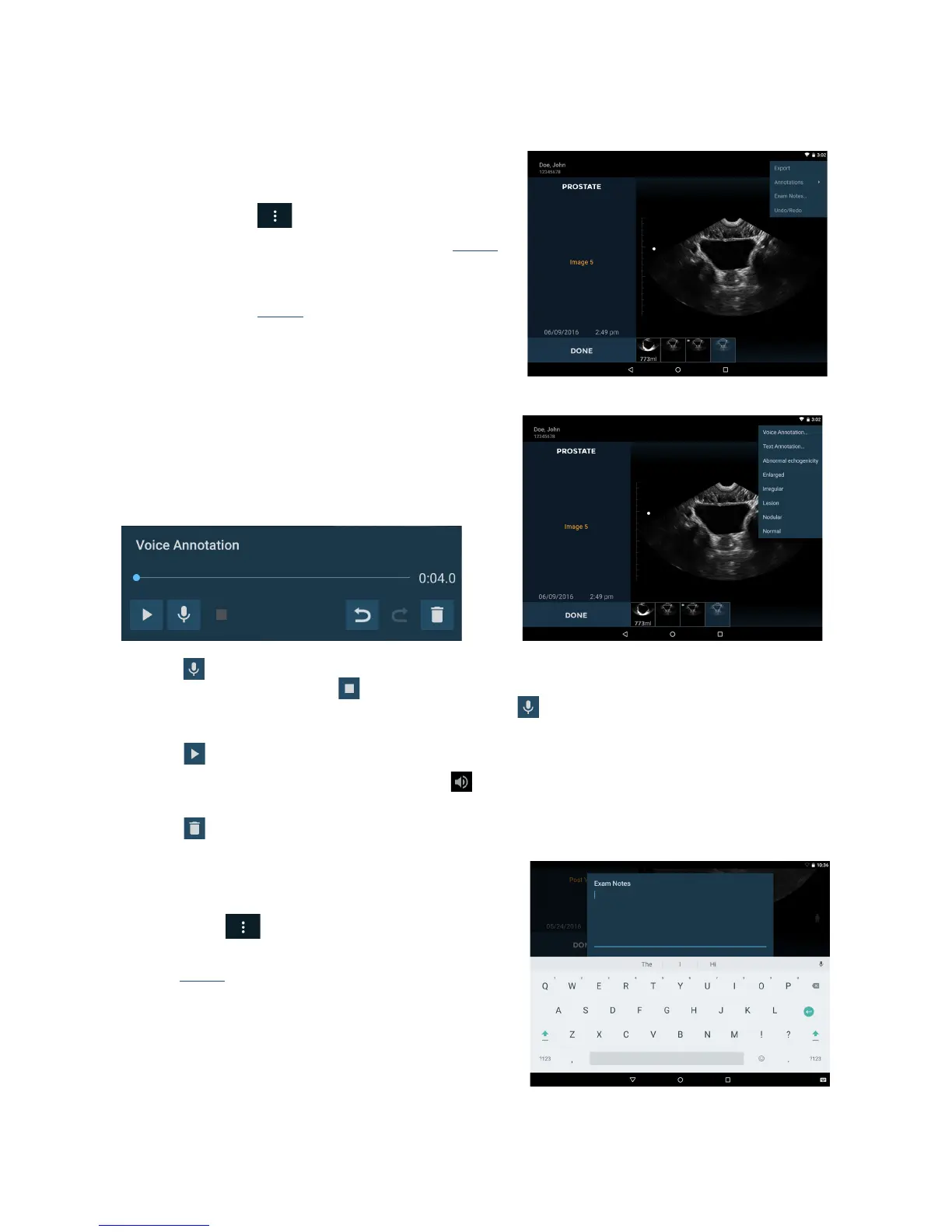
Annotations can be added to individual images.
Tap the icon
to display the Exam menu.
Select An
notation from the drop down list (Fig 4.1).
Select from the predefined set of annotations, or
sele
ct text or voice annotation for custom
annotations (Fig
4.2).
Annotations are applied to individual images.
Text Annotations
Select T
ext Annotation to e
nter custom annotations using
the on-screen keyboard.
Voice Annotations
Select V
oice annotation to save a recorded message with an
image. The voice recording controls are displayed.
Press the Microphone icon to record. Speak clearly into
the U
scan microphone. Press the Stop icon to end
recording. The length of the recording is displayed. Press the
Microphone icon again to add to the end of
the voice recordings.
Press the
Play button to play a voice recording.
Images with linked voice recordings wil
l display a Voice Annotation icon in the bottom left corner of the
image. Tap this icon to launch the V
oice Annotation window and play the existing voice annotation.
Press the
Delete icon to delete the recording.
Exam Notes
Notes can be added for an examination.
Tap the
icon to display the Exam menu.
Select Exam Notes from the drop down list
(Fig
4.1).
Use the on-screen keyboard to type notes in the text
bo
x.
Tap the Microphone icon to use speech recognition
to enter notes (only available wi
th Wi-Fi).


 To Next Page