P003948 Uscan User Manual Page | 27
Do not fan too fast. As a guideline a complete
fan should take around 3- 5 seconds.
Do not twist the transducer.
Angle the probe so the bladder is in the middle
of the ultrasound image.
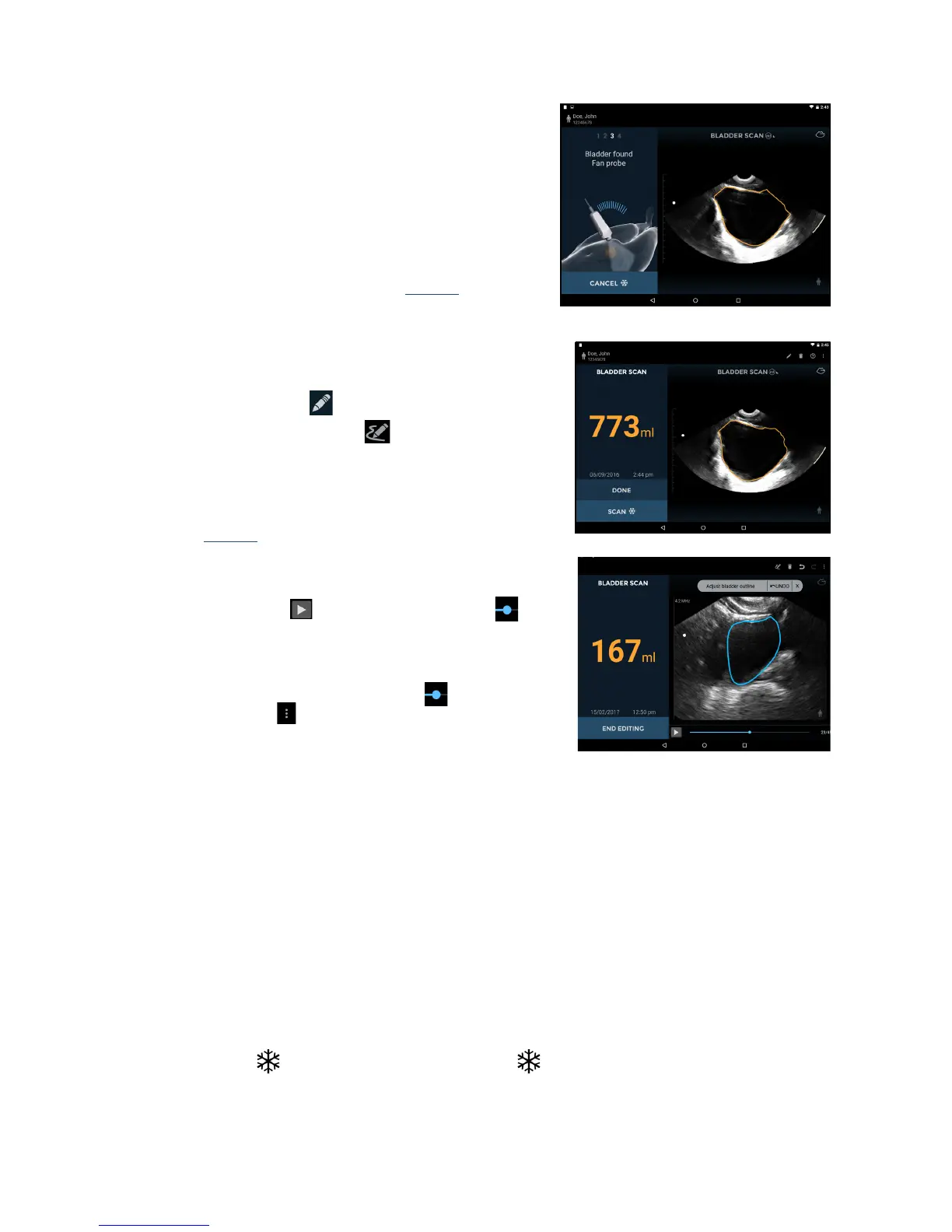
During acquisition, the display will show the fan
position.
When the three dimensional data acquisition is
complete, the system automatically completes the scan
and displays the measured volume (Fig
3.12).
A movie of the complete bladder acquisition i
s displayed.
Bladder Measurement Correction
Correct errors outlining the bladder as follows:
Tap the Pencil icon (
) to start outline editing.
Tap the Pencil Redraw icon (
) to delete the existing
outline and redraw; or
Touch the bladder outline t
o adjust the existing outline.
A drag circle will appear. Drag the outline to align with
the bladder wall. Adjusted outlines change color to blue
(see Fig
3.13).
For fine adjustments, zoom in to enlarge the image then
adjust the outline.
Tap the Pl
ay icon or drag the progress marker to
check other images. Every ima
ge in a measurement can
be adjusted if required.
If a bladder has been outlined where no bl
adder is
present, then drag the progress marker
to the end of
the bladder, tap
and select Mark Bladder End.
Tap En
d Editing to finish.
Audio Feedback
The U
scan provides audio feedback during bladder measurement as follows:
A short double beep sounds when the system has detec
ted a bladder and the user can start the fan of
the probe
A buzzer sounds if a user starts fann
ing the probe before the system has found the bladder
A chime sounds when the system expects the user to change direction
of the fan
A beep sounds at the completion of a
successful scan
A decaying tone sounds at the comple
tion of a 0ml scan
Common Functions
Multiple Scans
Simply tap the Scan
icon or click the probe Scan button to add more bladder volume measurements
or ultrasound scans to the exam.


 To Next Page