P003948 Uscan User Manual Page | 22
Bladder Scan Screens
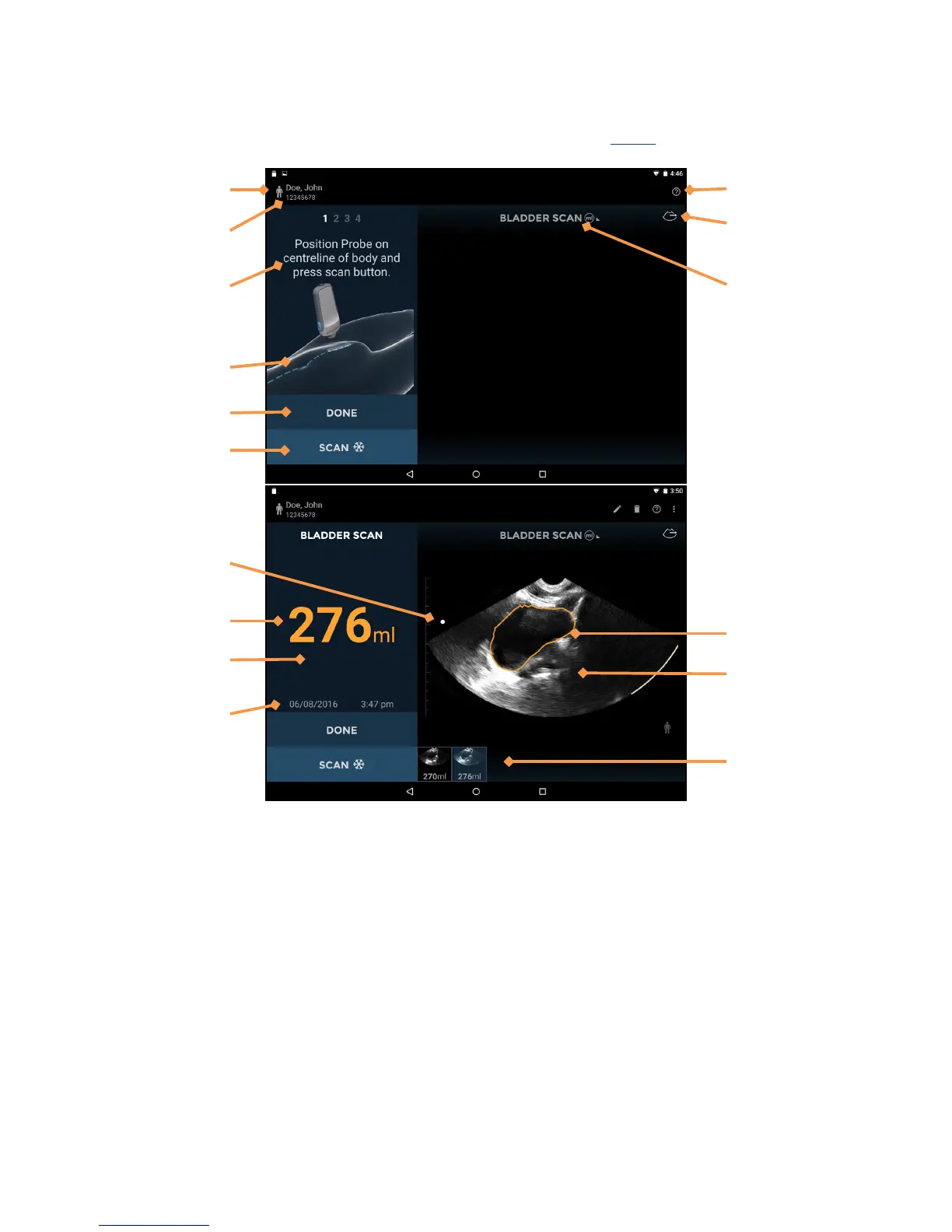
Tap Bladder Scan on the Home screen to start a bladder measurement. See Fig 2.7 for bladder screen layouts.
Fig 2.7 Bladder Scan Screens
The bladder screen layouts contain the following areas:
Patient Type – tap to change the patient type (Normal, pediatric, deep, pregnant, phantom).
Patient Details – displays patient details for the current exam.
Instructions – instructions of current step required for bladder measurement.
Instruction animation – animation of current step required for bladder measurement.
Done – tap to end and save the exam.
Scan (Stop) – tap to start (unfreeze) and stop (freeze) scans.
Orientation Mark – corresponds to the Scan button orientation on the probe.
Measured Volume – measured volume in milliliters.
Image Text Annotation – displays the text annotation for the image.
Image Date and Time – displays the date and time of the image.


 To Next Page