72
EN
Type No. Description Range U/M Step Default
tS 4.0 Modulating Pump Speed
-- = No modulation
AU = Automatic 30
.. 100
% 10 AU
tS 4.1 ∆T Modulating pump delivery/Return 10 .. 40 °C 1 20
tS 4.7
System pump forcing (only in winter mode)
0 = Disabled
1 = Enabled
0 .. 1 - 1 0
RESET
tS 4.8 INST Parameter set to default 0 .. 1 - - 0
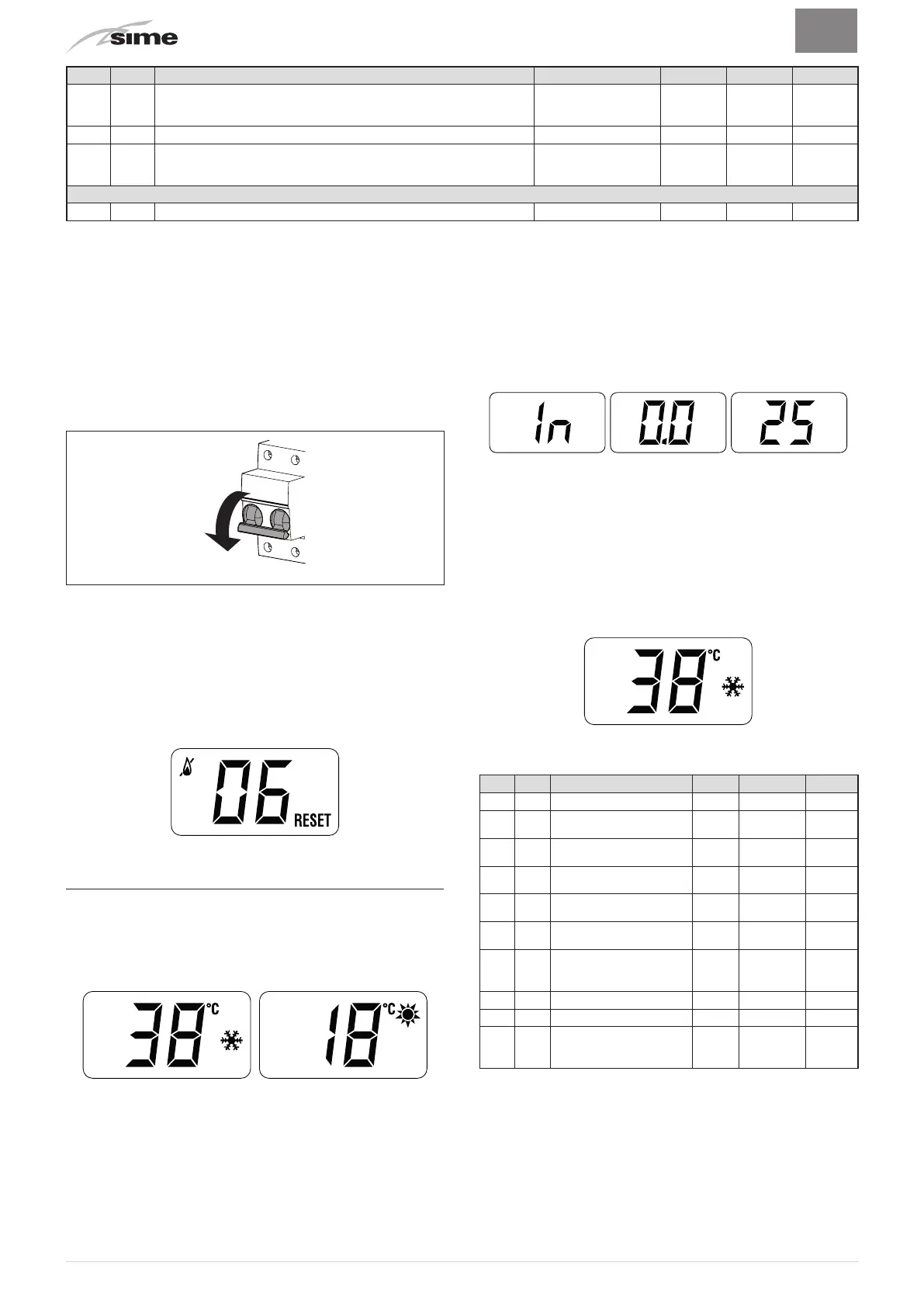
In the event of a fault/malfunction the message
“A L”
will appear
on the display alternating with the alarm number eg.
“AL 04”
(Domestic Hot Water Sensor Fault).
Before repairing the fault:
– disconnect the appliance from the mains power by setting the
main switch to "OFF"
Fig. 41
– as a precautionary measure, close the gas isolation valve.
Repair the fault and start-up the boiler again.
NOTE:
after having repaired the fault, when the alarm number
appears on the display together with the message RESET (see
figure), press the button
o
(
R
) for approximately 3 seconds
to start the appliance up again.
7.5 Display of operating data and counters
Once the boiler is operating a qualified technician can view the
operating data
“In”
and the counters
“CO”
as follows:
– from the operating screen in the mode enabled at that
moment (WINTER
n
or SUMMER
l
)
– go into
“INFO”
by pressing the buttons
>
and
<
at the same
time
for more than 3 seconds until
“In”
appears alternating
with
“0.0”
(information number) and
“25”
(eg. value)
From this point, the technician has 2 options:
– scroll through the list of
“info”
and
“counters”
by pressing the
button
>
. This way, scrolling will be in sequence
– display the
“activated alarms”
(no more than 10) by pressing
the button
<
. Once in this section, proceed with button
>
or
<
.
When all the values have been displayed, exit the menu by
pressing and holding down the buttons
<
and
o
at the same time
for approximately 5 seconds until the initial screen is displayed.
TABLE OF INFORMATION DISPLAYED
Type
No. Description Range U/M Step
In 0.0 SW version
In 0.1 External sensor
- 9 ..
99
°C 1
In 0.2
Delivery sensor 1
temperature
- 9 ..
99
°C 1
In 0.3
Delivery sensor 2
temperature
- 9 ..
99
°C 1
In 0.4
Domestic hot water
sensor temperature
- 9 ..
99
°C 1
In 0.5 AUX auxiliary sensor
- 9 ..
99
°C 1
In 0.6
Actual heating SET
temperature
Par. 13
… Par.
14
°C 1
In 0.7 Power level 0 .. 99 % 1
In 0.8 Flow meter rate 0 .. 99 l/min 0.1
In 0.9
Water pressure
transducer reading (if
resent)
0…99 bar 0.1



 To Next Page