27
SJ12 E, SJ16 E, SJ20 E
243762ABA
General components Section 3 – Familiarization
3.5 General components
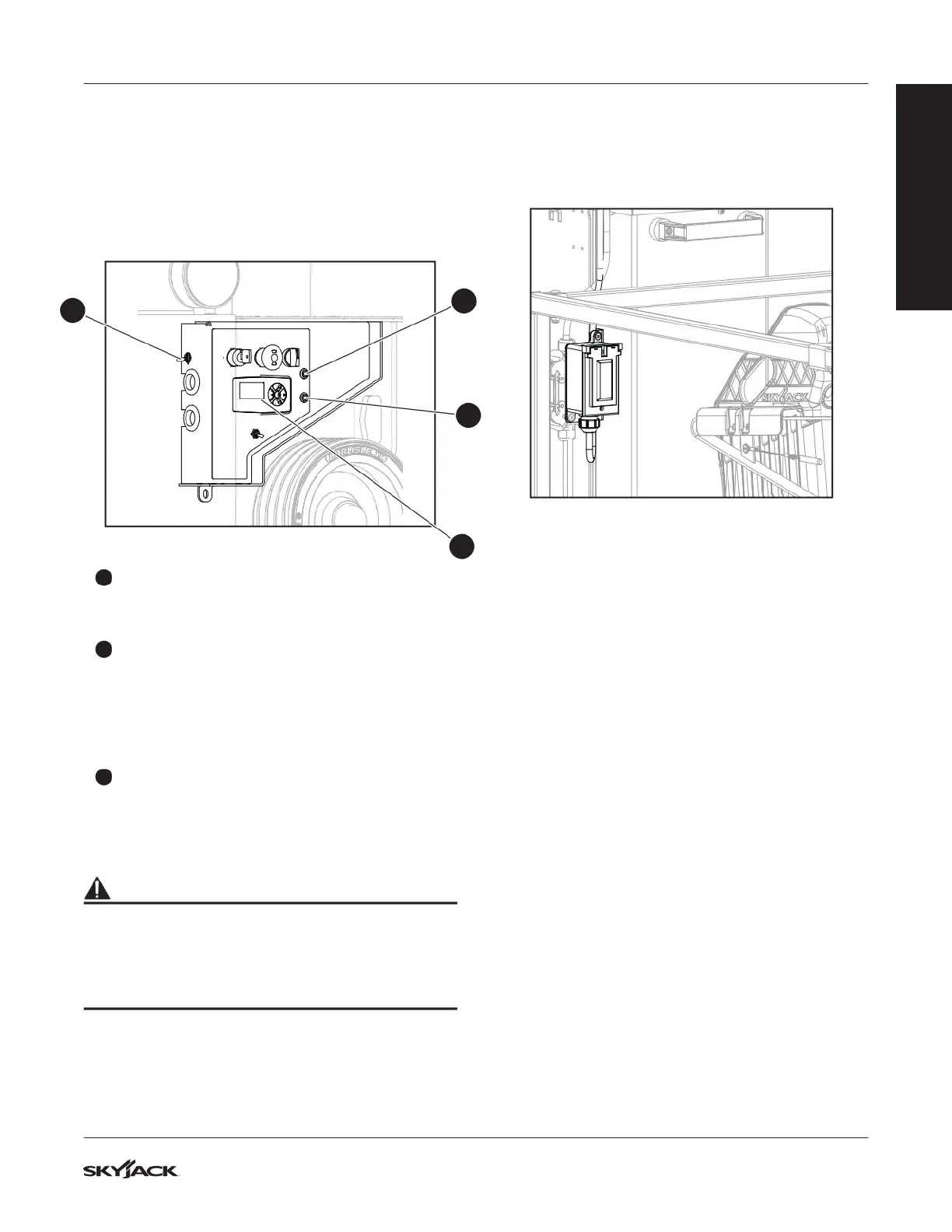
3.5-1 Diagnostic switch, display panel
and circuit breakers
Refer to Section 3.1 for the location of the circuit
breakers and diagnostic switch.
1
3
3
2
1
Diagnostic switch
The diagnostic switch is used for the purpose of
troubleshooting for MEWP.
2
Display Panel
This display panel, located in the base controls,
shows the operation and parameter information.
Examples are the battery state of charge, hours
of operation, machine speed, and diagnostic
information.
3
Power-overload circuit breaker
If a power overload occurs, the circuit breaker
opens. Push the circuit breaker to reset the
circuit.
WARNING
Do not use the diagnostic switch when there are
personnel on the platform. The MEWP can move
when you engage the diagnostic switch. If you use
it incorrectly, death, serious injury, and/or MEWP
damage can occur.
3.5-2 AC power socket on the platform
The AC power socket is a source of AC power on the
platform when the plug at the base is connected to an
inverter or an external power supply.
FAMILIARIZATION



 To Next Page