30
SJ12 E, SJ16 E, SJ20 E243762ABA
Section 3 – Familiarization
Optional equipment
2
1
NOT USED
1
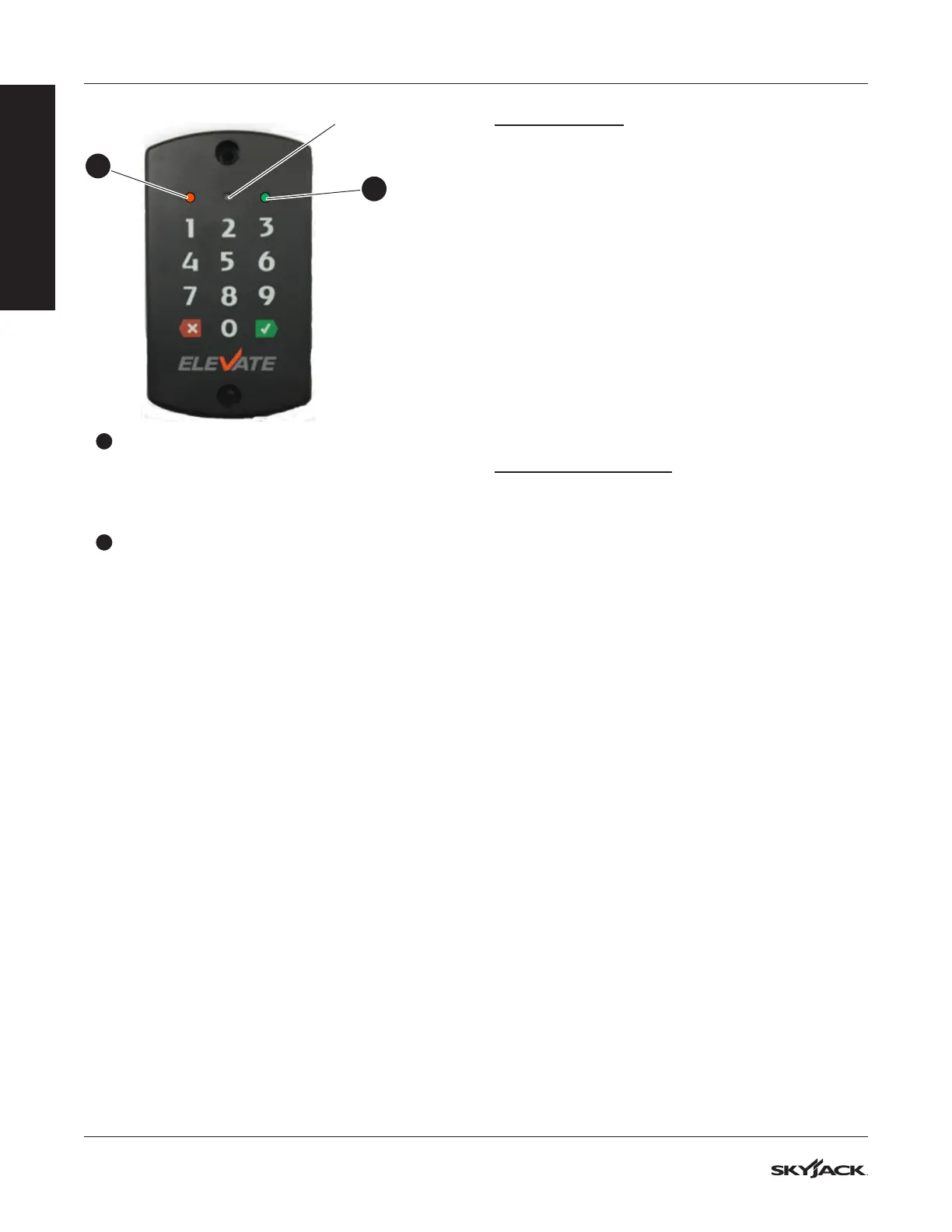
Orange indicator: This light shows that the
access control unit is on. The keypad always
has power regardless of the emergency-stop,
off/platform/base key switch, or main power
disconnect position.
2
Green/red indicator: A green light shows that
the access control unit is in operation. A red light
that ashes shows that the keypad received a
cancel input.
Operation
To operate the MEWP, the light and all of these power
connections must be on before the set time expires.
This set time is the time that the MEWP owner sets for
the access control operation.
▪
The green light on the keypad of the access
control unit.
▪
The main power disconnect switch.
▪
The emergency-stop button on the base control
console.
▪
The off/platform/base key switch.
You can also set these power connections to on
before you start the access control unit.
To operate the access control unit, use the PIN code
or Smart ID card.
With the Keypad:
NOTE
This touch-sensitive keypad beeps to identify a
correct input.
1. Enter the PIN code.
2. Press the green checkmark to conrm.
▪
Result: The green light identies an approved
ID. Start the operation.
NOTE
If you push an incorrect button when you enter
the PIN code, push the Cancel button to start
again.
With the Smart ID Card:
1. Put the card in front of the reader.
▪
Result: A beep identies that the reader
read the card. The green light identies an
approved ID. Start the operation.
IMPORTANT
If the set time of the access control unit expires,
enter the PIN code or tap the Smart ID card again.
If there is a failure of the access control activation,
speak to the MEWP owner.
IMPORTANT
To start the access control unit, enter the PIN
code or tap the Smart ID card. These power
connections must be in the on position in the set
time:
▪
The main power disconnect switch
▪
The emergency-stop button on the base
control console
▪
The off/platform/base key switch.
Function tests
Do the function tests as specied in Section 4.3.
When you do the function tests, make sure that the
green light on the keypad is ON. This light conrms
that the access control unit is in operation. Do the
function tests for these power connections in the set
time:
▪
The main power disconnect switch
▪
The emergency-stop button on the base control
console
▪
The off/platform/base key switch.
FAMILIARIZATION



 To Next Page