Snap‐onEEWB330AHandspinWheelBalancer
Note:Theoffsetanddiameterdimensionswerealready
enteredduringtheHWMrimdimensioninput.
Duringdataentryandweightapplication,therighthand
displayshows“S1”(Spoke1,weightposition1)or“S2”
(Spoke2,weightposition2)aslongasS1orS2are
withinthespecifiedrotationalangles.Else“S‐‐“willbe
shown.
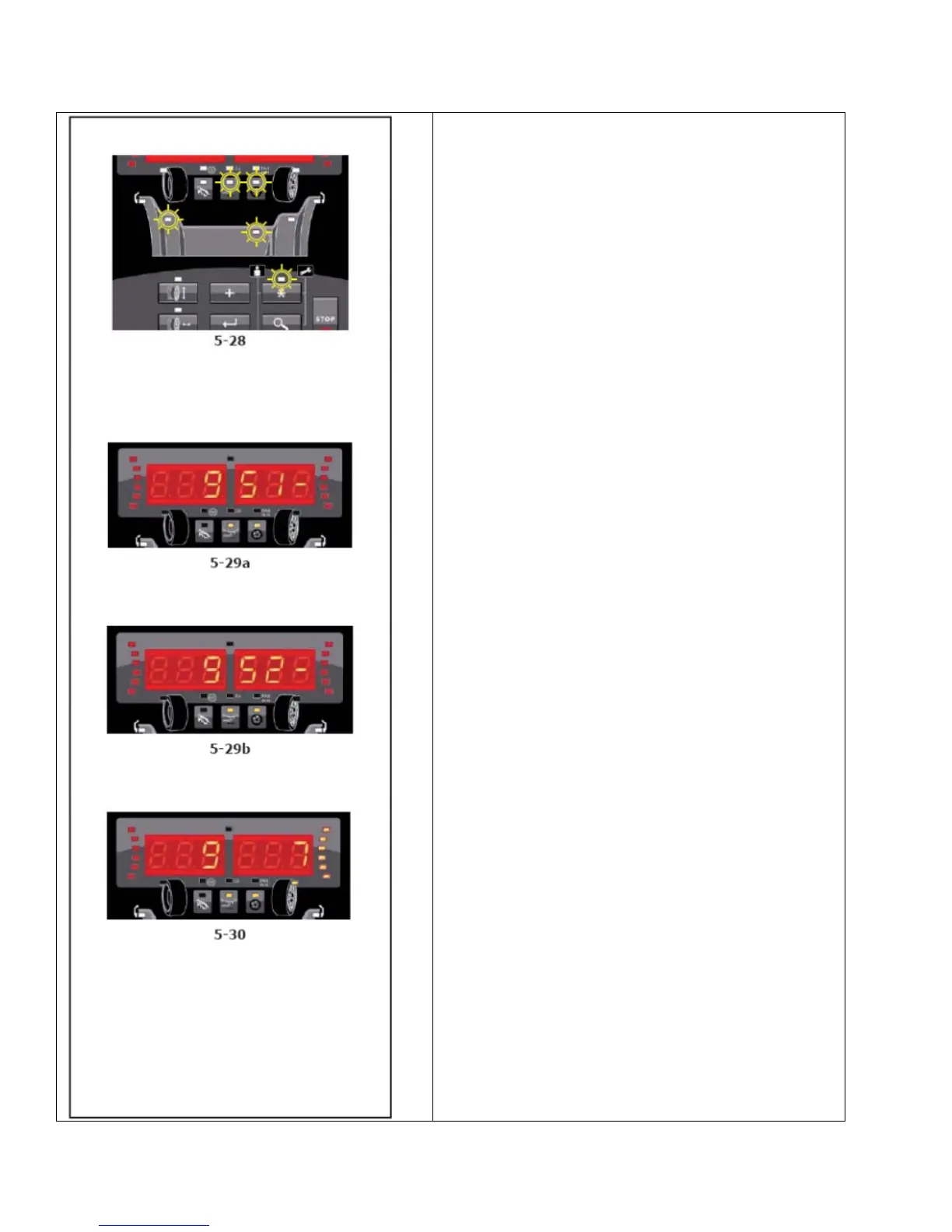
S1willappearonthedisplay,(Fig.5‐29a).Rotatethe
wheeluntilaspokeisat12o’clockpositionandselect
Enter.Ifthepositionislegal(withinthespecifiedangle)
ashortbeepwillbeheard.Ifanillegalpositionofthe
wheeliscreatedandEnterisselected,alongbeepwill
beheard.Checktherotationalpositionofthewheel.
S2willappearonthedisplay,(Fig.5‐29b).Repeat
previousstepforS2.Ifthepositionislegal,ashortbeep
willbeheard.Theunitwillcalculatetheweightsthat
mustbeappliedtopositionS1andS2.Slowlyrotatethe
wheelbyhandtoaweightapplicationposition,(Fig.5‐
30).Applytheweightwiththegaugearm.Slowlyrotate
thewheelbyhandagainuntiltheWAPindicatorgoes
offandonagain.Applytheweightwiththegaugearm.
SelectEntertoexitthismode.SelectingEnterseveral
times(dependingonthestageoftheprogram)forces
theprogramtoquit.Theoriginalrightplaneweight
valuewillbeshownagain.TheSWMindicatorwillgo
off,ashortbeepwillbeheard.Theprogramreturnsto
themainmenu.
Note:Applyingsplitweightsdoesnotinvolvepriorities.
Theoperatorcanchoosewhichtoapplyfirst.
Note:Theunbalancereadingisonlysubdividedontwo
fittingpositionswhenthespokepositionisstored.
Whenbalancingwithcounterweightspositionedbehind
thespokesifyoualsoneedtoperforman
Optimization/Minimizationrun,doitbeforeapplying
theweights.


 To Next Page