BTP-2002NP User’s Manual
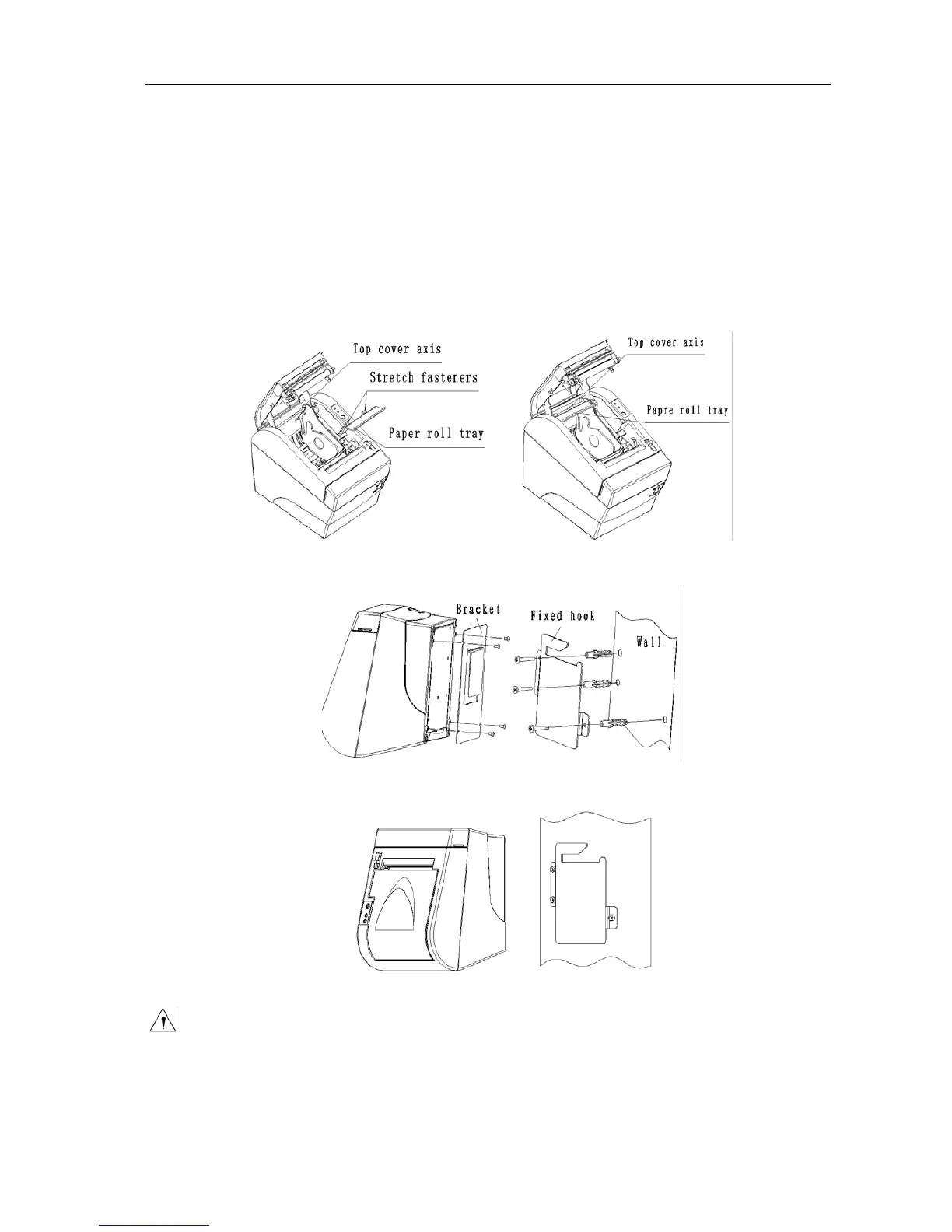
4) Select the location for mounting the printer with wall mount systems, It needs at least 15 cm
free space to the right of the location. Drill three Ø 8 mm holes in the wall using the
Fixed-Hook-Plate as a template. Insert three plastic plugs (Ø 8 mm x 40 mm) in these holes
and make sure that the plugs are completely inserted in the holes. Mount the
Fixed-Hook-Plate onto the wall with three screws (Ø 4.8 mm x 30 mm) as shown in figure
N.2.4. Please note that these screws and plastic plugs are not supplied with the Wall mount
system.
5) Hang the printer on the Fixed-Hook-Plate as shown in figure N.2.5 by sliding the printer from
the right side of the Fixed-Hook-Plate.
Figure N.2.1 Figure N.2.2
Figure N.2.3 Figure N.2.4
Figure N.2.5
Caution:
The printer should only be mounted as instructed above.
The structure of the wall should be strong enough to prevent the printer and wall mount
from dropping.
- 22 -



 To Next Page