BTP-2002NP User’s Manual
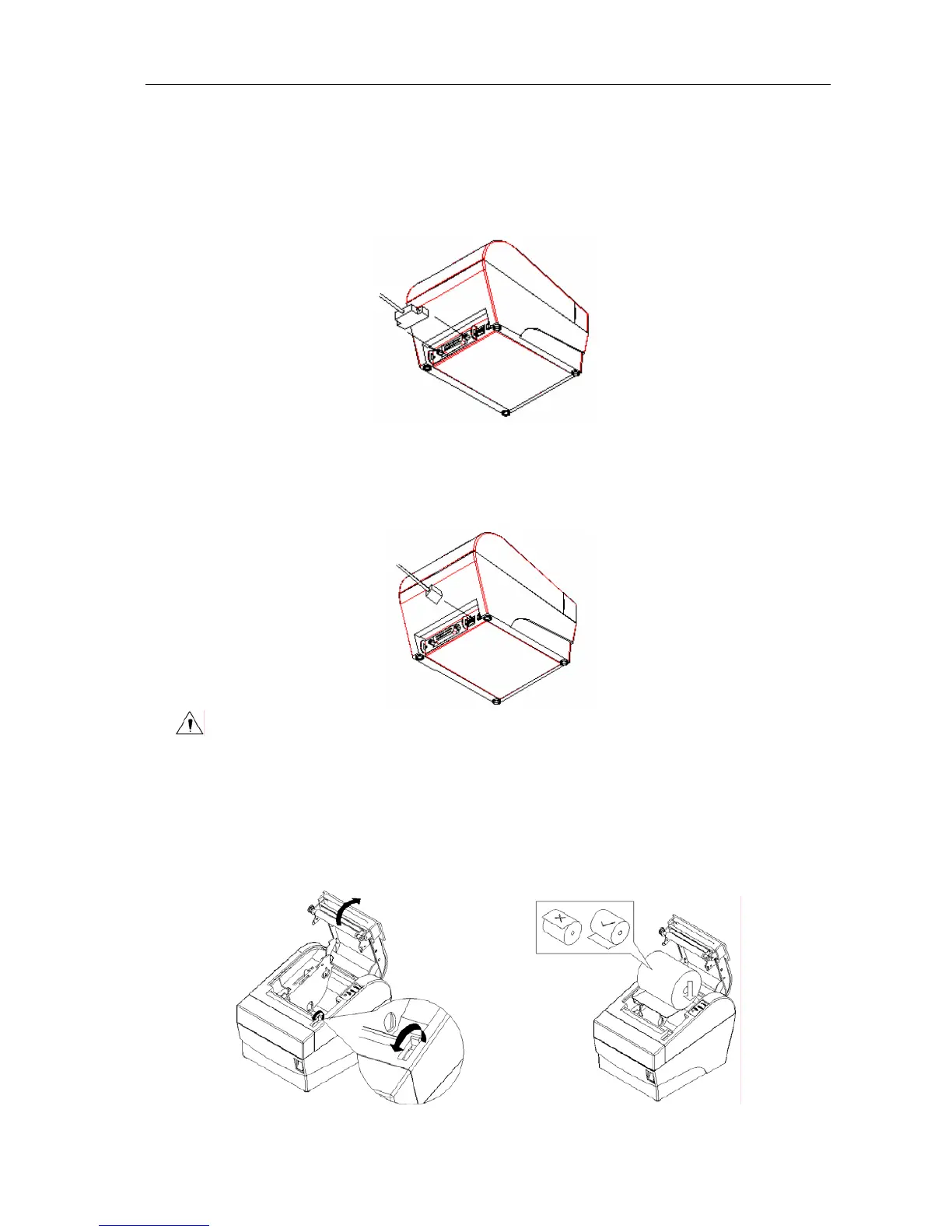
4.5 Connecting Signal Cable
1) Ensure the printer power is turned off.
2) Put signal cable into suitable connector which should be fixed with plug screws or clip springs
(for USB connector, there are no such plug screws or clip springs).
3) Connect the other end of the signal cable to the host.
4.6 Connecting the Cash Drawer
1) Ensure the printer power is turned off.
2) Insert the cash drawer cable into the cash drawer kick-out connector on the back of the printer.
Caution:
Do not connect any other device than the specified drawer (Solenoid type) to the cash
drawer kick-out connector(Do not connect a telephone line either).
4.7 Inserting the Paper Roll
1) Open the top cover of printer.
2) Put the paper roll into the paper cabinet. See figure below.
- 10 -



 To Next Page