SmartSMS User Manual Soft dB inc.
User Manual p. 103
How to use the wireless calibration system:
• Power the router. Connect the computer to the router “RES_SMS” network
• Power and connect the Silex to the SMS router (port 1) using an Ethernet RJ45
cable. Do not use the Internet port on the router
• Power, start, and connect the SmartSMS to the Silex using USB cable.
• Windows may ask for the drivers of the Smart SMS unit. See appendix A to do the
drivers installation procedure.
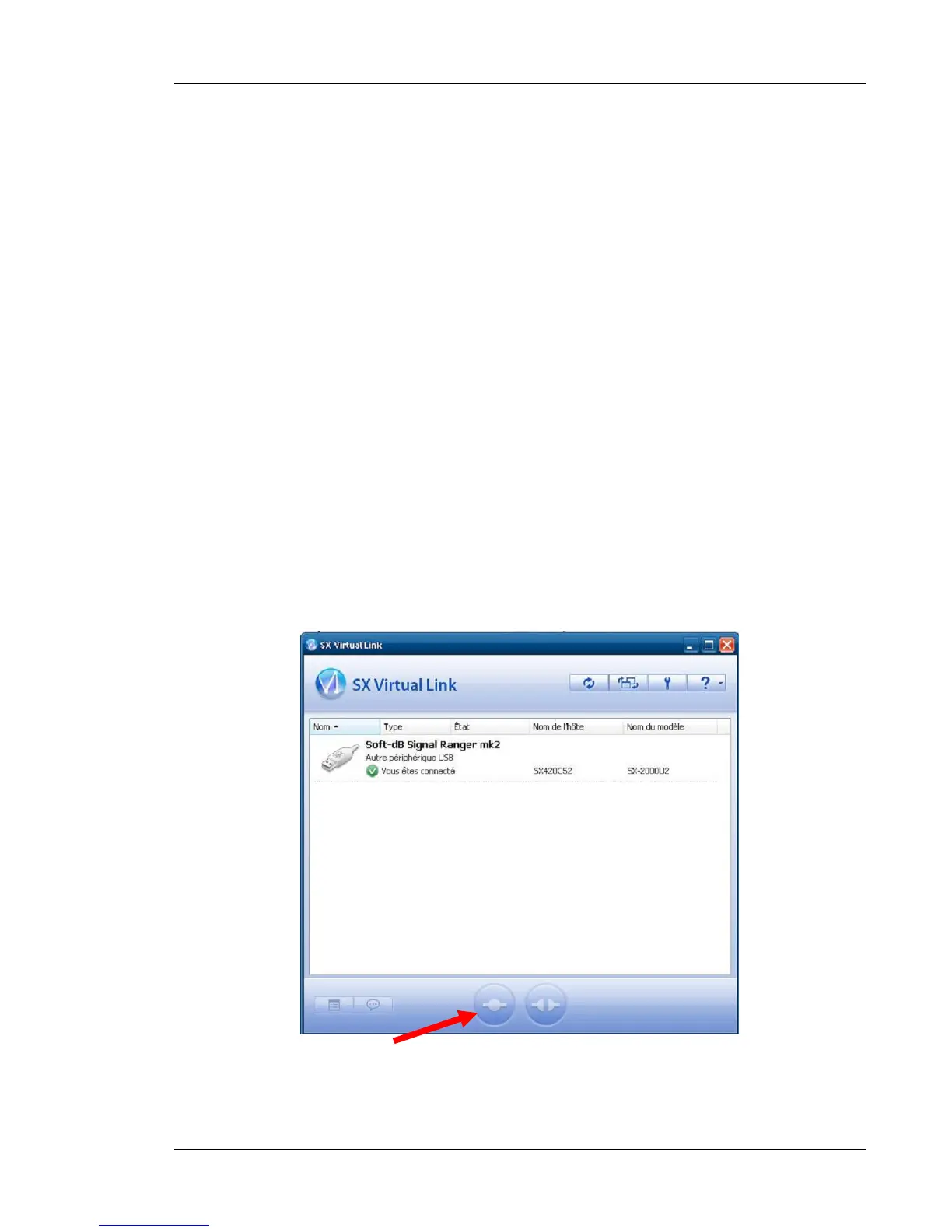
• Start the “SX Virtual Link” Program
• The Silex server detects and connects automatically the SMS unit to the computer.
If not, you can still try to do it manually by clicking on the button pointed by the red
arrow.
• If it is properly installed and connected, the name “Signal Ranger mk2” (name of
the DSP board into the SMS unit) should appear in the USB Devices tab and the
status should be connected. The SX Virtual link interface is always available by
clicking on the icon at the bottom right or in Start/program/SR Virtual link/SR Virtual
link. It can be useful if you have problem with connection and you want to verify if
the Silex device is connected.
You can now start the SmartSMS Software.



 To Next Page