SmartSMS User Manual Soft dB inc.
User Manual p. 81
8. Paging System
Each SmartSMS unit has up to four auxiliary inputs for paging and music. These inputs can be
multiplexed with an integrated mixer/equalizer so that each input signal can be sent to given
zone(s) and the output level in each zone can be adjusted and equalized.
The auxiliary input #1 can be set as priority for emergency signals. In this case, the signal that may
be present on other inputs and sent to some zones (for example, music) will be muted. Also, a
global masking sound attenuation can be specified when input #1 is activated.
Each input can accept a 0 to 5 Volts signal. Standard audio line (0 to 1 Volt) voltage is thus directly
accepted (see section 0).
8.1 Paging and Music Mixer/Equalizer
The paging/music mixer function is used to manage the paging inputs and outputs. There is a
possibility of up to four different inputs on the paging system.
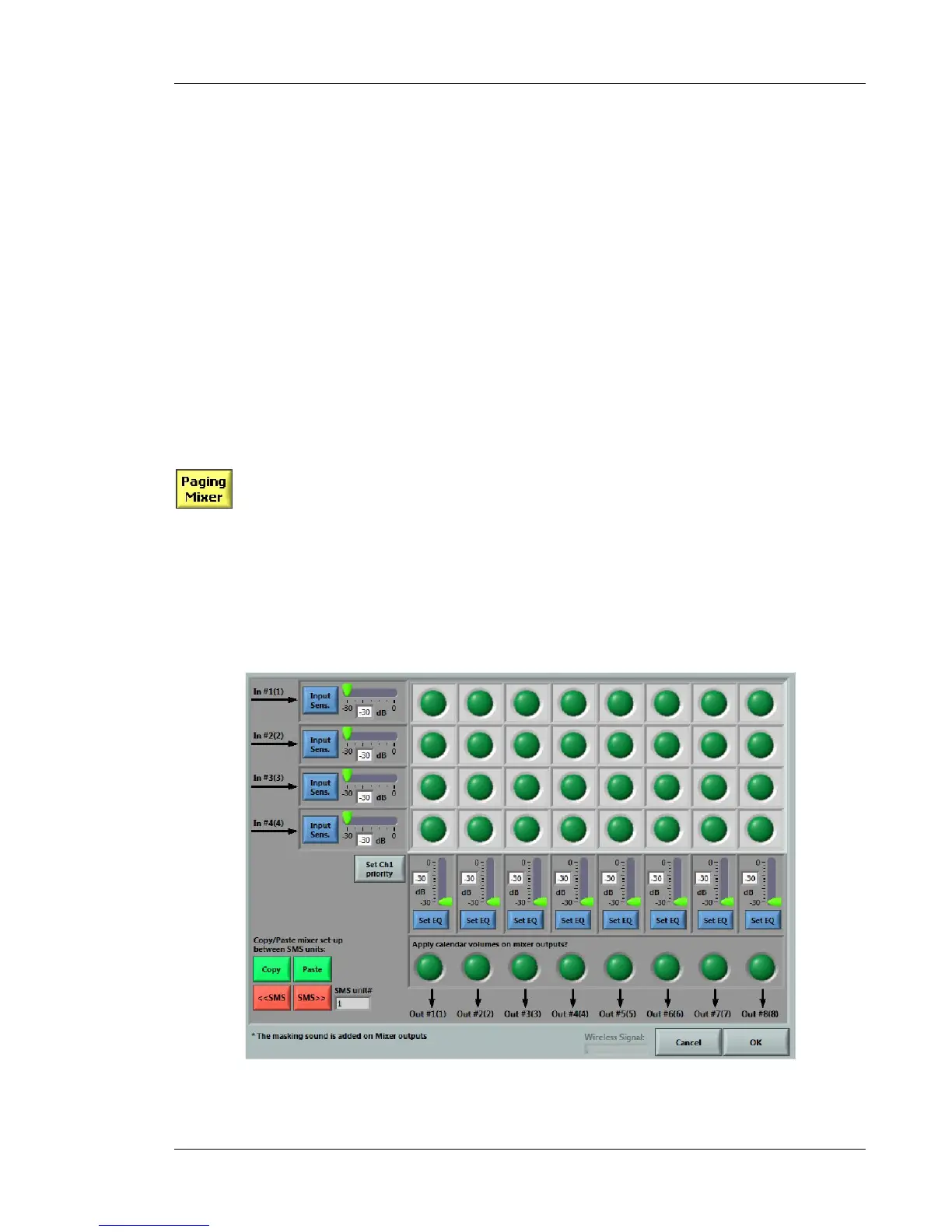
Figure 75 shows the interface for the paging/music mixer/equalizer function. The interface is a
matrix with four auxiliary inputs on the left and eight outputs at the bottom. Each input can be sent
to any of the eight output channels by clicking on the appropriate dots.
Figure 75: Paging and music mixer/equalizer



 To Next Page