EasyManua.ls Logo

Sojet V1H - Battery Charging; Battery Installation and Removal; Ink Cartridge Installation

Sojet V1H
73 pages
Print Icon
To Next Page IconTo Next Page
To Previous Page IconTo Previous Page
Loading...
3
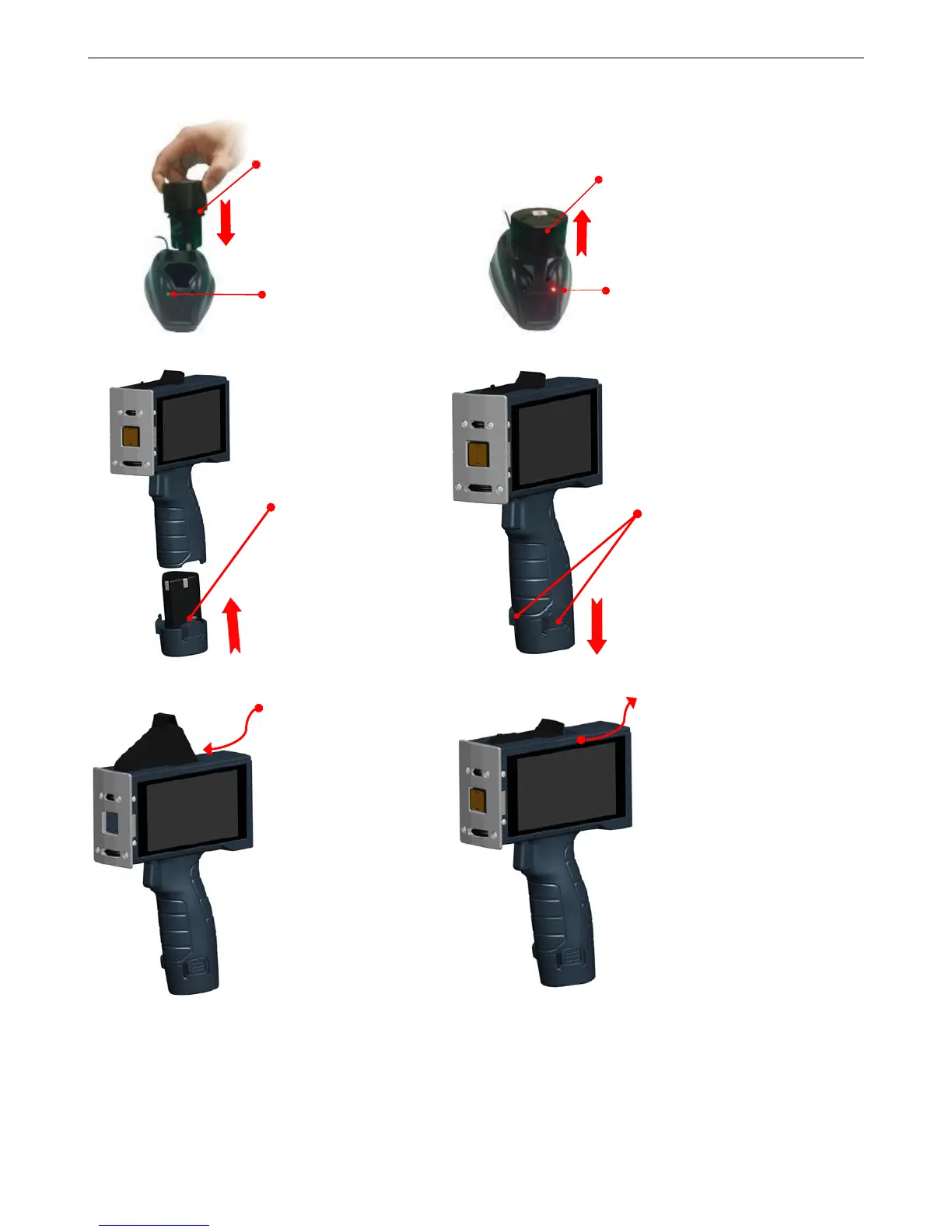
1.2 Battery Charging
1.3 Battery Installation and Removal
1.4 Ink cartridge Installation (42ml)
Battery charging:
Insert battery into
charger.
Green indicator light:
Battery not inserted or
battery fully charged.
Battery charging finished:
Remove battery from charger.
Red indicator light:
Battery is on charge.
Insert cartridge to
printer by an angle of 15
degree. Press vertical
when insert right
position, then hear
"click”, that means the
cartridge already is
fixed well.
Cartridge removal:
Remove cartridge from
printer by an angle of
15 degree.
Battery installation:
insert the battery into
handle and hear
click indicates the
battery is well fixed.
Battery removal:
Press the two lock
catches on battery,
remove battery from
printer.

Table of Contents

Related product manuals