Expanded List Width: If the object name is long, the list will show incompletely, if only click
【Unfold】, the list will be expanded, and display completely; Click 【Recover】again, then can recover
to normal.
Switch List Display Way: Display object in the way of default list, click 【List】, switch to icon
display way; Click 【Icon】again, can switch back to list display way; Select object, clip 【Edit
object】,then can enter object editing interface.
4.2.3 Toolbar
In the process of create and edit message, we can use shortcut function of toolbar to edit object and
source.
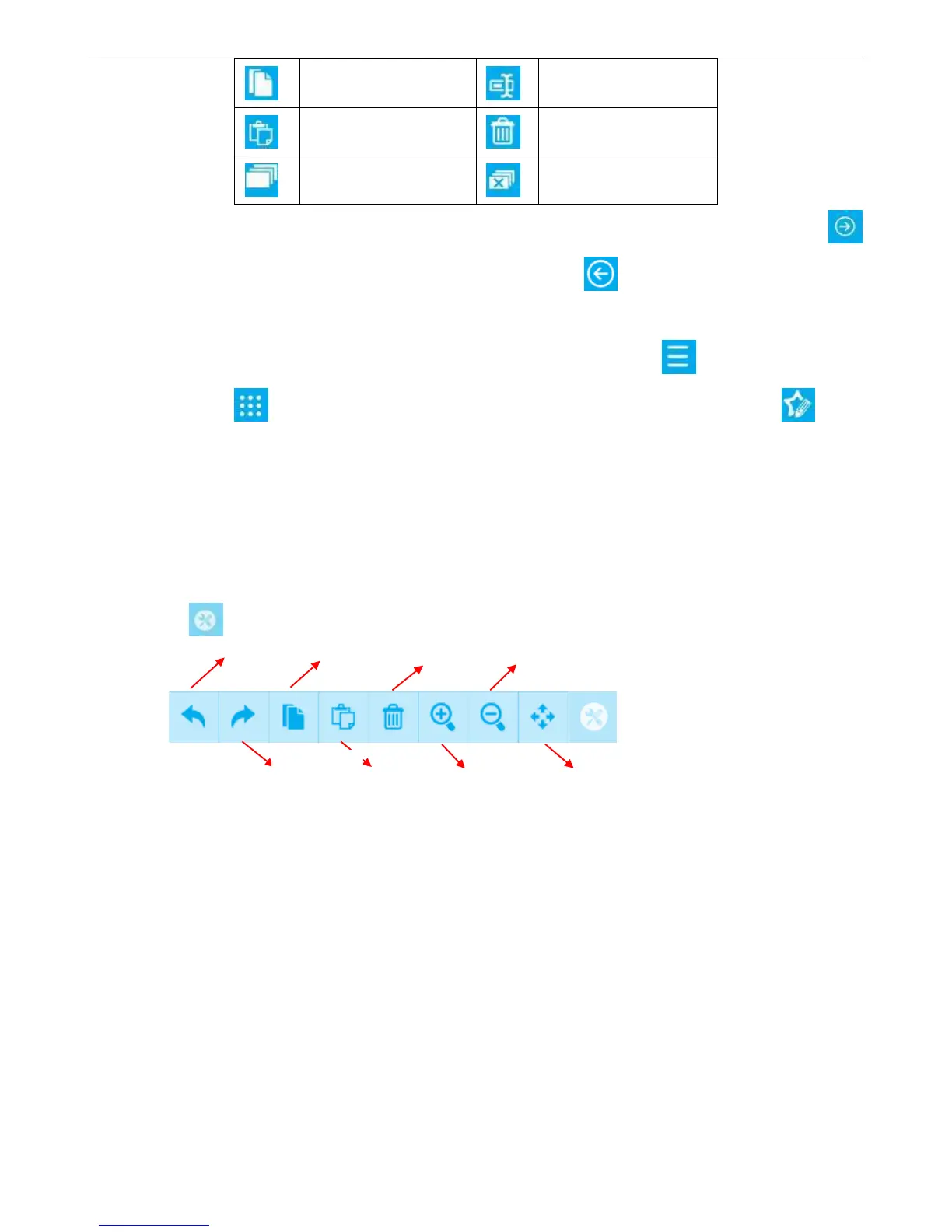
Click 【Tools】, expand various shortcuts.
【Undo】: Click once, can undo operation of step forward for one time, maximum can undo 5 steps
operation.
【Recover】: After perform one cancel command, click Restore key can restore content of
revocation.
【Copy】: Click object/source in the preview interface, click 【Copy】 to clipboard.
【Paste】: Paste copy or cut object/source to the preview interface.
【Delete】: Click object/source in the preview interface, Click 【Delete】, then will delete from the
interface.
【Zoom in】: Enlarge doubled canvas size in the standard state.
【Zoom out】: Click Zoom out in the enlarge canvas, then will restore to standard state canvas.



 To Next Page