OPERATING MANUAL PAT-1, PAT-2, PAT-2E, PAT-10 version 1.02
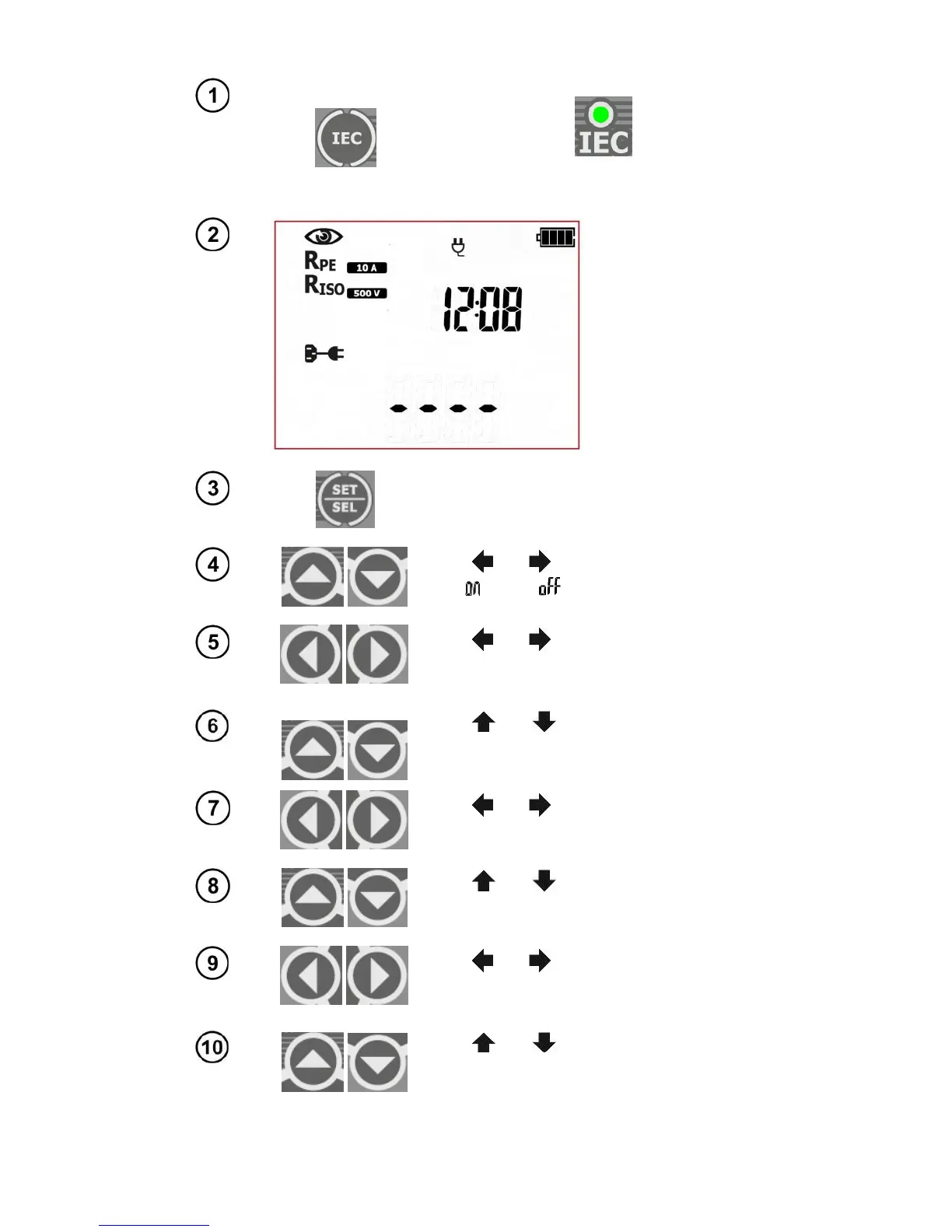
Press IEC button to go to the testing pro-
cedure for cables ( LED is on) –
icons representing all subsequent tests will
be displayed on screen.
The tester is in IEC
testing mode. On the
right side the current
time is shown.
Press SET/SEL button to set the
measurement parameters.
Use and
to set the visual inspection
:
on ( ) or off ( ).
Use and
to go to the test current
value settings for PE resistance measure-
ment.
Use and
to set the value of the test
current for the PE conductor resistance
measurement.
Use and
to go to the limit settings
for PE resistance measurement.
Use and
to set the upper limit for
the PE conductor resistance.
Use and
to go to the test time dura-
tion settings for PE conductor resistance
measurement.
Use and
to set the test time
duration
for PE conductor resistance
measurement.



 To Next Page