SONOSAX SX-R4
+
User interface V1.2 Page
3
of 26
2. PRINCIPLE OF OPERATION
2.1 FRONT PANEL
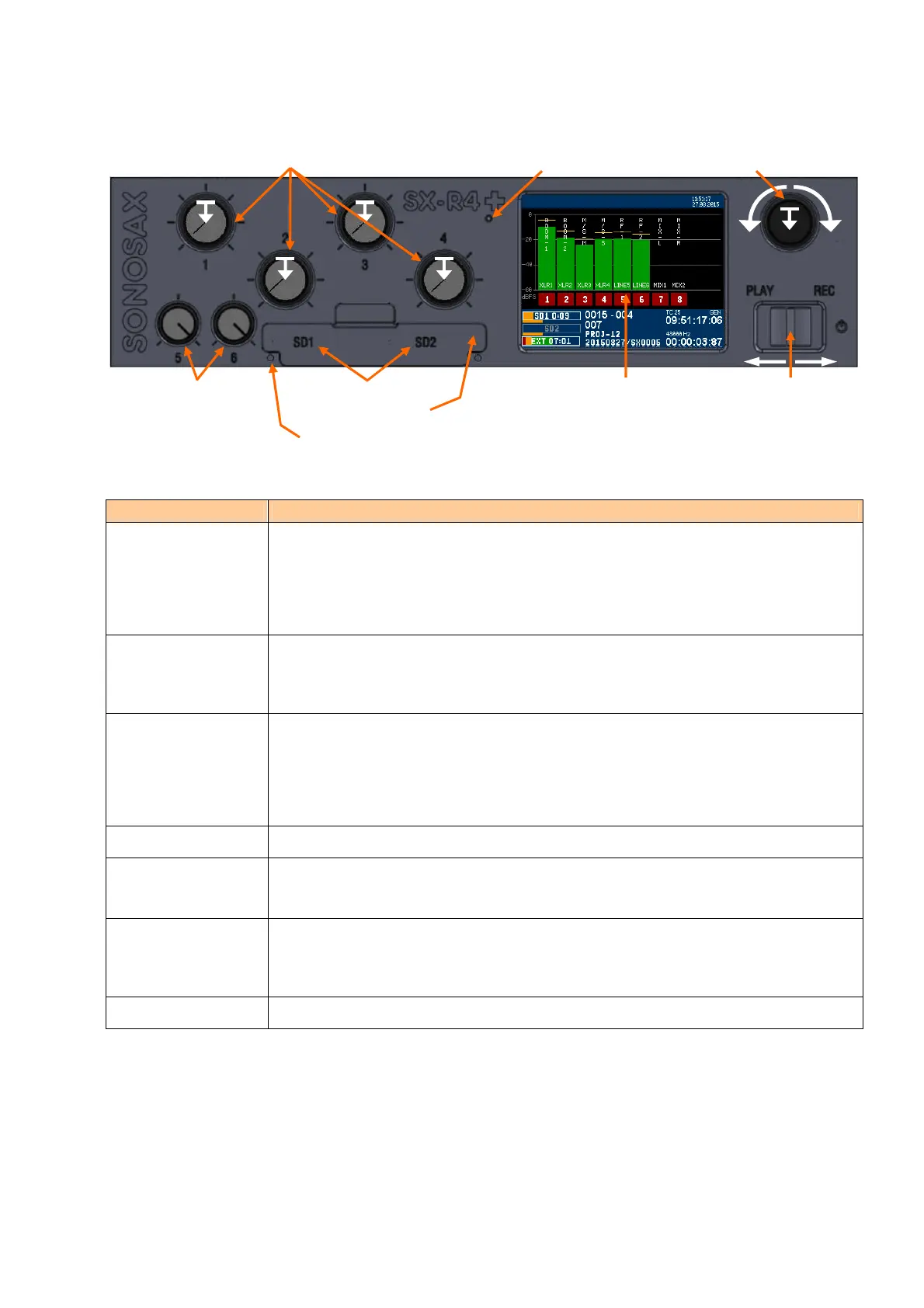
FEATURES FUNCTIONS / DESCRIPTION
Potentiometers 1 to 4
Push-On switch 1 - 4
Level or Gain control of XLR's inputs 1 to 4 (controlling the DSP)
• Primarily assigned to XLR inputs 1 to 4, either set as analogue or digital input
• Fader range adjustable by menu
Switches with two programmable functions selected by a short press or a long press such as:
• Solo monitoring - Mute - Phase reversal - etc
Potentiometers 5 & 6 Retractable potentiometer with a function switch
• Analogue volume control dedicated to Line inputs 5 & 6 on TA3
• User programmable switch to activate Solo monitoring of the input is activated by releasing
the knob
Headphone Encoder
Push-On switch
Multifunction encoder with push-on switch,
• Primarily controls the headphones volume
• Scroll specific functions or values according to displayed contextual menu
Switches with two programmable functions selected by a short press or a long press such as:
• Lock/Unlock touch screen - Lock/Unlock volume control
Toggle Switch Primarily dedicated for Record and Playback functions
SD Card slots Accepts SD/SDHC/SDXC cards, High speed class 10 or higher are recommended. Press to
insert with notched corner oriented toward the right. Press to eject.
Push protection cover firmly in place to avoid dust and water ingression
SD Card Led status The Led's indicate the status of the SD Cards such as:
• Blinking: ready to Record
• ON: recording in progress
• OFF: SD Card not present, not formatted or full
Color Touch Screen Touch the screen to call and navigate sub-menus
Potentiometers controlling XLR inputs 1 to 4
with programmable push-on switches
Headphone volume / Encoder
Potentiometers controlling
Line Inputs 5 & 6, with
programmable switch
Primary and Secondary
SD Card slots under
protection cover
Color TFT Display
with Touch Screen
Toggle Switch
► Power ON
► REC ► INDEX
►► REC -> STOP
◄ PLAY ◄ PAUSE
◄◄
PLAY -> STOP
SD Card status Led's
Light Sensor



 To Next Page