SONOSAX SX-R4
+
User interface V1.2 Page
11
of 26
4.5.2 AUX AES ROUTING & SETUP
The TA3 [AUX AES] connector can be configured either as a digital input or as a digital output; the digital format is
AES3.
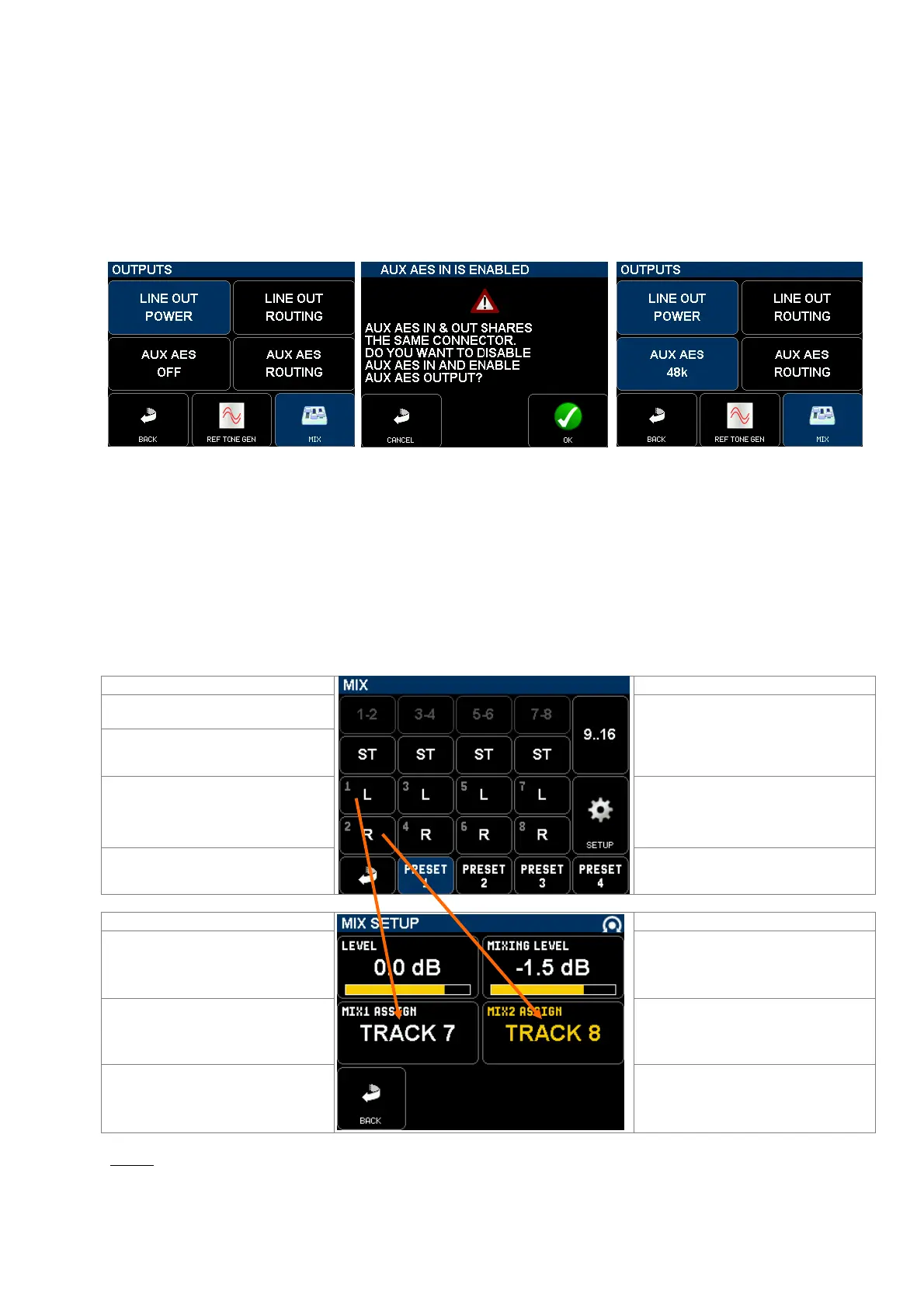
When the AES I/O button is darkened in the [OUTPUTS] page, the AES I/O is configured as a digital input; touching the
AES I/O key switches the [AUX AES] TA3 connector to output mode and toggles the output sampling frequency to 48,
96 or 192 kHz. The AUX AES output has its own ASRC (Asynchronous Sampling Rate Converter) so that the sampling
frequency at this output can be different than the sampling frequency set for the recordings.
When set as an output, the modulation routed to the [AUX AES] connector is routed and configured exactly in the same
manner as the [LINE OUT].
AUX AES set as an input Selecting AUX AES as an output AUX AES set as an output at 48kHz
posts a warning sampling frequency
4.5.3 MIX SETUP
The [MIX] and [MIX SETUP] pages are used to create a down-mix of the recorded tracks (not of the inputs). One can
create a stereo mix, 2 independent mono mixes or a single mono mix.
The routing matrix works in the same manner as the LINE OUT where the tracks are grouped per pair so that stereo or
M/S microphones can be routed accordingly, but any track of a pair can be considered as a mono track and can be
freely assigned to MIX1 (L) or MIX 2 (R) in the MIX SETUP page.
Primary switches toggles the monitoring
mode per pair: OFF, MONO, STEREO,
REV-ST, M/S
Call 2nd page to configure tracks 9 to 16
Odd track of the pair
Secondary switches route each track
individually: OFF - L - R- C
Even track of the pair
Call a SETUP page for the monitoring
Return to previous Menu
4 preset keys to store and recall user's
selections see note
Use the encoder wheel to adjust the
MIX level from -80 to +20dB
Adjust le mixing level from 0 to -6dB
see chapter below
Use the encoder wheel to freely assign
the MIX1 (Left) to any of the 16 tracks
Use the encoder wheel to freely assign
the MIX2 (Right) to any of the 16 tracks
Return to previous Menu
NOTE:
Press 2 seconds on a [PRESET] key to store the configuration as it appears on screen.
Briefly press on a [PRESET] key to recall a configuration.



 To Next Page