SONOSAX SX-R4
+
User interface V1.2 Page
20
of 26
6. SYSTEM SETUP
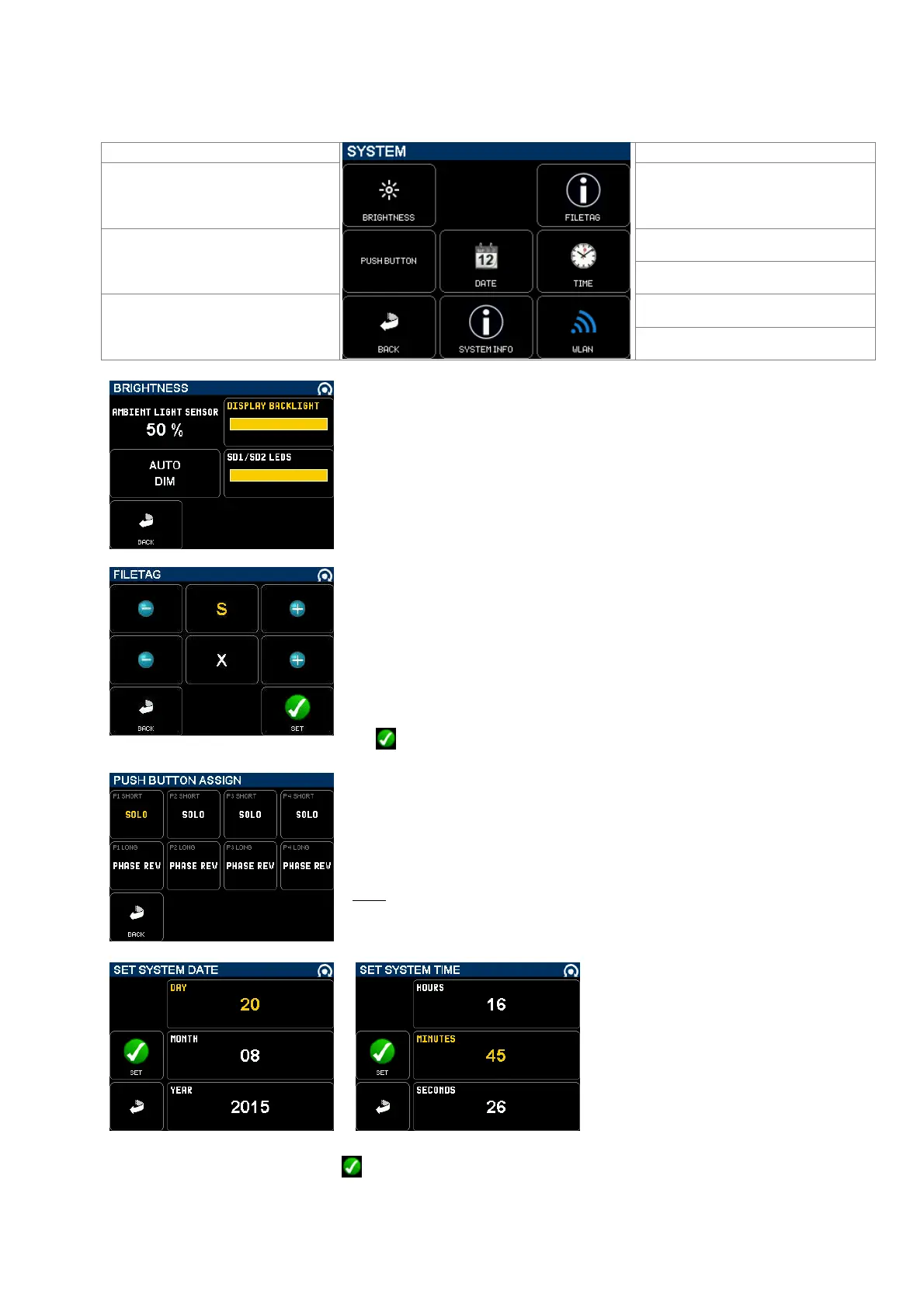
The [SYSTEM] menu gives access to various system parameters, system informations and WLan settings for the Wifi
interface.
Adjust the brightness of the TFT
backlight and of the SD1& SD2 Led
Set system date
Set the function of each push button
Set time of the system real time clock
time
Displays system information
Return to SETUP page
Set WiFi Wlan parameters
[LIGHT SENSOR] indicates the ambient light intensity
[DISPLAY BACKLIGHT] select this field and then set the backlight intensity using
the encoder wheel.
[AUTO DIM] when activated the backlight and led's intensity are automatically
dimmed according to the ambient light.
[SD1/SD2 LEDS] select this field and then set the leds intensity using the
encoder wheel.
[FILETAG] is a unique identifier automatically generating the audio files name.
The first 2 characters can be modified by the user, which might be useful to
identify the recorder unit when multiple recorders are used on the same
production.
The last 4 digits are automatically incremented by 1 at each new take. When the
numbering reaches 9999 it starts again at 0000 and the alphabetic prefix is
incremented to the next value (SX SY).
Change the values with the [+] & [-] keys or the encoder wheel then validate with
the key
The [PUSH BUTTON ASSIGN] page allows users to program the functions of
each push button; select a field - highlighted in yellow - then use the encoder
wheel to select a function.
Push buttons of faders 1 to 4 have two programmable functions; the selected
functions are called respectively by a short or a long pressure on the knob.
Note: the function activated by the switches of faders 5 & 6 is not yet
implemented
[SYSTEM TIME] and [SYSTEM TIME] are set in a similar manner; select a field then use the encoder wheel to set the
value. Validate the selection with the
key.



 To Next Page