SONOSAX SX-R4
+
User interface V1.2 Page
10
of 26
4.5 OUTPUTS
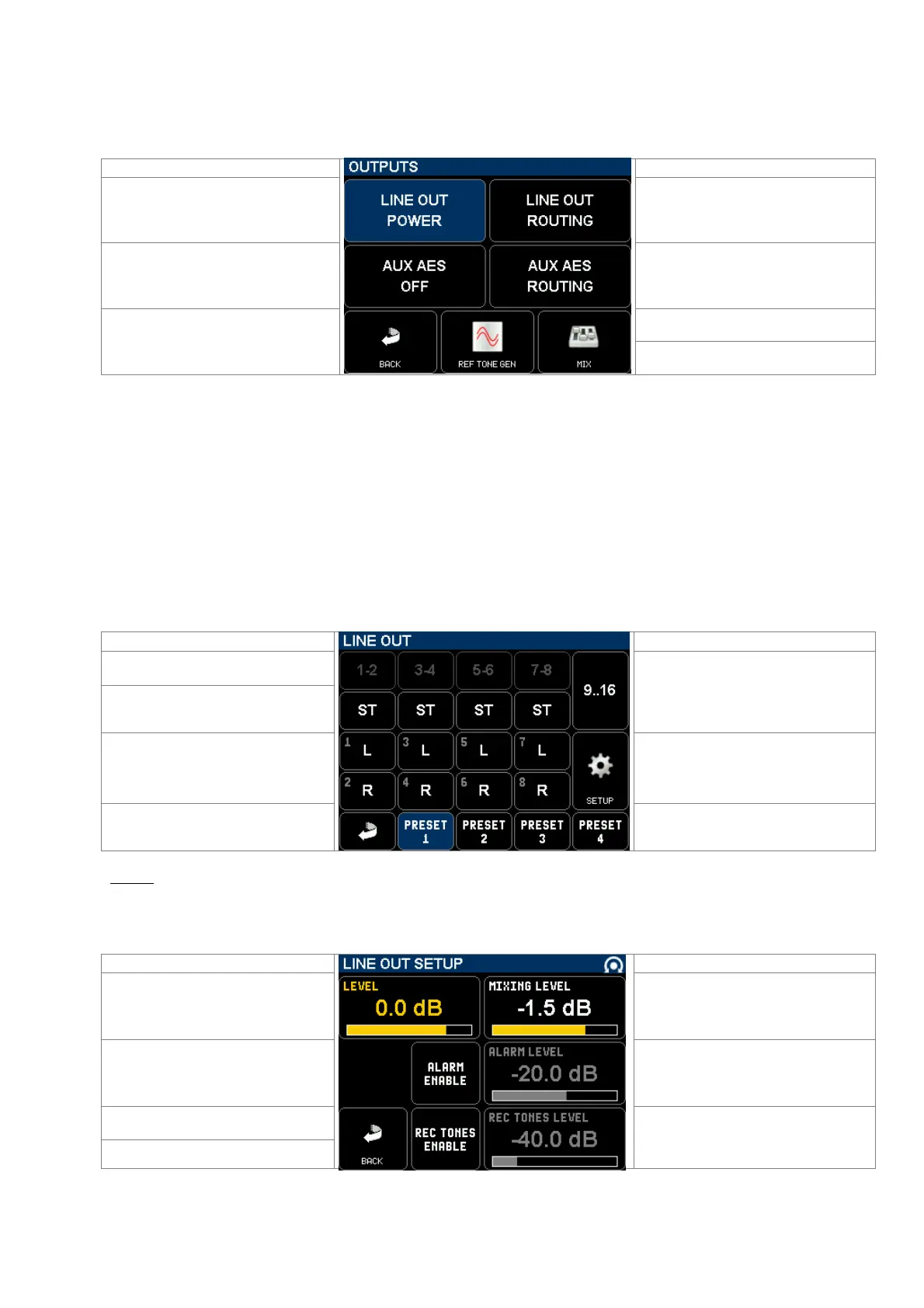
The [OUTPUTS] menu configures the stereo / 2 channels analogue [LINE OUT], the [AUX AES] when set as an output,
the [REFERENCE TONE] generator and the [MIX] of the recorded tracks
Turns the LINE OUT output On or Off to
save on battery
Calls a sub-menu to route tracks to the
LINE OUT output
Switches the AUX I/O to output mode
and toggles the output's sampling rate at
48, 96 or 192kHz
Calls a sub-menu to route tracks to the
AUX AES output
Call a sub-menu to configure the Ref
Tone generator
Return to previous Menu
Call a sub-menu to configure the Mix
4.5.1 LINE OUT ROUTING & SETUP
The modulation routed to the TA3 [LINE OUT] connector can be configured as a stereo pair or as two independent
mono channels.
The tracks are grouped per pair so that stereo or M/S microphones can be routed accordingly; in this case the odd
tracks are routed to the Left channel and the even track to the Right channel of the [LINE OUT] connector.
Each track can also be individually routed as a mono track.
• A primary switch toggles the different modes per pairs 1-2, 3-4 … 15-16:
OFF – MONO – STEREO – REVERSE STEREO – M/S – OFF.
• Two secondary switches freely assigns each tracks of the pair to the Left or Right channel of the Line Output:
OFF (–) ; Left [L] ; Right [R] ; Centre [C] (route the track with an equal volume to the Left and Right channels);
when the tracks are individually assigned the primary switch displays "USER".
Primary switches toggles the monitoring
mode per pair: OFF, MONO, STEREO,
REV-ST, M/S
Call 2nd page to configure tracks 9 to 16
Odd track of the pair
Secondary switches route each track
individually: OFF - L - R- C
Even track of the pair
Call a SETUP page for the monitoring
Return to previous Menu
4 preset keys to store and recall user's
selections see note
NOTE: Press 2 seconds on a [PRESET] key to store the configuration as it appears on screen.
Briefly press on a [PRESET] key to recall a configuration.
Pressing the [SETUP] key calls a sub-menu to adjust various parameters of the Line Output
Use the encoder wheel to adjust the
LINE OUT level from +20dB to 80dB
Adjust le mixing level from 0 to -6dB
see chapter below
Enable / disable the ALARM level on the
LINE OUT output
Adjust the ALARM level on the LINE OUT
outputs
Enable / disable the REC TONES on
the LINE OUT output
Return to LINE OUT page
Adjust the REC TONE level on the
LINE OUT outputs



 To Next Page