SONOSAX SX-R4
+
User interface V1.2 Page
19
of 26
5.5 SD CARDS
For data safety and integrity, the SONOSAX SX-R4+ uses UDF file format. Any other file format such as FAT32, NTFS,
HFS+ etc will not be recognized by the recorder. All SD cards being used with the SX-R4+ must be formatted as UDF
media exclusively with the formatting tool provided in the [SD CARDS]; third party formatting tools will not necessary be
compatible and/or may lead to unrecognized card or data corruptions.
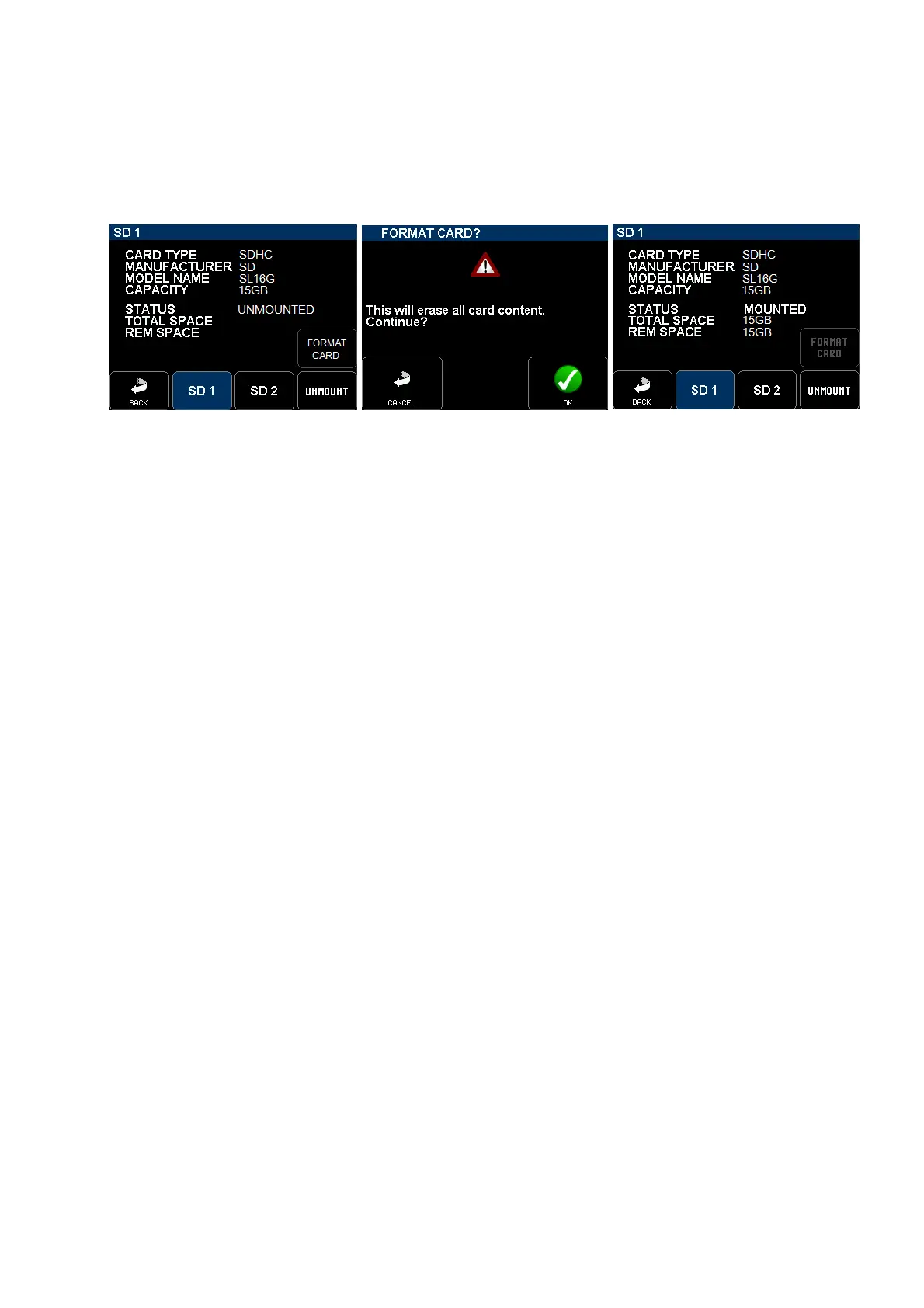
Insert card(s) in SD1 and/or SD2 slot(s); the system will display card's information such as card type, manufacturer ID,
model name and total capacity.
Insert a SD card in a slot, then A warning is posted Formatting completed; the card is
press the Format Card press OK to proceed mounted, the SD Led starts flashing
NOTES:
• When two cards are inserted, the SX-R4+ records on both cards simultaneously in "Mirroring" mode"
• SD1and SD2 may have different capacities; e.g. SD1 could be a 64Gb or 128Gb to record all files of the same
project, SD2 could a 8 or 16Gb for the daily rushes.
• There is no limit in terms of capacity; one can use 256 or 512Gb.
• The remaining capacity is posted on the lower left corner of the mains screen by means of a progression bar.
• The remaining recording time noted in the progression bar is calculated according to the number of armed
tracks and sampling frequency.
• An alarm is posted when the remaining capacity drops under 100Mb.
• When the remaining capacity drops under 5Mb, the SX-R4+ stops recording and closes the audio file; the
recording continues on the second card providing it has sufficient free space.
• The SONOSAX SX-R4+ does not provide a trash bin, therefore recovering free space by trashing audio files is
not possible. Deleting file using a computer is not possible.
• When a card is full, it must be un-mounted with the [UNMOUNT] key and reformatted to recover free space.
(do not forget to back-up your audio files before reformatting your card).
• The SD cards being formatted as UDF media and being "write protected", computers can not alter the content of
the card; copying, writing or deleting files on the SD card connected on a computer is not possible.
• The tiny locker switch (write protect locker) aside the SD Card is ignored by the SX-R4+; thus the SXR4+ can
record on the card what ever is the switch position.
Cards limitations:
Due to some SD cards limitations, recording 16 tracks @ 96kHz is not yet guaranteed; SD cards performance tests are
under course. At the time of publication, we recommend following cards:
- SanDisk Ultra 16, 32 or 64Gb: 16 tracks @48kHz; 12 tracks,@96kHz with 2 seconds of pre-recording
- SandDis Extreme16, 32 or 64Gb: 16 tracks @48kHz; 16 tracks @96kHz with 2 seconds of pre-recording
seems to work but not yet certified
- SandDisk ExtremePro16, 32 or 64Gb: 16 tracks @48kHz; 16 tracks @96kHz with 2 seconds of pre-recording
seems to work but not yet certified
Tips: if your card seems to be slow and stop recording a few second after recording has started, try reducing the pre-
record time to 2 sec only.



 To Next Page