SONOSAX SX-R4
+
User interface V1.2 Page
13
of 26
4.6 TRACKS MONITORING [HEADPHONES]
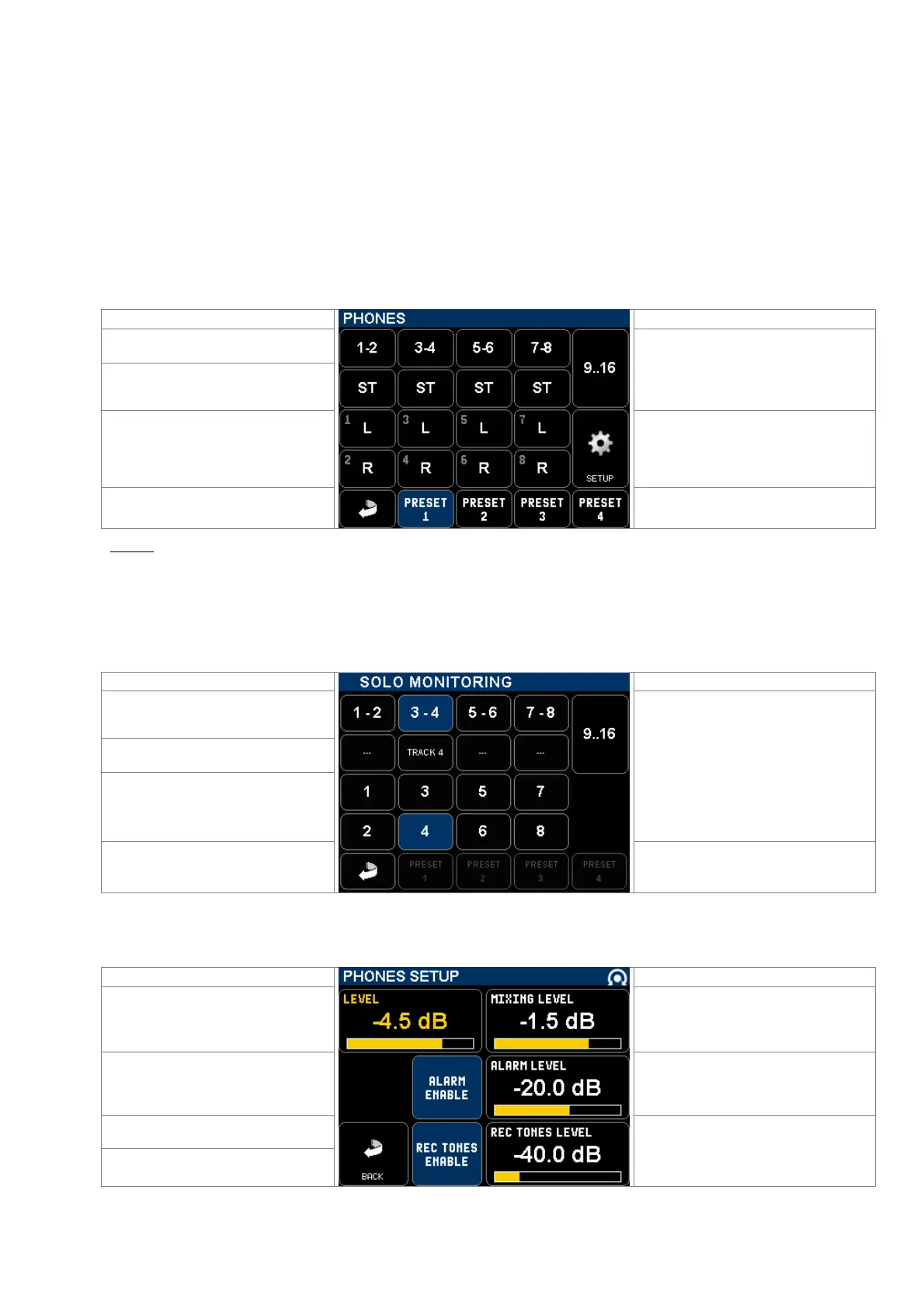
The modulation sent to the [PHONES] output corresponds to the track's selection and their routing as set in this menu.
The tracks are grouped per pair so that stereo or M/S microphones can be heard accordingly; in this case the odd tracks
are routed to the Left channel and the even track to the Right channel of the headphones. However each track can also
be individually routed as a mono track.
• The first row of switched activate SOLO MONITORING mode.
• A primary switch toggles the different monitoring modes per pairs 1-2, 3-4 … 15-16:
OFF – MONO – STEREO – REVERSE STEREO – M/S – OFF.
• Two secondary switches freely assigns each tracks of the pair to the Left or Right channel of the monitor output:
OFF (–) ; Left [L] ; Right [R] ; Centre [C] (equal volume to the Left and Right channels);
when the tracks are individually assigned the primary switch displays "USER".
The first row activates the SOLO
MONITORING
Primary switches toggles the monitoring
mode per pair: OFF, MONO, STEREO,
REV-ST, M/S
Call 2nd page to configure tracks 9 to 16
Odd track of the pair
Secondary switches route each track
individually: OFF - L - R- C
Even track of the pair
Call a SETUP page for the monitoring
Return to previous Menu
4 preset keys to store and recall user's
selections **
NOTE: Press 2 seconds on a [PRESET] key to store the configuration as it appears on screen.
Briefly press on a [PRESET] key to recall a stored configuration.
4.6.1 SOLO MONITORING MODE (not yet implemented)
Touching a key in the first row on the [PHONES] page activates the SOLO MONITORING; this page is used to listen in
SOLO any individual track, or pair(s) of track(s) or any combination.
Enable / disable the pair, the monitoring
mode is as configured in the PHONES
page ( Non exclusive selection )
3rd and 4th row:
Select each track individually in
exclusive mode, all other tracks are
muted
Second row:
enable / disable the pair and toggles its
listening mode: Odd - Even - Stereo - MS
- OFF ( Non exclusive selection )
Return to PHONES page, the
monitoring is resettled in its original
configuration
No Preset in Solo Monitoring mode
4.6.2 MONITORING SETUP
Touching the [SETUP] key in [PHONES] page calls the MONITORING SETUP page;
Adjust the PHONES volume by turning
the encoder wheel from -80dB to +20dB
Adjust le mixing level from 0 to -6dB
see chapter above
Enable / disable the Alarms in the
phones output
Adjust the ALARM level on the phones
outputs
Enable / disable the REC TONES in the
phones output
Return to PHONES page
Adjust the REC TONE level on the
phones outputs



 To Next Page