SONOSAX SX-R4
+
User interface V1.2 Page
15
of 26
4.8 TAKES MENU
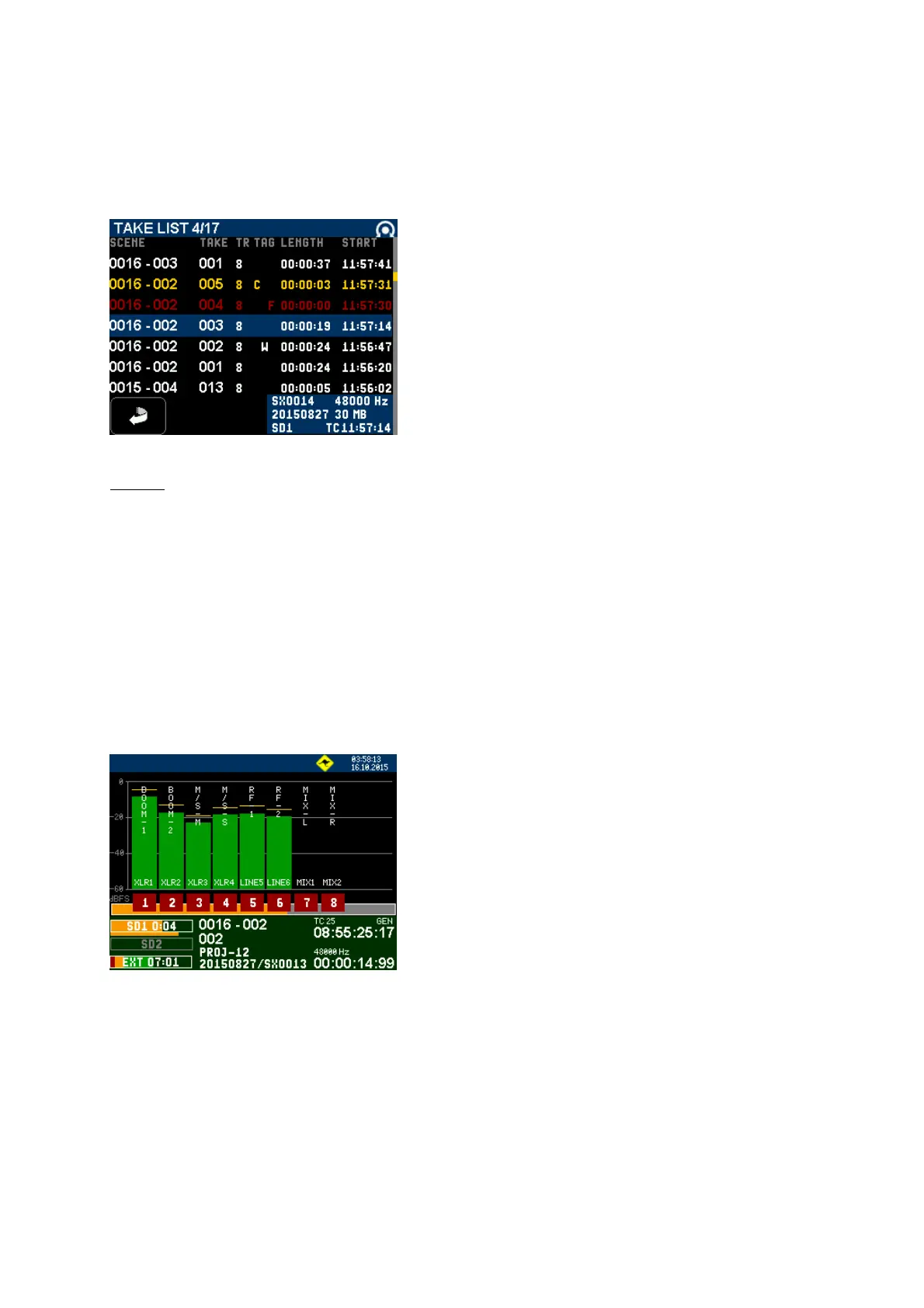
The [TAKES] key calls a [TAKE LIST] displaying all takes recorded on both SD cards **(see notes). The takes are listed
in reverse order so that the last recorded take is posted on the top of the list.
The takes are sorted by "File Tag", a unique identifier generated by the system, see [FILE TAG] in the [SYSTEM] menu.
Scroll the takes with the encoder wheel, the selection is highlighted in blue in the middle of the screen; press on the
encoder wheel to load the selected take in the player.
TAKE LIST 4/17: the highlighted take is the 4
th
of 17 takes in the list
SCENE = sequence nr followed by the shot nr
TAKE = take nr
TR = track count (number of recorded tracks)
TAG C = circled
F = False Start or No Good
W = Wild track
LENGTH = duration of the take
START = time code value at the start of the take
Additional Information's related to the selected take:
SX0014 = File Tag of the take 48000Hz = Sampling frequency
20150827 = working day 30MB = Size of the file
SD1** = file is stored on SD1 TCxxx = TimeCode at start
**NOTE: Depending on how the SD cards are managed by the user, the content on SD1 and SD2 may be different.
The Take List shows the content of both cards; if a file is present on both cards, the blue field of additional
informations will post SD1 SD2. If a file is stored only on one card, the system will mention on which SD card
the file is stored.
4.9 PLAYER MODE
When a TAKE is loaded, the recorder switches to PLAYER mode and automatically starts playing the selected take.
Press the toggle switch toward [PLAY] to Pause, Stop or Start playing
• While in Play: a brief press will Pause at current location
• While in Pause: a brief press will start playing from current position
• In Play or Pause: a long press will stop and "rewind" to the beginning of the take
The main screen of the Player is similar to the screen of the Recorder except that a progression bar is posted under the
modulometers. This bar is a graphical representation of the "time line". While in PLAY or in PAUSE touching along the
time line in the green area jump to another location in the time line.
Time Line's progression bar
Touch in the green area to play from another location in the time line
4.9.1 METADATA IN PLAYER mode:
Editing the metadata of an existing audio file implies that the take is loaded in the Player. Select the file to be edited in
the [TAKE] menu; then press on the encoder wheel to load that file in the player. Once loaded, return to the Main menu
and press on the [METADATA] key to edit the metadata of the played file.
4.9.2 EXIT PLAYER
Touch on the modulometer area to call the Main menu, then touch the [EXIT PLAYER] key to return in Recorder mode.



 To Next Page