SONOSAX SX-R4
+
User interface V1.2 Page
14
of 26
4.7 METADATA
The audio files embed metadatas in both BWF and iXML formats. Metadatas can be pre-settled while the recorder is in
Record Ready mode, edited while recording and/or re-edited post-recording when the unit is in Player mode.
Editing the metadata can be done either directly on the [METADATA] page or by using a smartphone or a tablet through
the WiFi interface.
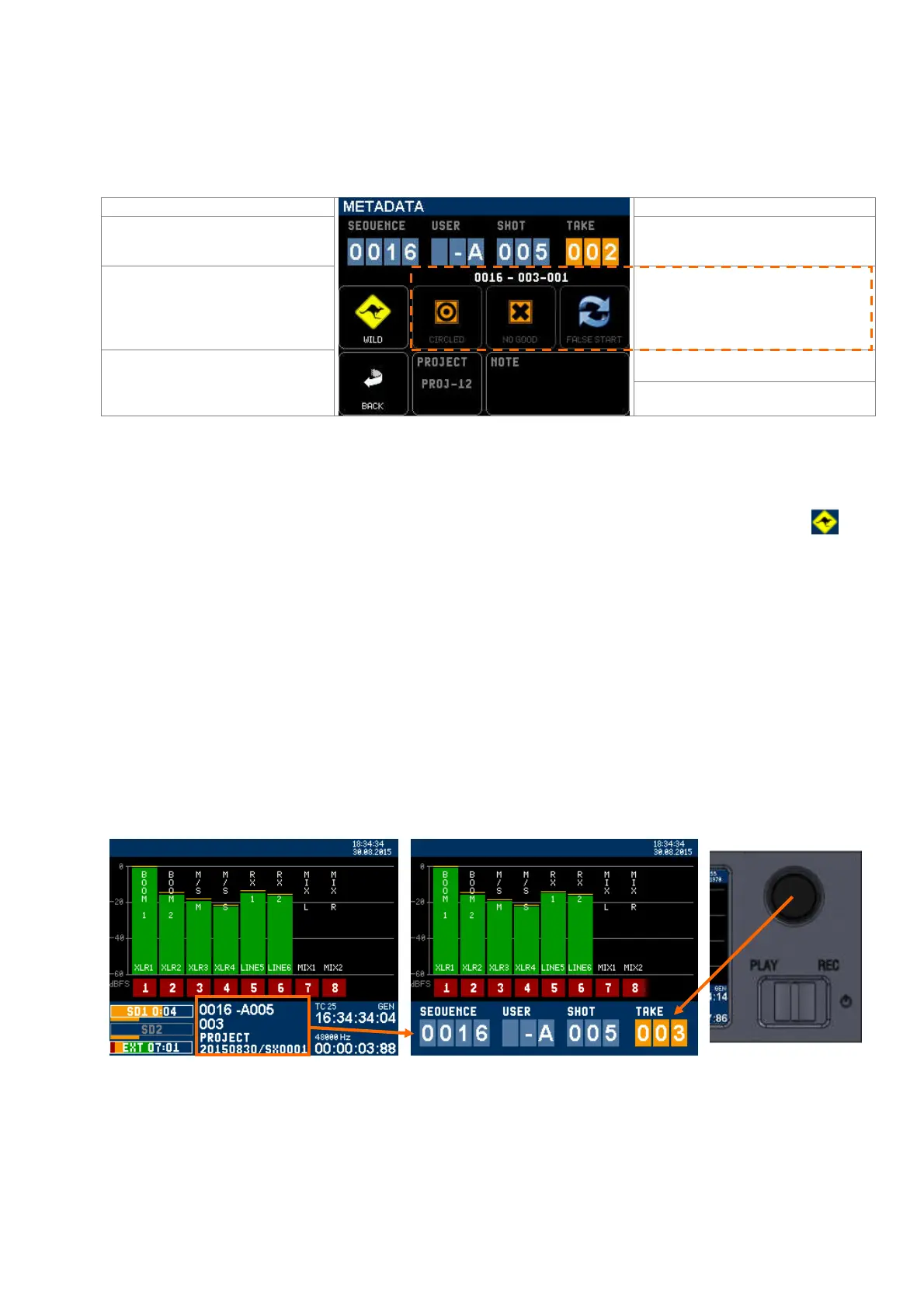
The upper 4 fields concern the next
Takes to be recorded
Select a field then edit with the encoder
wheel
When enabled, all subsequent takes will
be tagged as Wildtrack
Last recorded TAKE name
Tag the last recorded Take as Circled, No
Good or False Start
Edit the PROJECT name, calls a
keyboard to type the project name
Return to Main Menu
NOTE, calls a keyboard to type notes,
The [METADATA] page displays several editable fields:
• The upper row concerns the metadatas of the next take to be recorder; these four fields are the same as shown
- and editable - on the main screen: Sequence (or scene name) / User ID / Shot nr / Take nr.
When a Sequence and/or a Shot nr is modified, the Take nr is automatically reset to 001.
• When "Wild Track" is enabled, all subsequently recorded files will be tagged as "Wild Track". the symbol is
posted on the main modulometger's screens warning the user that the tag is enabled. Recorded audio files are
notified with the suffix "W" in the [TAKE] menu.
•
The 3 keys
[CIRCLED]
,
[NO GOOD]
and
[FALSE START]
concern
the last recorded Take. The name of the last
Take is posted just above these 3 keys
.
If no file is available the screen posts [NO TAKE AVAILABLE]
The Firmware version 1.2 does not provide with a trash bin. When a file is tagged as False Start it simply appears in red in the
TAKES list.
•
The PROJECT key calls a keyboard to type the project name with up to 8 characters.
Typing a new Project name will create a new directory at the root level of SD Card(s); all subsequently recorded
files are stored in "working day's" subdirectories in that Project folder.
• The NOTE key
calls a keyboard to type notes, up to 256 characters.
4.7.1 METADATA Quick Editing Mode
Metadatas can be rapidly edited by using the "on screen short cut"; touching the screen within the metadata area will
overlay four data fields showing: SEQUENCE - USER ID - SHOT NR - TAKE NR
Touching a field will highlight the corresponding data; use the encoder wheel to rapidly incremented the value.



 To Next Page