SONOSAX SX-R4
+
User interface V1.2 Page
6
of 26
4. MAIN MENU
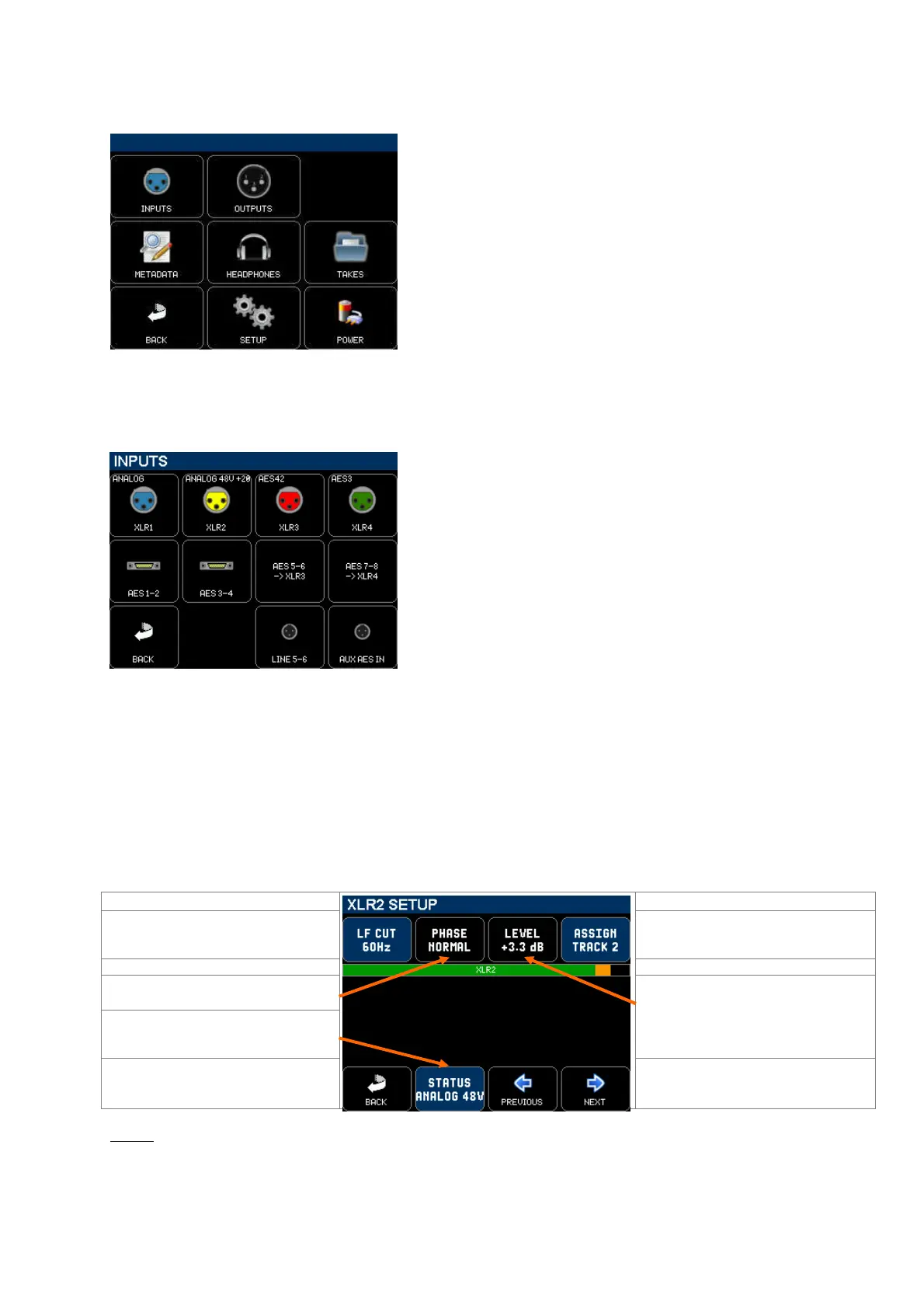
Pressing the main screen anywhere above the blue area will call the Main Menu. Pressing any key calls a Sub-Menu.
[INPUTS] configure the physical inputs of the recorder
[OUTPUTS] configure the physical outputs and the MIX
[METADATA] edit the Metadatas
[HEADPHONE] configure the Headphones outputs
[TAKES] browse recorded takes on the SD cards
[BACK] return to the main screen
[SETUP] configure all parameters of the recorder
[POWER] displays power sources informations
4.1 INPUTS
The [INPUT] menu gives access to the configuration pages of the physical inputs of the recorder. Pressing a key calls
subsequent configuration and setting pages.
[XLR1 to XLR4] configure the physical XLR inputs of the recorder,
each XLR can independently be configured as Analogue, AES42 or
AES3. The icon reflects the actual settings
[AES 1-2] to [AES 3-4] configure the physical AES3 type digital input
of the 26 pin connector
[LINE 5-6] configure the physical TA3 Line Inputs 5 & 6 connectors
[AUX AES] configure the physical TA3 AES I/O connector
4.2 XLR SETUP
Pressing on a XLR icon calls the corresponding [XLR SETUP] page, showing the current configuration and settings.
When an [XLR SETUP] page is called, the headphones monitoring switches to SOLO mode so that the corresponding
input is heard in solo in the headphones; a bargraph displays the modulation level of the physical input (not the level of
the track on which the input is assigned.
4.2.1 XLR SETUP - Analogue
When an XLR is set as analogue for a Microphone or a Line input, that particular input is obviously a mono input and is
heard as such in the headphone. The modulation level is shown by a single bargraph.
LF CUT: toggles OFF, 60Hz, 120Hz
Call a sub-menu to assign the input on a
track
Input Modulometer
Toggle the polarity of the input:
(phase normal or phase reversed)
Call a sub-menu to setup the type of the
XLR input, showing the actual status
Call a sub-menu to adjust the range of
the fader and how the range is stepped;
the actual fader level is displayed
Return to previous page
Call the Setup page of the Next or
Previous physical input
NOTE: - When the XLR is configured as Analogue input, the [LF CUT] key activates an analogue circuitry in the input
preamplifier. The [PHASE] and [LEVEL] are controlled by the DSP.
- The analogue inputs are protected by an internal RF Filter



 To Next Page