SONOSAX SX-R4
+
User interface V1.2 Page
18
of 26
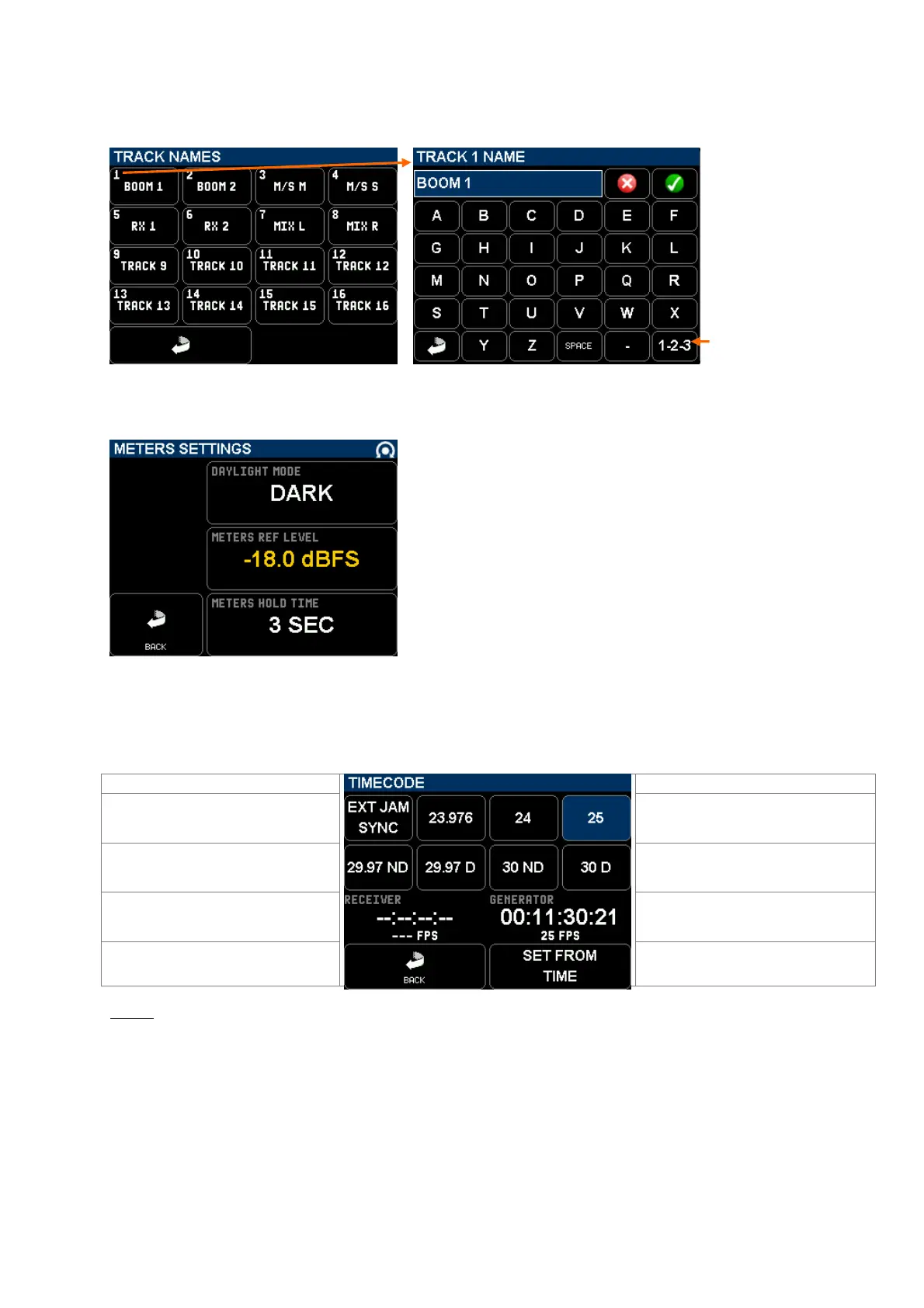
5.2.2 TRACK NAME
The name of the tracks is stored in the metadatas; it can contain up to 8 characters. Touching a track field calls a
keyboard to edit the track name.
Calls a numerical
keyboard
5.3 METERS SETTINGS
Not yet implemented; will offer a selection of colour themes.
Set the reference level of the modulometers from 0 to -30 dBFS.
Below the settled level, the modulation'a level is posted in green
and in orange above the reference level.
Set the time during which the peak level is posted (Peak Hold) between
0 to 600 seconds
5.4 TIMECODE SETUP
The SX-R4+ can simultaneously receive and generate Time Code at any of the conventional frame rates; following sub-
menus are used to set the required TimeCode parameters.
When ON, the TC value is jammed on an
external source, then it runs on its own
clock
Select the desired Frame Rate
Select the desired Frame Rate
Shows the TimeCode value and is fps as
received on the Lemo connector
Shows the generated TimeCode value
and is fps as set in this page
Return to SETUP page
Grab the system time of the internal real
time clock to set the TC value
NOTE: When the receiver locks on an external TimeCode, the time difference between the generator and the receiver
is posted between the two time code values.



 To Next Page