SONOSAX SX-R4
+
User manual / Hardware description Page 8 of 12
3.2.6 Auxiliary AES input/output [ AES I/O ]
The [AES I/O] TA-3 connector is an AES3, digital input or transformer balanced output. Its configuration and settings are
accessible in the [INPUTS] and [OUTPUTS] menu.
3.2.7 TimeCode connector [ TC ]
The TimeCode input/output connector is a Lemo 5 pin, compatible with the Aaton wiring as below. It is compatible with
all TimeCode format, including pull-up / pull-down. Settings and parameters are accessible in the [TIMECODE] menu.
• Pin 1 = Gnd
• Pin 2 = Smpte Out
• Pin 3 = not connected
• Pin 4 = not connected
• Pin 5 = Smpte In
The mating cable connector Lemo 5 pin is available by SONOSAX or by your local dealer under ref part
SONOSAX SX-860232 or Lemo FGG.0B.305.CLAD52
3.2.8 Digital inputs [ AES IN ]
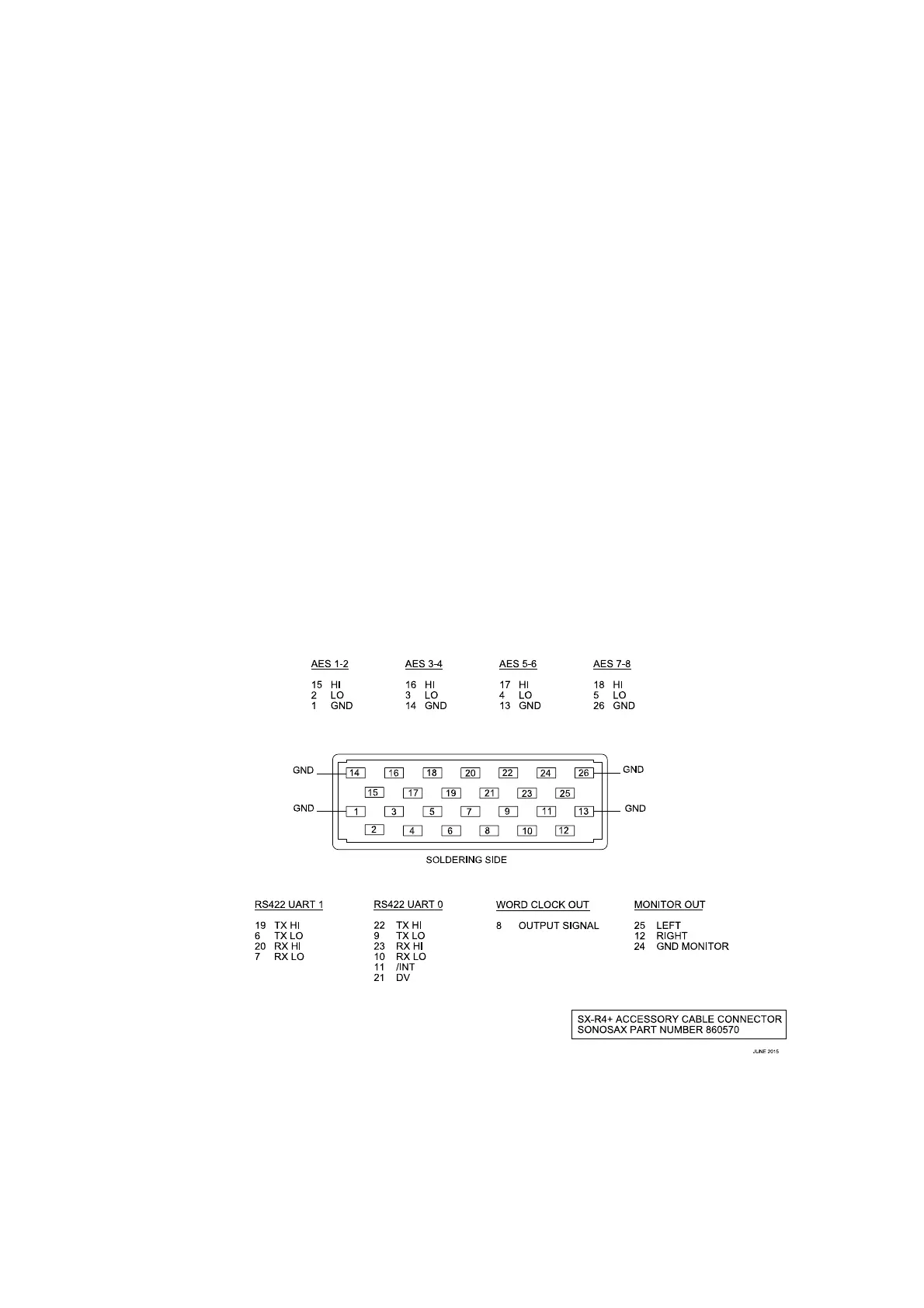
The [AES IN] 26 pin connector provides 4x independent AES3 inputs (8 audio channels). Each of these 4 inputs has its
own ASRC circuitries allowing connection of independent asynchronous sources. Configuration and settings are
available in the [INPUTS] menu.
A WordClock output is provided to synchronize external equipments.
Two RS422 Tx/Rx lines are available to control the SONOSAX SX-AD8+ pre-amplifier and the mixing control surface.
The headphone output is also available; it is wired in parallel to the [PHONES] jack.
The mating cable 26 pin connector is available by SONOSAX or by your local dealer under ref part
SONOSAX SX-860570
3.2.9 WiFi
Manage the SX-R4+ through the integrated Wifi using the web-browser of a smartphone, tablet or PC. The WiFi settings
are accessible in the [WLAN] menu. Read the User interface manual for further information.



 To Next Page