SONOSAX SX-R4
+
User interface V1.2 Page
23
of 26
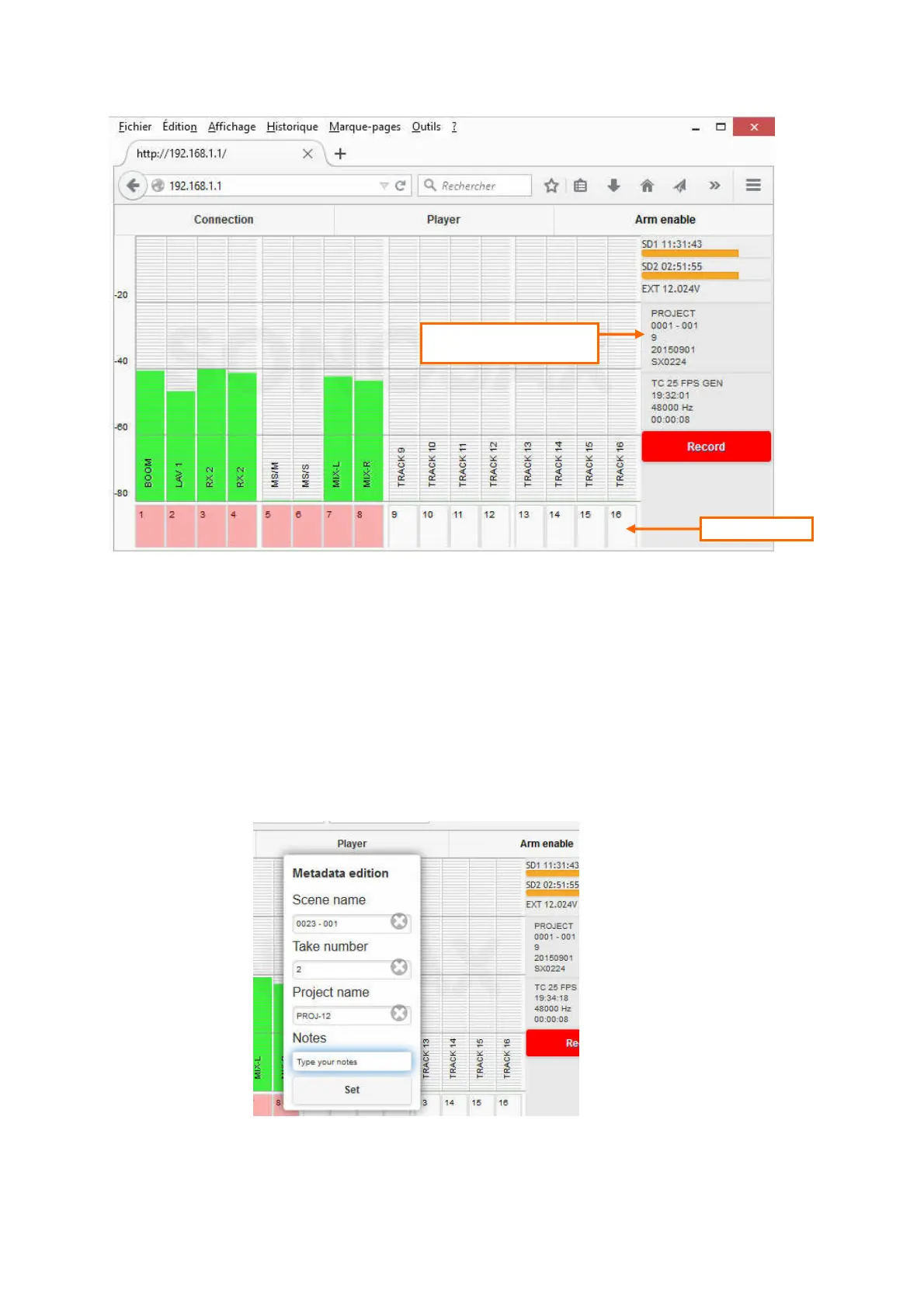
Once the connection between the web browser and the SX-R4+interface is established, the web page appears as
illustrated below. All informations posted in the SX-R4+ main screen are displayed in the webpage.
The three tabs on the top of the page, the "record" button and the metadata field provide with following functionalities:
• Connection: post a page to connect/disconnect the browser to the SX-R4+ and toggle the grids On or Off.
• Player: not yet implemented
• Arm enable: Enable / disable the track arming keys at the bottom of the page. The tab turns red when the
keys are enabled (active).
When enabled, press on a "Track arming key" at the bottom of the page to arm or disarm a track.
Once the tracks are armed it is advisable to disable the keys to avoid arming/disarming a track
inadvertently.
• Record: press the button to Start / Stop recording; button is flashing in record ready mode and steady in
red when recording
• Metadata: touching the metadata field calls a pop up window in which metadatas can be edited. Select a
field then type data using the keypad of your tablet. When the editing is completed, validate the
changes with the [SET] key.
Track arming keys
Touching this field calls a pop
up window to edit metadata



 To Next Page