ILCE-9M2
5-010-473-11 (1)
GB
227
MENU items/List of icons
C:\5010473111\5010473111ILCE9M2IN5\01GB-ILCE9M2IN5\100MEN.indd
DTP data saved: 2019/07/26 13:31
PDF file created: 2019/08/06 10:23
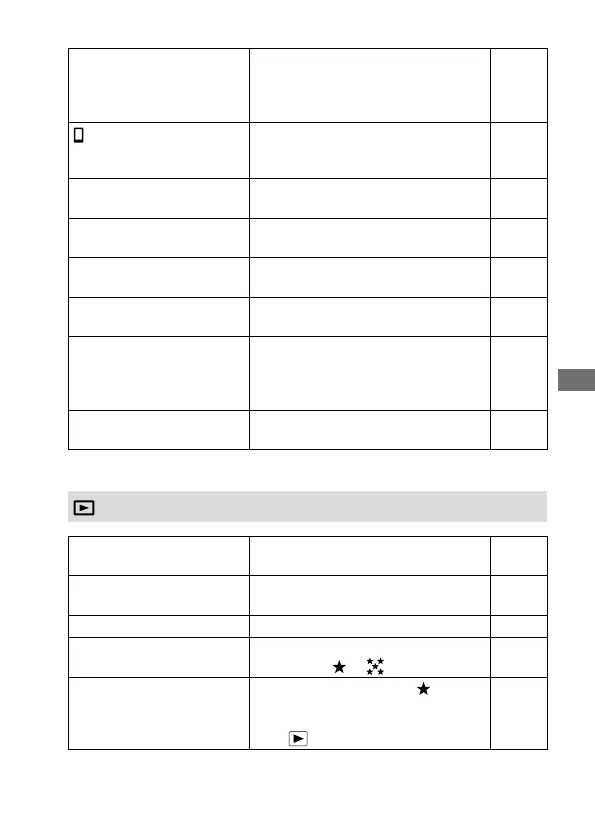
Bluetooth Settings
Configures settings for connecting
the camera to a smartphone or a
Bluetooth remote commander via a
Bluetooth connection.
209,
Help
Guide
Location Info. Link Set.
Obtains location information from the
paired smartphone and records it to
captured images.
Help
Guide
Bluetooth Rmt Ctrl
Sets whether or not to use a
Bluetooth remote commander.
209
Wired LAN Setting
Sets the wired LAN. Help
Guide
Edit Device Name
Changes the device name under Wi-Fi
Direct, etc.
Help
Guide
Import Root Certificate
Imports a root certificate to the
camera.
Help
Guide
Security (IPsec)
Sets whether or not to encrypt
communications between the camera
and a computer while they are
connected via Wi-Fi or a wired LAN.
Help
Guide
Reset Network Set.
Resets all the network settings. Help
Guide
(Playback)
Protect
Protects recorded images against
accidental erasure.
168
Rotate
Rotates the image. Help
Guide
Delete
Deletes images. 174
Rating
Assigns rating to recorded images on
a scale from
to .
170
Rating Set (Custom Key) Sets the rating (number of
) that
can be selected using the custom key
to which [Rating] has been assigned
with [ Custom Key].
171
Blue tab


 To Next Page