ILCE-9M2
5-010-473-11 (1)
GB
57
Shooting
C:\5010473111\5010473111ILCE9M2IN5\01GB-ILCE9M2IN5\030BAS.indd
DTP data saved: 2019/07/26 13:31
PDF file created: 2019/08/06 10:22
Right/Left Eye Select: Specifies the eye to be detected when
[Subject Detection] is set to [Human]. If [Right Eye] or [Left Eye] is
selected, only the selected eye is detected.
[Auto]: The camera detects eyes automatically.
[Right Eye]: The right eye of the subject (the eye on the left side from
the photographer’s perspective) is detected.
[Left Eye]: The left eye of the subject (the eye on the right side from the
photographer’s perspective) is detected.
Face/Eye Frame Display: Sets whether or not to display the face/eye
detection frame when a human face or eyes are detected. ([On]/[Off])
Animal Eye Display: Sets whether or not to display the eye detection
frame when the eye of an animal is detected. ([On]/[Off])
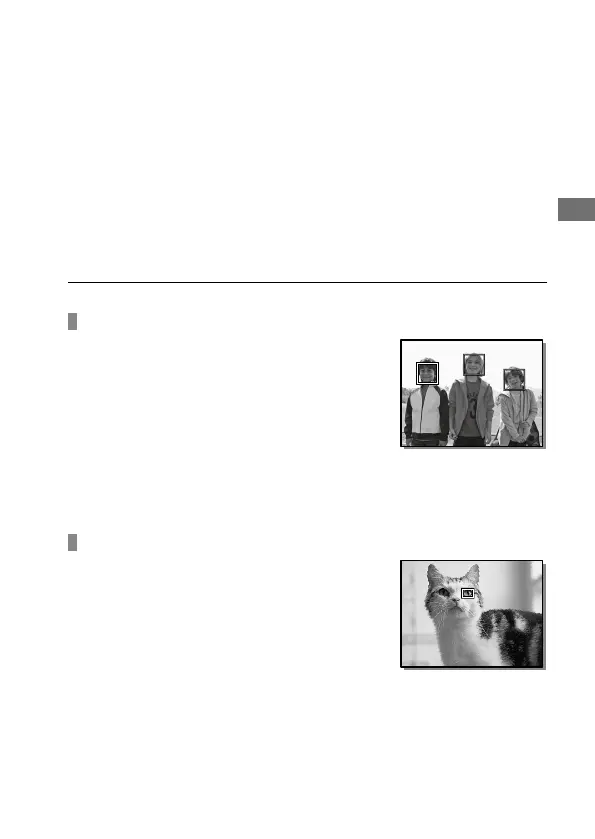
Face detection frame
When the product detects a face, the gray face
detection frame appears. When the product
determines that autofocus is enabled, the face
detection frame turns white.
In case you have registered the priority order for
each face using [Face Registration], the product
automatically selects the first prioritized face
and the face detection frame over that face
turns white. The face detection frames of other
registered faces turn reddish-purple.
Eye detection frame
A white eye detection frame appears when an
eye is detected and the camera determines
that autofocusing is possible, depending on the
settings.
The eye detection frame is displayed as
illustrated when [Subject Detection] is set to
[Animal].



 To Next Page