EasyManua.ls Logo

Sony BDV-E500W - Page 128

Sony BDV-E500W
149 pages
Print Icon
To Next Page IconTo Next Page
To Previous Page IconTo Previous Page
Loading...
~
o 0
."
~
"
GO
om
m
Playa
discI
Reproduccion
de
discos
1===0
==.<::>=
000
000
000
=0=
=<:::1'<::"':::>
===Q
Do
not
insert a
disc:
before performing
theNEasy
Setup~.
No
inserte
ningun
disco
antes
de
lIevar
a
cabo
la»Configuraci6n
facil:
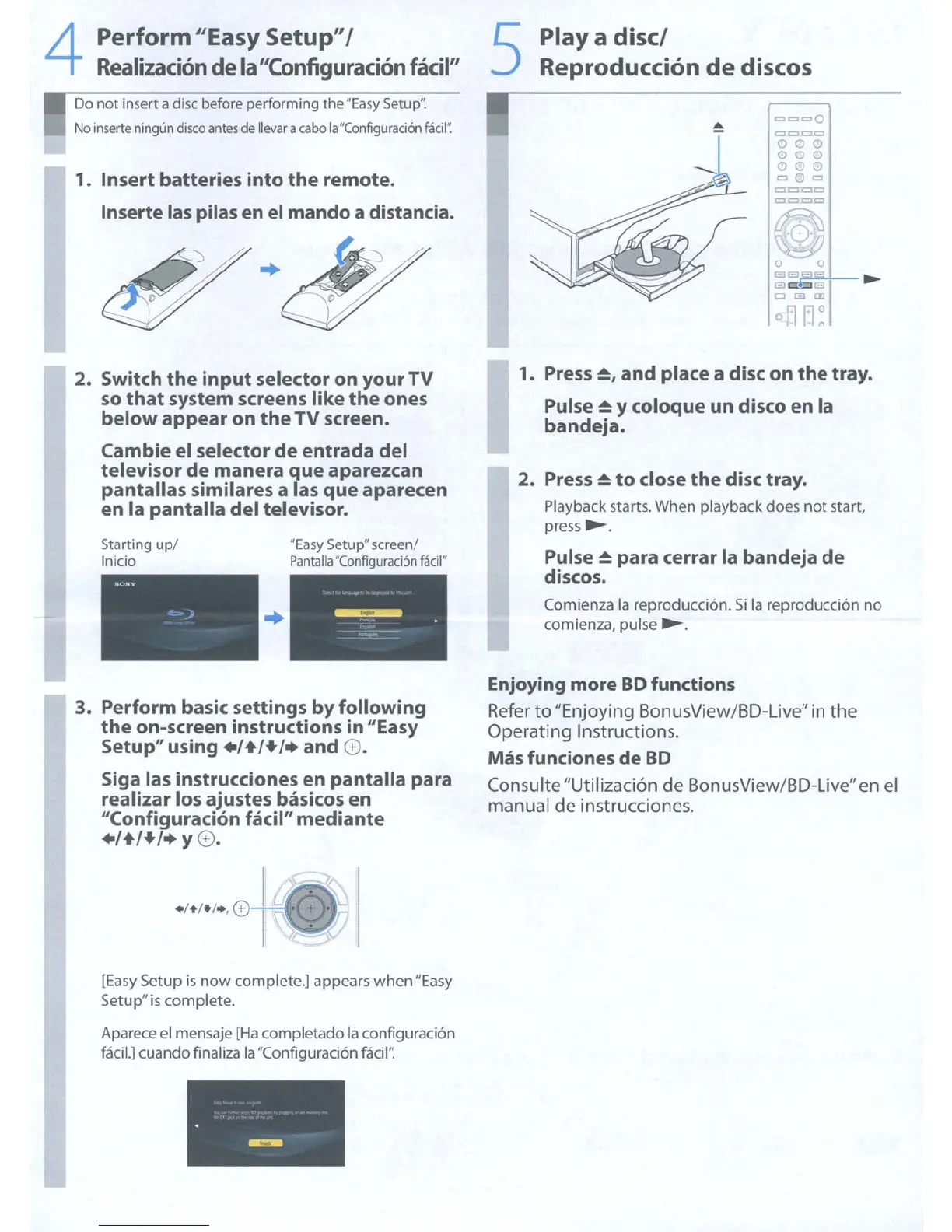
1.
Insert
batteries
into
the
remote.
Inserte las pilas
en
el
mando
a distancia.
4
Perform
"Easy
Setup"
I
Realizacion
de la"Configuracion
facil"
2. Switch
the
input
selector
on
yourTV
so
that
system
screens
like
the
ones
below
appear
on
the
TV
screen.
Cambie el
selector
de
entrada
del
televisor
de
manera
que
aparezcan
pantallas
similares a las
que
aparecen
en
la
pantalla
del
televisor.
NEasy
SetupN
screen!
Pantalia
N
Configuraci6n
fadl»
Starting up!
Inicio
..
- -.
-=-
.
~-
1.
Press~.
and
place a disc
on
the
tray.
Pulse
~
y
coloque
un disco
en
la
bandeja.
2.
Press
~
to
close
the
disc tray.
Playback starts. When playback does not start,
press
~.
Pulse
~
para
cerrar
la
bandeja
de
discos.
Comienza
la
reproducci6n.
Si
la
reproducci6n no
comienza, pulse
~
.
3. Perform basic
settings
by
following
the
on-screen instructions in "Easy
Setup"
using
+1+1+1+
and
G.
Siga las instrucciones
en
pantalla
para
realizar los
ajustes
basicos
en
"Configuracion facil"
mediante
+1+1+1+
y G.
Enjoying more
BO
functions
Refer
to
"Enjoying BonusView/BD-Live" in the
Operating Instructions.
Mas funciones
de
BO
Consulte "Utilizaci6n de BonusView/BD-Live"en
el
manual
de
instrucciones.
[Easy Setup
is
now
complete.] appears when"Easy
Setup"
is
complete.
Aparece
el
mensaje
[Ha
completado
la
conflguraci6n
facH.]
cuando finaliza
la
"Configuraci6n
facil'~

Table of Contents

Other manuals for Sony BDV-E500W

Related product manuals