9 Press
"'/""
to select [Off]. then press
C).
1m
• The test tone signals are not output from the HDMI
OUT jack.
iil'!I
• To adjust the volume
of
all the speakers at one time,
press VOLUME
+/-.
Controlling
Your
TV
with
the
Supplied
Remote
By adjusting the remote signal, you can control
your TV with the supplied remote.
1m
• When you replace the batteries
of
the remote, the
code number may reset itself to the default (SONY)
setting. Reset the appropriate code number.
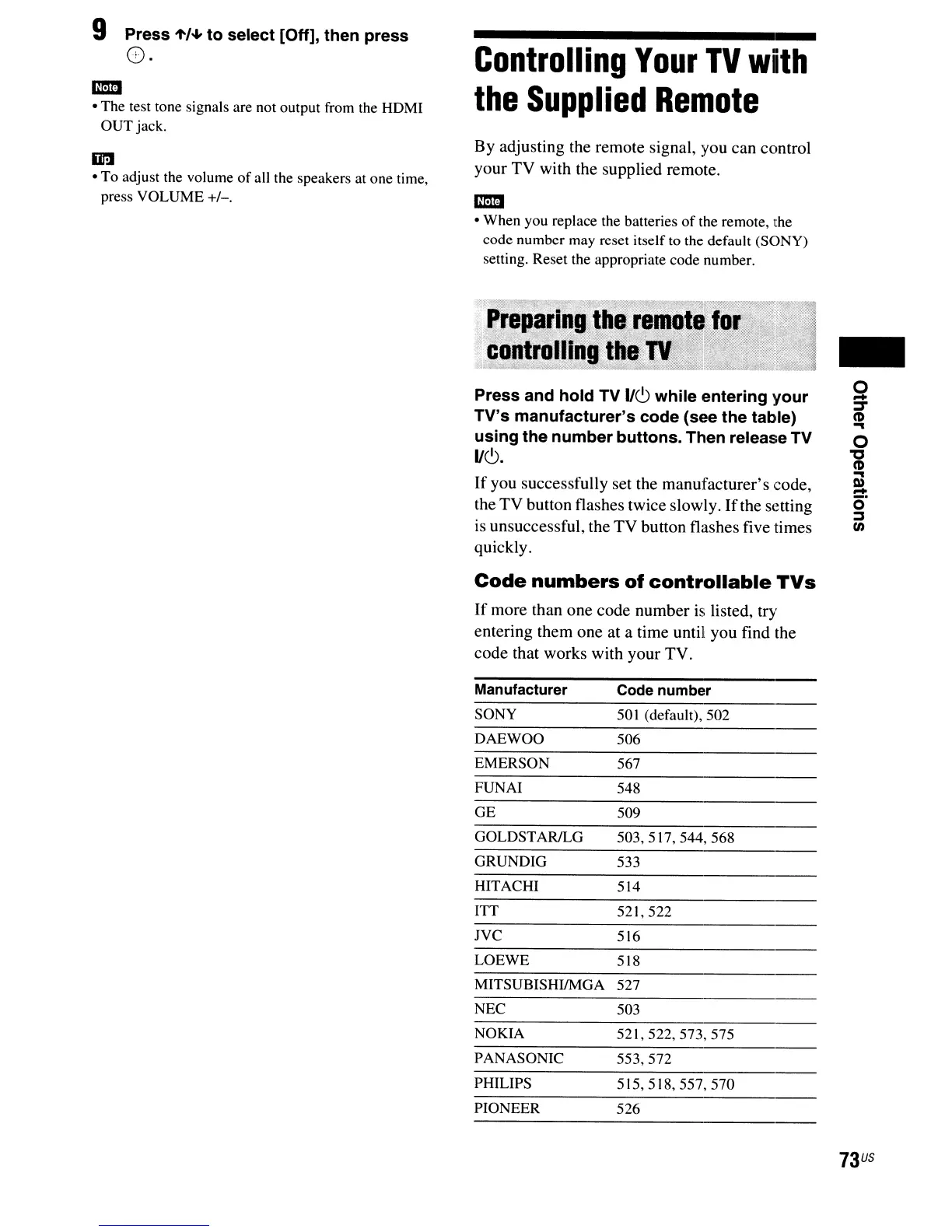
Press and hold TV
1/(9
while entering your
TV's manufacturer's code (see the table)
using the number buttons. Then release TV
11(9.
If
you successfully set the manufacturer's code,
the TV button flashes twice slowly. Ifthe setting
is unsuccessful, the
TV
button flashes five times
quickly.
Code
numbers
of
controllable
TVs
If
more than one code number is listed, try
entering them one at a time until you find the
code that works with your TV.
-
o
-
J
CD
...
o
"'C
CD
...
Q)
-
O·
::::s
en
Manufacturer
SONY
DAEWOO
EMERSON
FUNAI
GE
GOLDSTARlLG
GRUNDIG
HITACHI
ITT
lVC
LOEWE
MITSUBISHIIMGA
NEC
NOKIA
PANASONIC
PHILIPS
PIONEER
Code number
50
I (default),
502
506
567
548
509
503,517,
544,
568
533
514
521,522
516
518
527
503
521,522,573,575
553,572
515,518,557,570
526
73
US



 To Next Page