Manufacturer Code number
By
pressing
You can
RADIO SHACK
565
Number buttons,
Select the TV channel.
RCNPROSCAN
510
0,
ENTER
SABA
530,537,558
HOME
Display the menu
of
the TV.
SAMSUNG
515,517,544,566,569,571,
FAVORITES
Display the favorite channel list.
574
CC Display closed captioning.
SANYO
508,545
GUIDE Display the Digital Electronic
SHARP
535,565
Programme Guide (EPG).
TELEFUNKEN
547,558
TOOLS
Display the operation menu for the
THOMSON
547,549
current display.
TOSHIBA
541,551
RETURN Return to the previous channel
or
layer on the menu
of
the TV.
ZENITH
543
Input "." (dot) when inputting
numerics.
WIDE
Change the aspect ratio
of
the
connected TV.
+-/'tN4-+, 0
Select the item on the menu.
DISPLAY
Display the information.
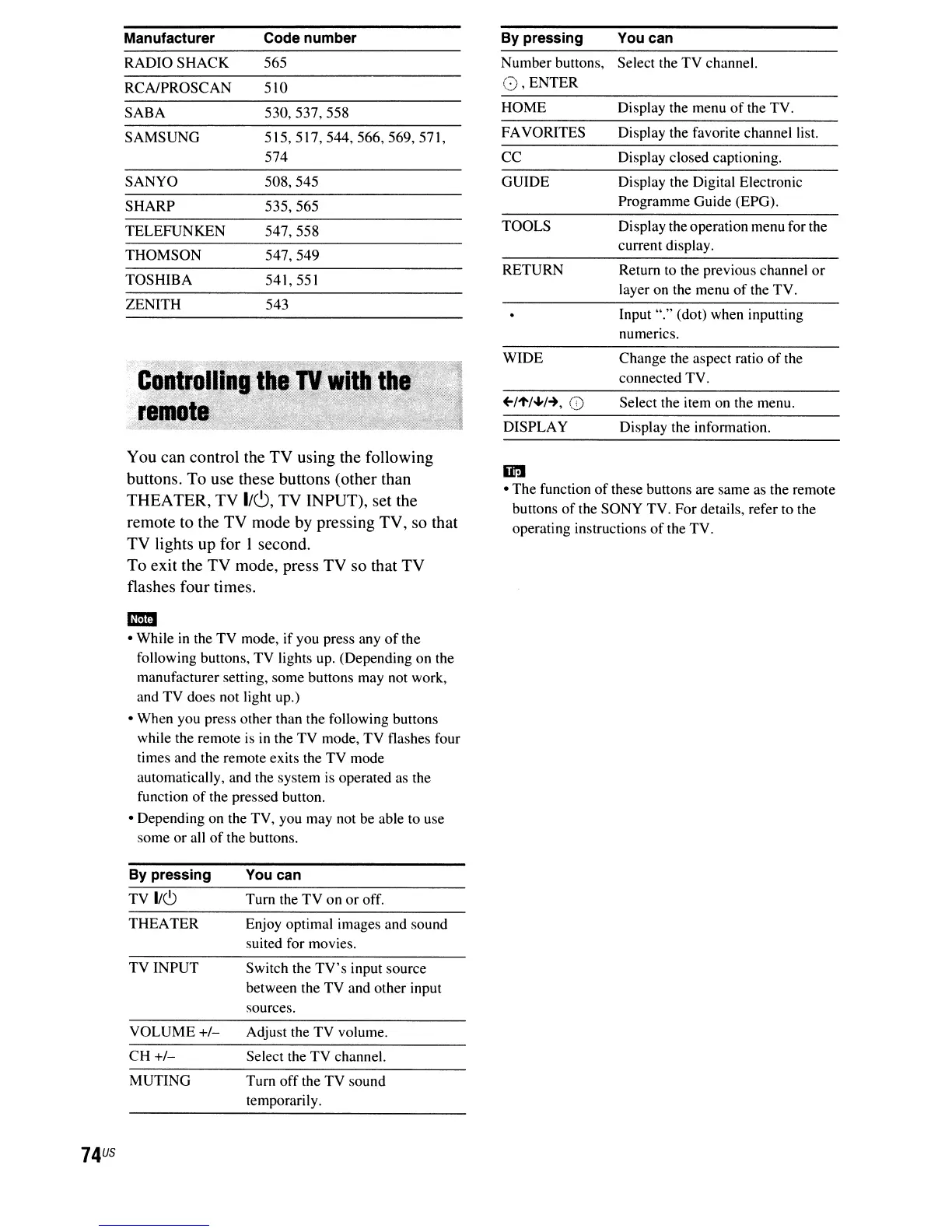
You can control the TV using the following
buttons. To use these buttons (other than
THEATER, TV
1/c.9,
TV INPUT), set the
remote to the TV mode by pressing TV, so that
TV lights
up
for I second.
To exit the TV mode, press TV so that TV
flashes four times.
mm
• While
in
the TV mode, if you press any
of
the
following buttons, TV lights up. (Depending on the
manufacturer setting, some buttons may not work,
and TV does not light up.)
• When you press other than the following buttons
while the remote
is
in
the TV mode,
TV
flashes four
times and the remote exits the TV mode
automatically, and the system
is
operated as the
function
of
the pressed button.
• Depending on the TV, you may not be able to use
some
or
all
of
the buttons.
ill1
• The function
of
these buttons are same as the remote
buttons
of
the SONY TV. For details, refer to the
operating instructions
of
the TV.
74
US
By
pressing
TV
1/(')
THEATER
TV INPUT
VOLUME
+1-
CH +1-
MUTING
You can
Turn the TV on or off.
Enjoy optimal images and sound
suited for movies.
Switch the
TV's
input source
between the TV and other input
sources.
Adjust the TV volume.
Select the TV channel.
Turn
off
the TV sound
temporarily.



 To Next Page