NIGHT (page 55)
cm2J
Activates the night mode function.
DYNAMIC BASS (page 54)
cm2J
Reinforces bass frequencies.
TV (page 73)
C!YJ
Changes to the
TV
operation mode for the
remote.
~
Number
buttons
(pages 41, 57, 73)
cm2J
em
Enters the title/chapter numbers, radio
frequencies, etc.
CLEAR (pages 45, 58)
cm2J
Clears the entry field.
TIME (page 46)
cm2J
Displays the elapsed/remaining playback
time in the front panel display.
• (page 73)
CD[)
Inputs"."
(dot) when inputting numerics.
ENTER (page 73)
em
Enters the selected item.
@]
AUDIO (pages 53, 54)
cm2J
Selects the audio format/track.
SUBTITLE (page 43)
cm2J
Selects the subtitle language when multi-
lingual subtitles are recorded on a BD-
ROMlDVD VIDEO.
D.TUNING (page 58)
cm2J
Selects the radio frequencies.
[I]
TH
EATER (page 68)
C!YJ
Switches to the optimum video mode for
watching movies automatically.
ONE-TOUCH PLAY (pages
41,68)
cm2J
By only pressing the button, the
TV
turns
on, the
TV
is set for BDIDVD input
selector, andthe system starts playing a disc
automatically.
TV
11(9
(on/standby) (page 73)
C!YJ
Turns on the
TV
or
sets it to standby mode.
11(9
(on/standby)
(pages 31, 34, 41, 56)
cm2J
Turns on the system or sets it to standby
mode.
[gJ
S-AIR MODE (page 62)
cm2J
Selects playback mode for the S-AIR
receiver.
'{~
~.
TVC:t
9
o
DISPLAY
- - 0
(j)@@
@ @
@"""'-;3
~@®
MODE
NIGHT B
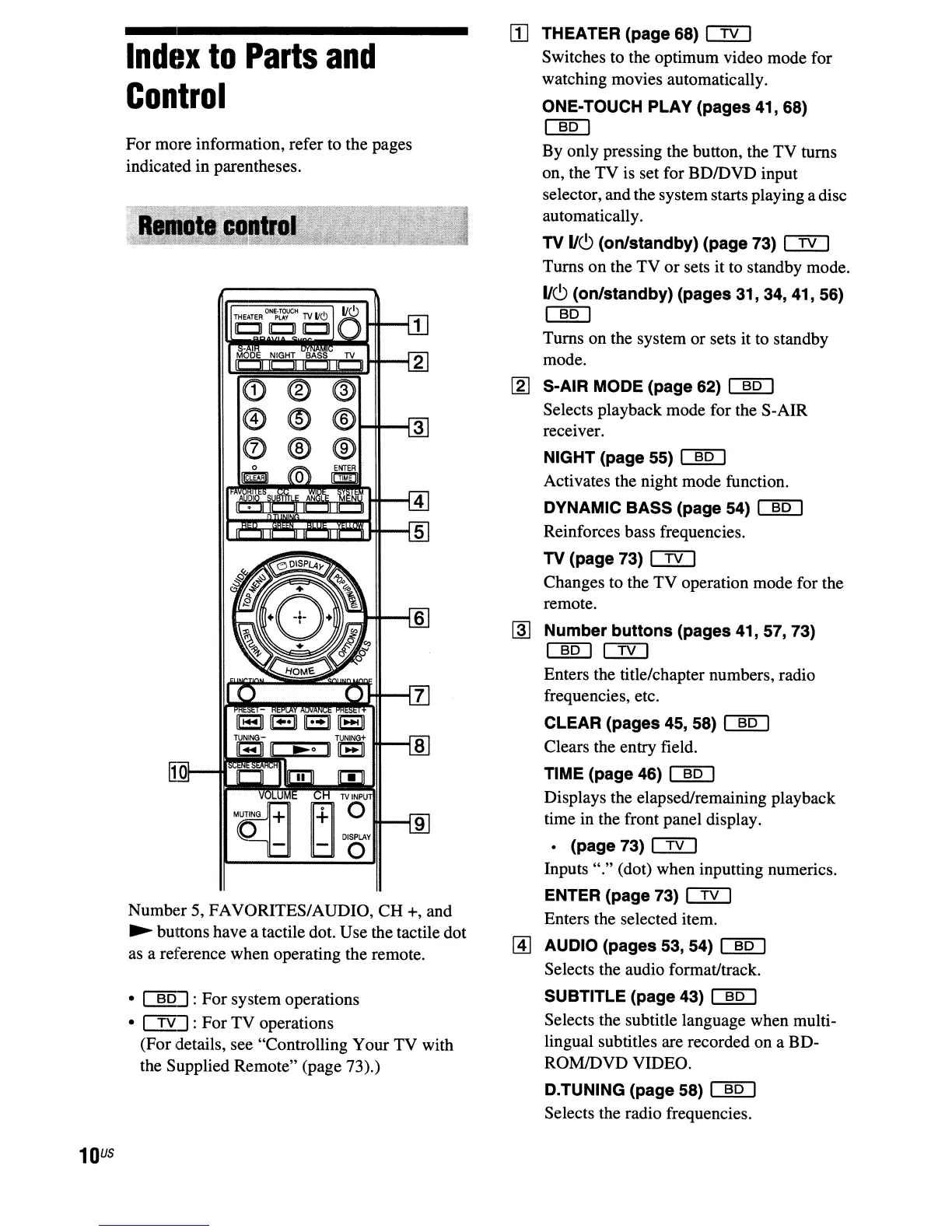
Number 5, FAVORITES/AUDIO,
CH
+, and
~
buttons have a tactile dot. Use the tactile dot
as a reference when operating the remote.
• cm2J: For system operations
• C!YJ: For
TV
operations
(For details, see "Controlling Your TV with
the Supplied Remote" (page 73).)
For more information, refer to the pages
indicated in parentheses.
Index
to
Parts
and
Control
10
U5



 To Next Page