Playback
Playing
a
BD/DVD
5
Press~.
6 Place a
disc.
Place one disc on the disc tray, and then
press
~.
-
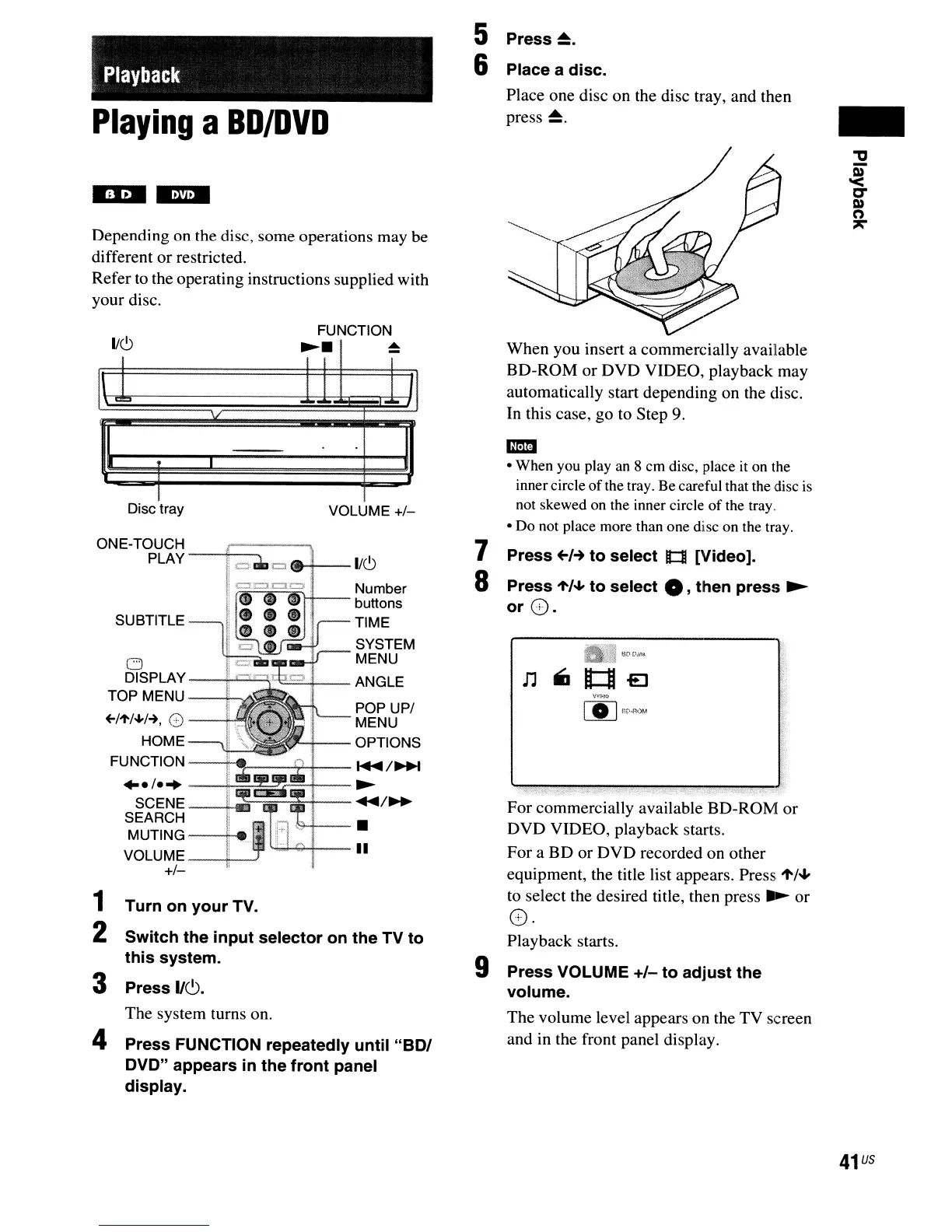
Depending on the disc, some operations may be
different or restricted.
Refer
to
the operating instructions supplied with
your disc.
FUNCTION
lie,)
~.
~
1\
C~
fl
When you insert a commercially available
BD-ROM
or
DVD VIDEO, playback may
automatically start depending on the disc.
In this case, go to Step 9.
1
Turn
on
your
TV.
2
Switch
the
input
selector
on
the
TV
to
this
system.
3 Press
1/6.
The system turns on.
4
Press
FUNCTION repeatedly
until
"BOI
DVO"
appears
in
the
front
panel
display.
Playback starts.
9
Press
VOLUME
+1-
to
adjust
the
volume.
The volume level appears on the TV screen
and in the front panel display.
For commercially available BD-ROM or
DVD VIDEO, playback starts.
For a
BD
or DVD recorded on other
equipment, the title list appears. Press
't/oJ"
to select the desired title, then press
~
or
o
v·
1m
• When you play an 8 cm disc, place it on the
innercircle
of
the tray. Be careful that the disc
is
not skewed on the inner circle
of
the tray.
• Do not place more than one disc on the tray.
7
Press
+-1-+
to
select
It:tI
[Video].
8
Press
't/oJ"
to
select
• ,
then
press
~
orG.
VOLUME +1-
Disc
tray
..
e/e
..
---+-=
SCENE_-+-iI
SEARCH
MUTING--
......
VOLUME
---li--..J
+1-
ONE-TOUCH
PLAY
---+,-,:::::-,,--
=
..
+--1/(9
ftti''tIFIi~I--
Number
buttons
TIME
SYSTEM
MENU
--t
..........
'--l'~::::..+--
ANGLE
POP UPI
MENU
OPTIONS
----[--,...----l;4.--
~
/~
~
...
/~
1&+--.
'4d....g-.+--1I
41
us



 To Next Page