16
US
...../ Surround right speaker (R)
i
\
\
e
v
o
"
",
Surround left speaker (L)
Getting
Started
Subwoofer Center speaker
Front left speaker
(l)
w········r·····················
'
~ront
,;ghl speaker (R)
//~
0 ?\.
:/
0 300 300 0 \
...
-
• Use caution when placing the speakers and/or speakerstands attached to the speakers ona specially treated (waxed,
oiled, polished, etc.) floor, as staining
or
discoloration may result.
•
Do
not lean
or
hang on a speaker, as it may fall down.
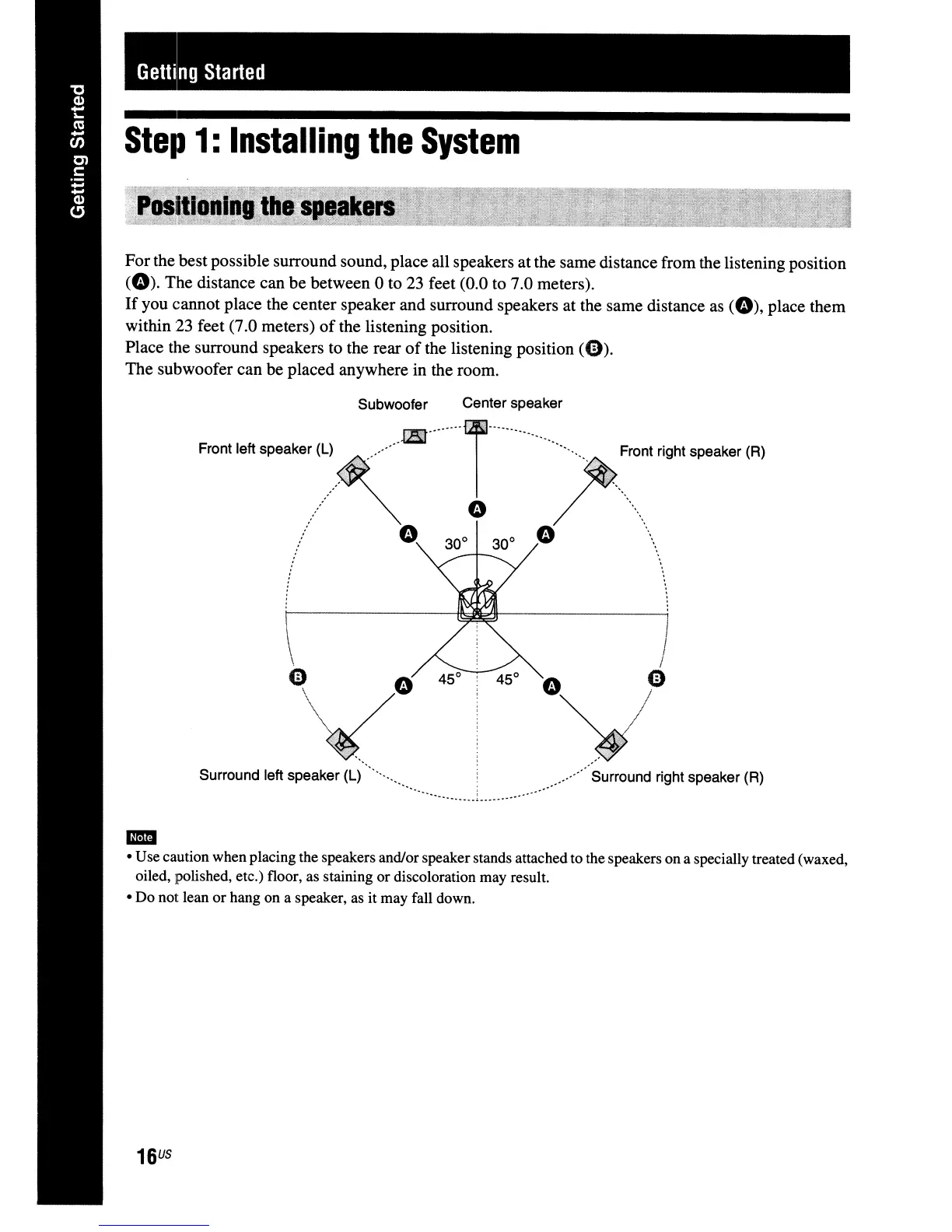
Forthe best possible surround sound, place all speakers at the same distance from the listening position
(0).
The distance can be between 0 to 23 feet (0.0 to 7.0 meters).
If
you cannot place the center speaker and surround speakers at the same distance
as
(0),
place them
within 23 feet (7.0 meters)
of
the listening position.
Place the surround speakers to the rear
of
the listening position
(0).
The subwoofer can
be
placed anywhere in the room.
Step
1:
Installing
the
System



 To Next Page