Troubleshooting
If
you experience any
of
the following difficulties while using the system, use this troubleshooting
guide to help remedy the problem before requesting repairs. Should any problem persist, consult your
nearest Sony dealer.
Note that
if
service personnel changes some parts during repair, these parts may be retained.
In
the event
of
a problem with the S-AIR function, have a Sony dealer check the entire system together
(S-AIR main unit and sub unit).
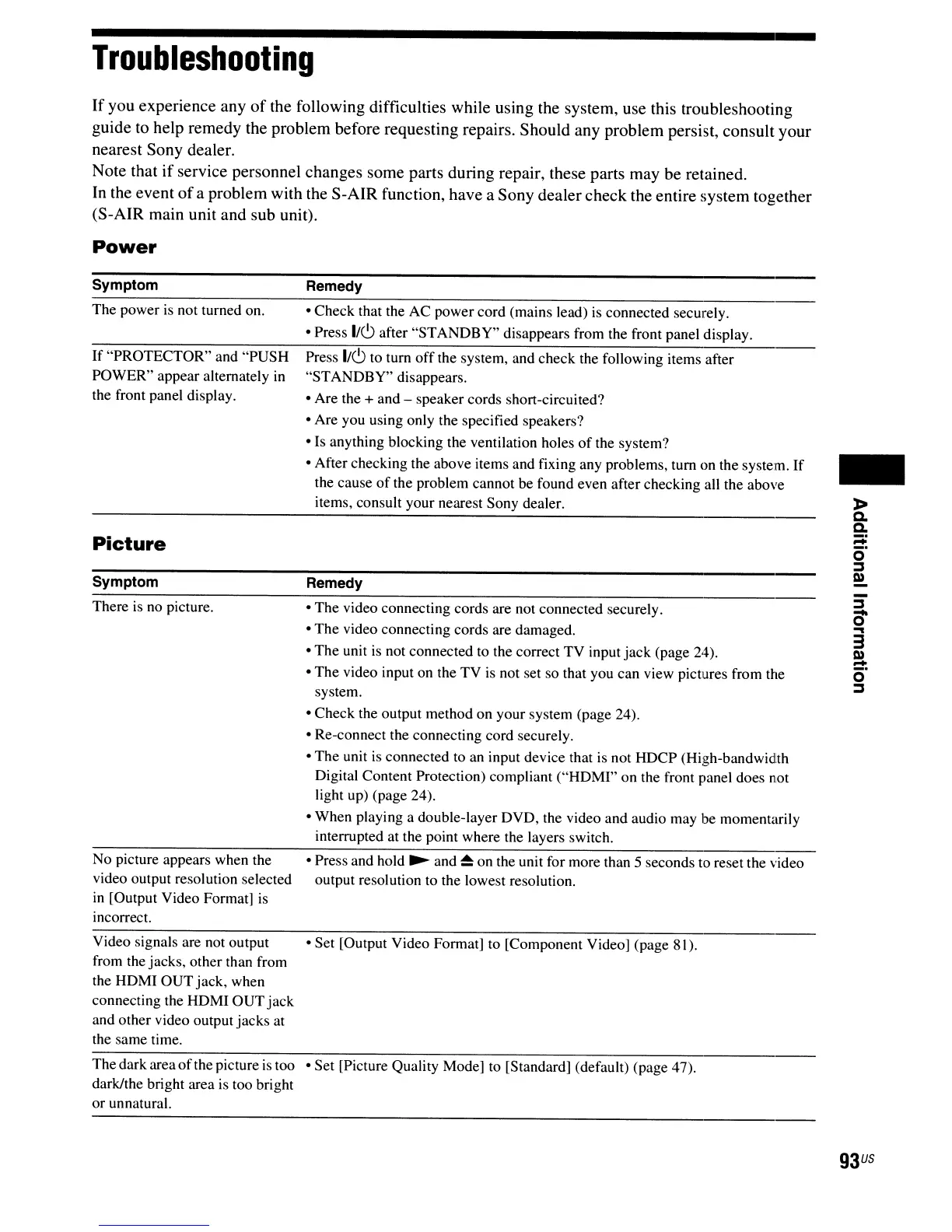
Power
Symptom
The power is not turned on.
If "PROTECTOR" and "PUSH
POWER" appear alternately
in
the front panel display.
Picture
Symptom
There is no picture.
No picture appears when the
video output resolution selected
in
[Output Video Format]
is
incorrect.
Remedy
• Check that the AC power cord (mains lead)
is
connected securely.
• Press 1/6 after "STANDBY" disappears from the front panel display.
Press 1/6 to tum
off
the system, and check the following items after
"STANDBY" disappears.
• Are the + and - speaker cords short-circuited?
• Are you using only the specified speakers?
• Is anything blocking the ventilation holes
of
the system?
• After checking the above items and fixing any problems, tum on the system.
If
the cause
of
the problem cannot be found even after checking all the above
items, consult your nearest Sony dealer.
Remedy
• The video connecting cords are not connected securely.
• The video connecting cords are damaged.
• The unit
is
not connected
to
the correct TV input
jack
(page 24).
• The video input on the TV
is
not set so that you can view pictures from the
system.
• Check the output method on your system (page 24).
• Re-connect the connecting cord securely.
• The unit is connected to an input device that
is
not HDCP (High-bandwidth
Digital Content Protection) compliant ("HDMI" on the front panel does not
light up) (page 24).
• When playing a double-layer DVD, the video and audio may be momentarily
interrupted at the point where the layers switch.
• Press and hold
~
and
~
on the unit for more than 5 seconds to reset the video
output resolution to the lowest resolution.
-
-
~
0'
...
3
Q)
-
o·
~
Video signals are not output • Set [Output Video Format] to [Component Video] (page 81).
from the jacks, other than from
the HDMI OUTjack, when
connecting the HDMI OUT
jack
and other video output jacks at
the same time.
Thedark area
of
the picture
is
too • Set [Picture Quality Mode] to [Standard] (default) (page 47).
dark/the bright area
is
too bright
or unnatural.
93
US



 To Next Page