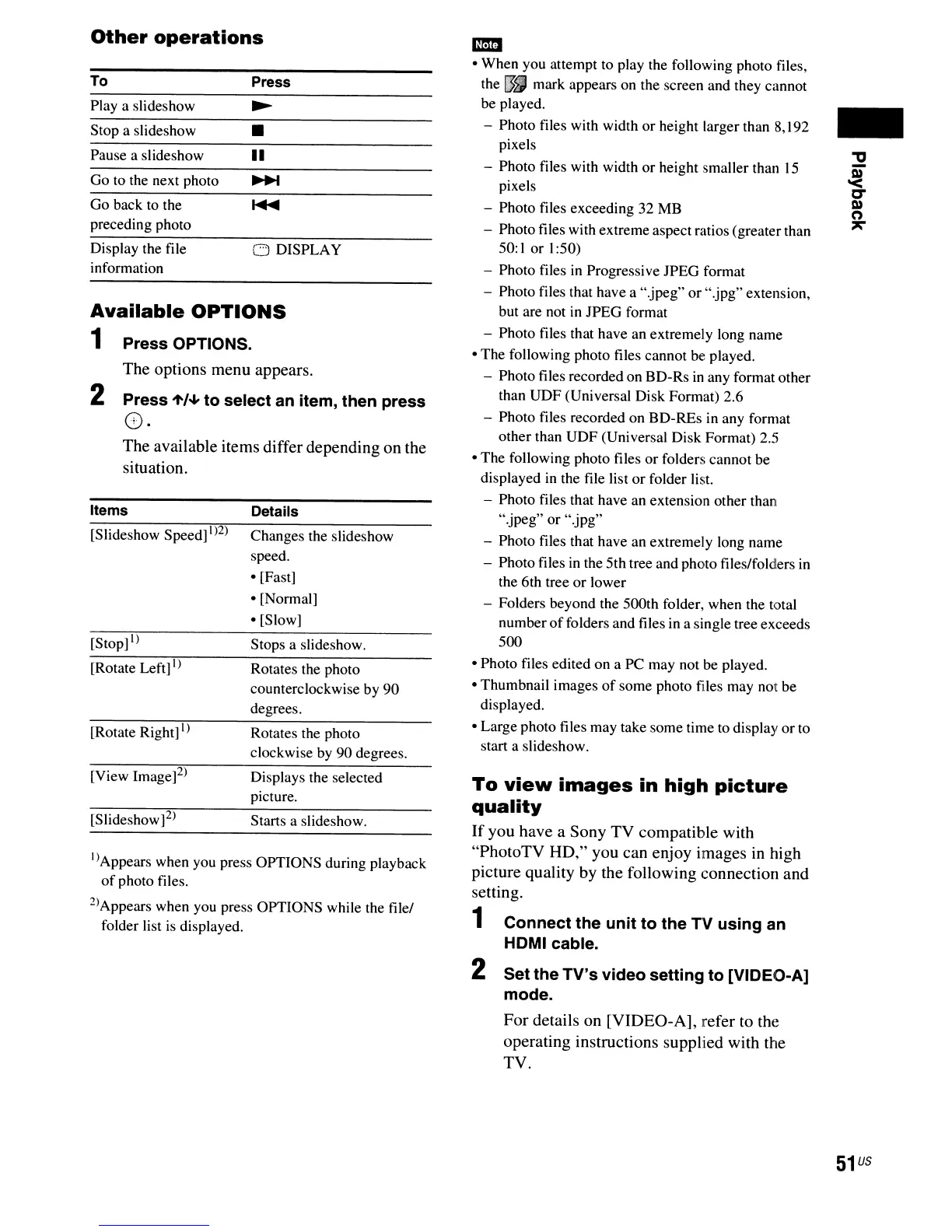
Other
operations
Available
OPTIONS
1 Press OPTIONS.
The options menu appears.
2 Press
't/~
to select
an
item, then press
8.
The available items differ depending on the
situation.
I)
Appears when you press OPTIONS during playback
of
photo files.
2)Appears when you press OPTIONS while the file/
folder list
is
displayed.
To
Playa
slideshow
Stop a slideshow
Pause a slideshow
Go to the next photo
Go back to the
preceding photo
Display the file
information
Items
[Slideshow Speed]
1)2)
[Stop]
I)
[Rotate Left]
I)
[Rotate Right]l)
[View Image]2)
[Slideshow]2)
Press
•
II
o DISPLAY
Details
Changes the slideshow
speed.
• [Fast]
• [Normal]
• [Slow]
Stops a slideshow.
Rotates the photo
counterclockwise by 90
degrees.
Rotates the photo
clockwise by 90 degrees.
Displays the selected
picture.
Starts a slideshow.
-
• When you attempt to play the following photo files,
the
lJ.I
mark appears on the screen and they cannot
be played.
- Photo files with width or height larger than 8,192
pixels
- Photo files with width or height smaller than
15
pixels
- Photo files exceeding 32
MB
- Photo files with extreme aspect ratios (greater than
50: I or 1:50)
- Photo files
in
Progressive IPEG format
- Photo files that have a ".jpeg" or ".jpg" extension,
but are not in IPEG format
- Photo files that have
an
extremely long name
• The following photo files cannot be played.
- Photo files recorded on BD-Rs
in
any format other
than UDF (Universal Disk Format) 2.6
- Photo files recorded on BD-REs in any format
other than UDF (Universal Disk Format) 2.5
• The following photo files or folders cannot be
displayed
in
the file list or folder list.
- Photo files that have an extension other than
".jpeg" or ".jpg"
- Photo files that have an extremely long name
- Photo files
in
the 5th tree and photo files/folders
in
the 6th tree
or
lower
- Folders beyond the
SOOth
folder, when the total
number
of
folders and files
in
a single tree exceeds
500
• Photo files edited on a
PC
may not be played.
• Thumbnail images
of
some photo ftles may not be
displayed.
• Large photo files may take some time to display or to
start a slideshow.
To
view
images
in
high
picture
quality
If
you have a Sony TV compatible with
"PhotoTV HD," you can enjoy images in high
picture quality by the following connection and
setting.
1 Connect the unit to the
TV
using an
HDMI cable.
2 Set the TV's video setting to [VIDEO-A]
mode.
For details on [VIDEO-A], refer to the
operating instructions supplied with the
TV.
-
51
US



 To Next Page