3-26
BRC-300/300P
BRU-300/300P
3-2. BRC-300/300P Camera Block Electrical Alignment
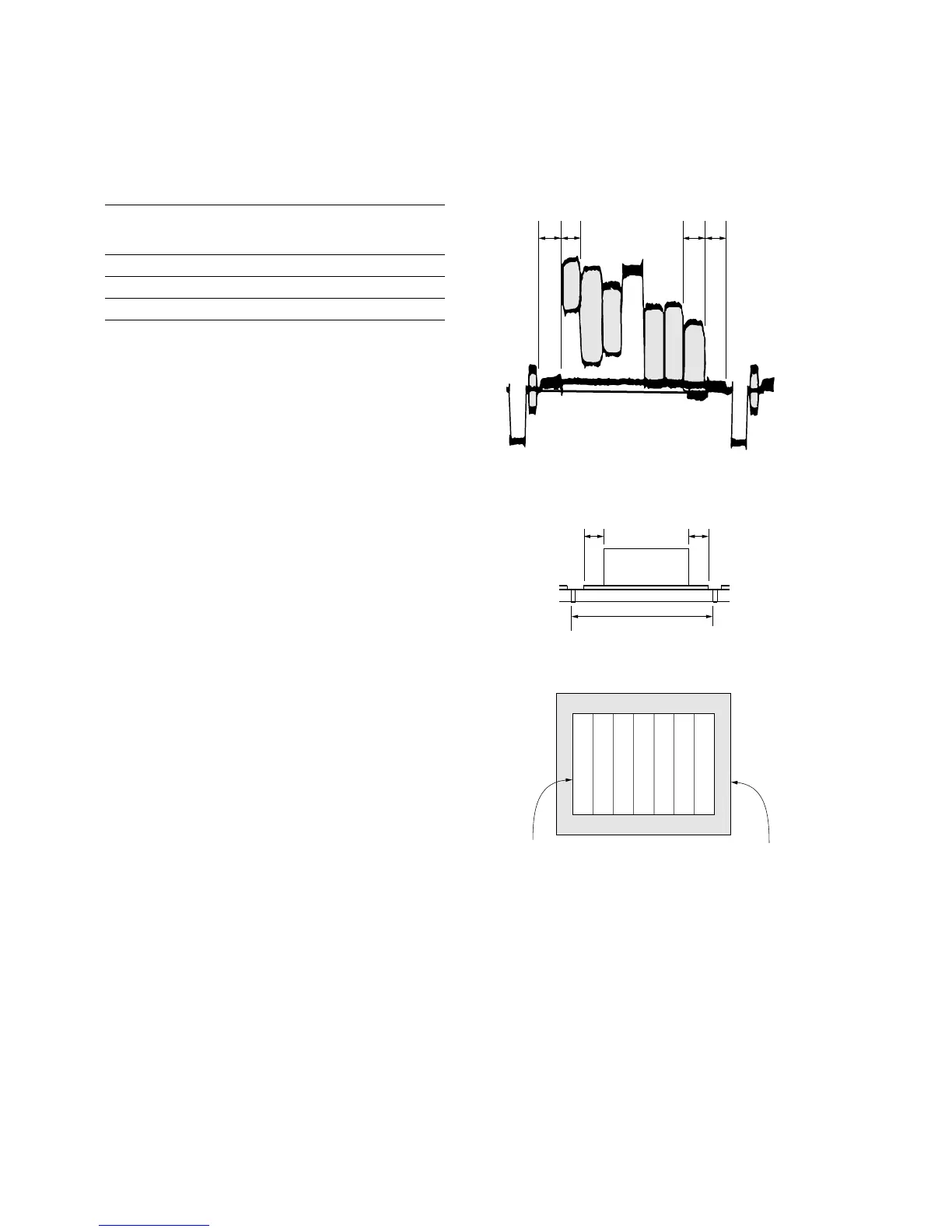
3-2-13. Picture Frame Setting
Subject Color-bar chart
(Color reproduction adjustment frame)
(1.0 m from the front of the lens)
Measurement point DD-208 board, pin 4 of CN151
Measuring instrument Oscilloscope and color monitor
Specifications A = B, C = D, E = F
n
Perform this setting after performing “3-2-12. Flange Back
Adjustment.
Control software settings
. DIGITAL ZOOM: OFF
. FOCUS: MANUAL
Setting procedure
1. Adjust the zoom and the camera direction, and set to
the specified position.
2. Mark the position of the picture frame on the monitor
display, and adjust the picture frame to this position
with color-bar chart in following adjustments using
“Color reproduction adjustment frame”.
A = B C = D
A
B
C
D
1. Horizontal period
2. Vertical period
Check on the color monitor (Underscanned mode)
Color-bar chart picture frame
Color monitor picture frame
E = F
V
E
F




 To Next Page