Recording still images on "Memory
Stick"s - Memory Photo recording
You can record still images oil "Memot 7 Stick"s.
Before operation
Insert a "Memory Stick" into yonr camcorder.
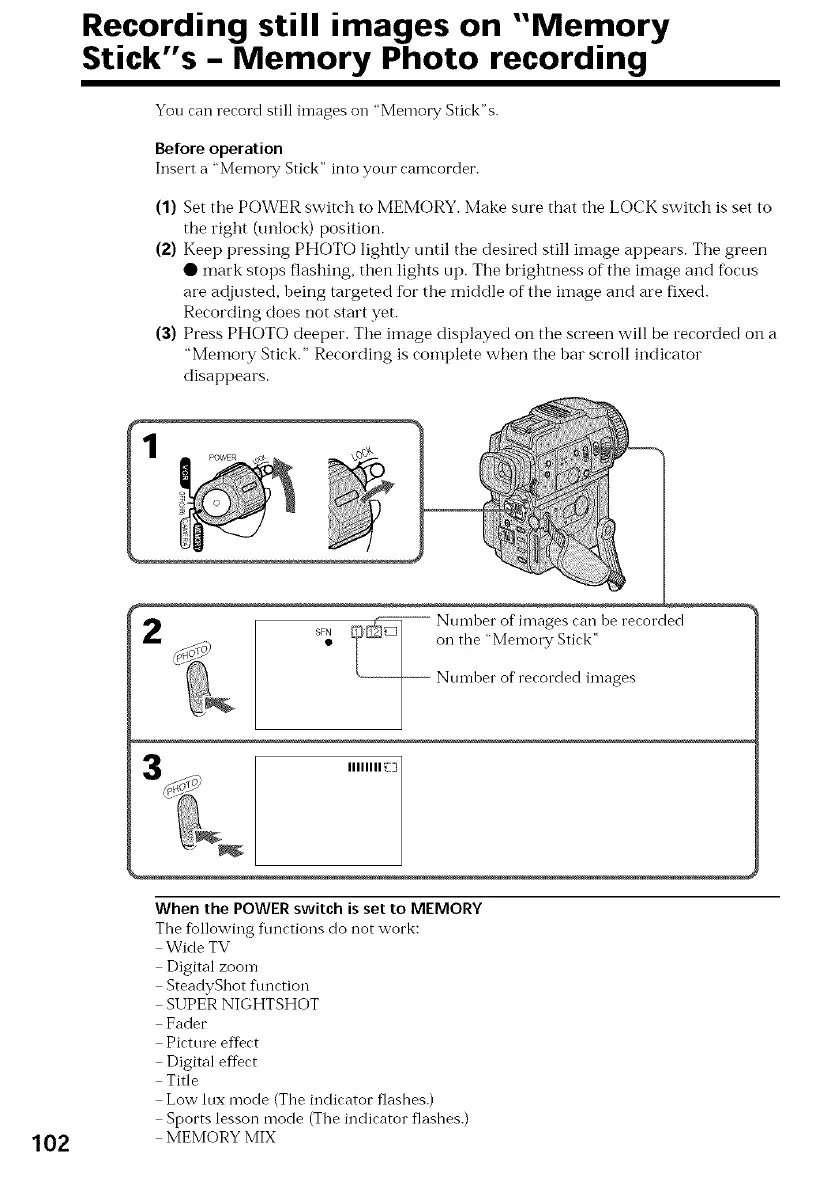
(1) Set tile POWER switch to MEMORY. Make sure that the LOCK switch is set to
the right (unlock) position.
(2) Keep pressing PHOTO lightly until the desired still image appears. Tile green
• mark stops flashing, then lights up. The brightness of the image and focus
are adjusted, being targeted for the middle of the image and are fixed.
Recording does not start yet.
(3) Press PHOTO deeper. The itnage displayed on the screen will be recorded on a
"Memory Stick." Recording is complete when the bar scroll indicator
disappears.
2
SFN
IIIIIIII _Z]
102
When the POWER switch is set to MEMORY
The tbllowing flmctions do not work:
Wide TV
Digital zoom
SteadyShot ftmction
SUPER NIGHTSHOT
Fader
Picture effect
Digital effect
Title
Low lux mode (The indicator flashes.)
Sports lesson mode (The indicator flashes.)
MEMORY MIX















 To Next Page