--Quick Reference--
Identifying the parts and controls
[]
[]
[]
[]
[]
[]
[]
[]
[]
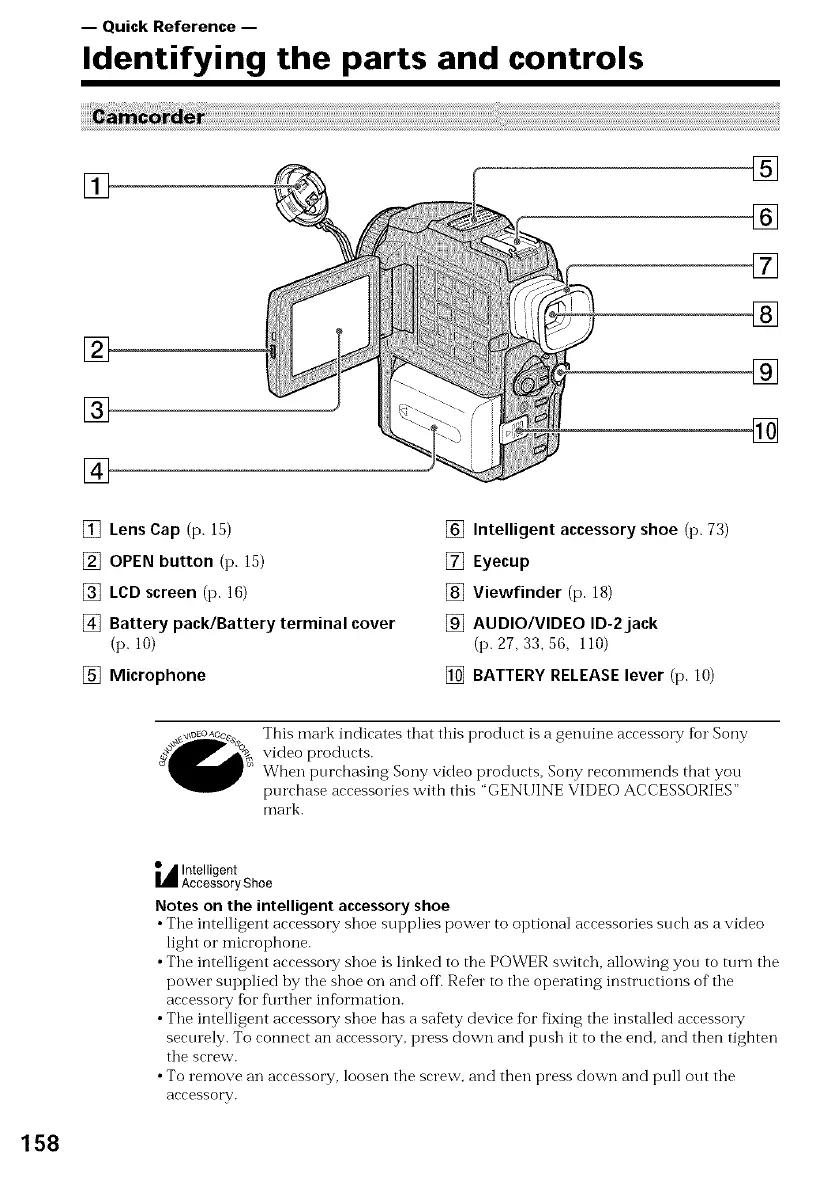
[] Lens Cap (p. 15)
[] OPEN button (p. 15)
[] LCD screen (p. 16)
[] Battery pack/Battery terminal cover
(p. ]0)
[] Microphone
[] Intelligent accessory shoe (p. 73)
[] Eyecup
[] Viewfinder (p. 18)
[] AUDIO/VIDEO ID-2jack
(p. 27, 33, 56, 110)
[] BATTERY RELEASE lever (p. 10)
This mark indicates that this product is a genuine accessory for Sony
video products.
When purchasing Sony video products, Sony recommends that you
purchase accessories with this 'GENUINE VIDEO ACCESSORIES"
mal'k.
_ Intelligent
Accessory Shoe
Notes on the intelligent accessory shoe
• Tile intelligent accessory shoe supplies power to optional accessories such as a video
light o1" microphone.
• The intelligent accessory shoe is linked to the POWER switch, allowing you to mrn the
power supplied hy the shoe on and off. Refer to the operating instructions of" the
accessory for fl/rther information.
• The intelligent accessory shoe has a safety device for fixing the installed accessory
securely. To connect an accessory, press down and push it to the end, and then tighten
the screw.
• To remove an accessory, loosen the screw, and then press down and pull out the
accessory.
158















 To Next Page