Enlarging images recorded on tapes
- Tape PB ZOOM
You can enlarge playback images recorded on tapes. You can also dub tile enlarged
images to tapes or copy to "Memo1T Stick"s. Besides the operation described here, yore
camcorder can enlarge still images recorded on "Memo W Stick"s.
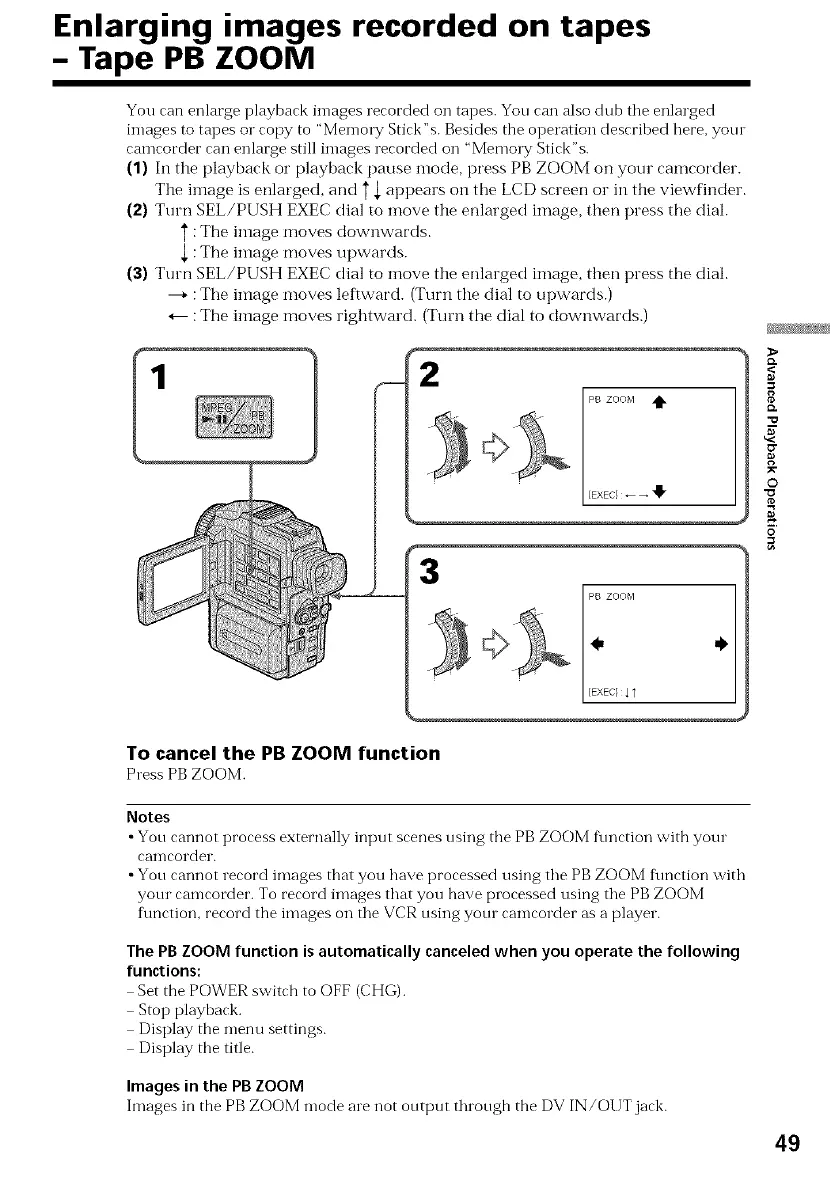
(1) In the playback or playback pause mode, press PB ZOOM on your camcorder.
The image is enlarged, and T,[ appears on the LCD screen or in the viewfinder.
(2) Turn SEL/PUSH EXEC dial to move the enlarged image, then press the dial.
: The image moves downwards.
,[ : The image moves upwards.
(3) Turn SEL/PUSH EXEC dial to move the enlarged image, then press the dial.
----+: The ilnage moves leftward. (Turn the dial to upwards.)
_-- : The image moves rightward. (Turn the dial to downwards.)
1
3
To cancel the PB ZOOM function
Press PBZOOM.
8
O"
_r
O
O
Notes
•You cannot process externally input scenes using the PB ZOOM t\mction with your
caIncorder.
•You cannot record images that you have processed using the PB ZOOM fimction with
yore camcorder. To record images that you have processed using the PBZOOM
ftmction, record the images on the VCR using yore camcorder as a player.
The PB ZOOM function is automatically canceled when you operate the following
functions:
Set the POWER switch to OFF (CHG).
Stop playback.
Display the menu settings.
Display the title.
Images in the PBZOOM
hnages in the PB ZOOM mode are not output through the DV IN/OUT jack.
49















 To Next Page