Recording moving pictures on "Memory
Stick"s - MPEG movie recording
You can record moving pictures with sound on "Memory Stick"s.
Before operation
Insert a "Memory Stick" into you] can-lcorder.
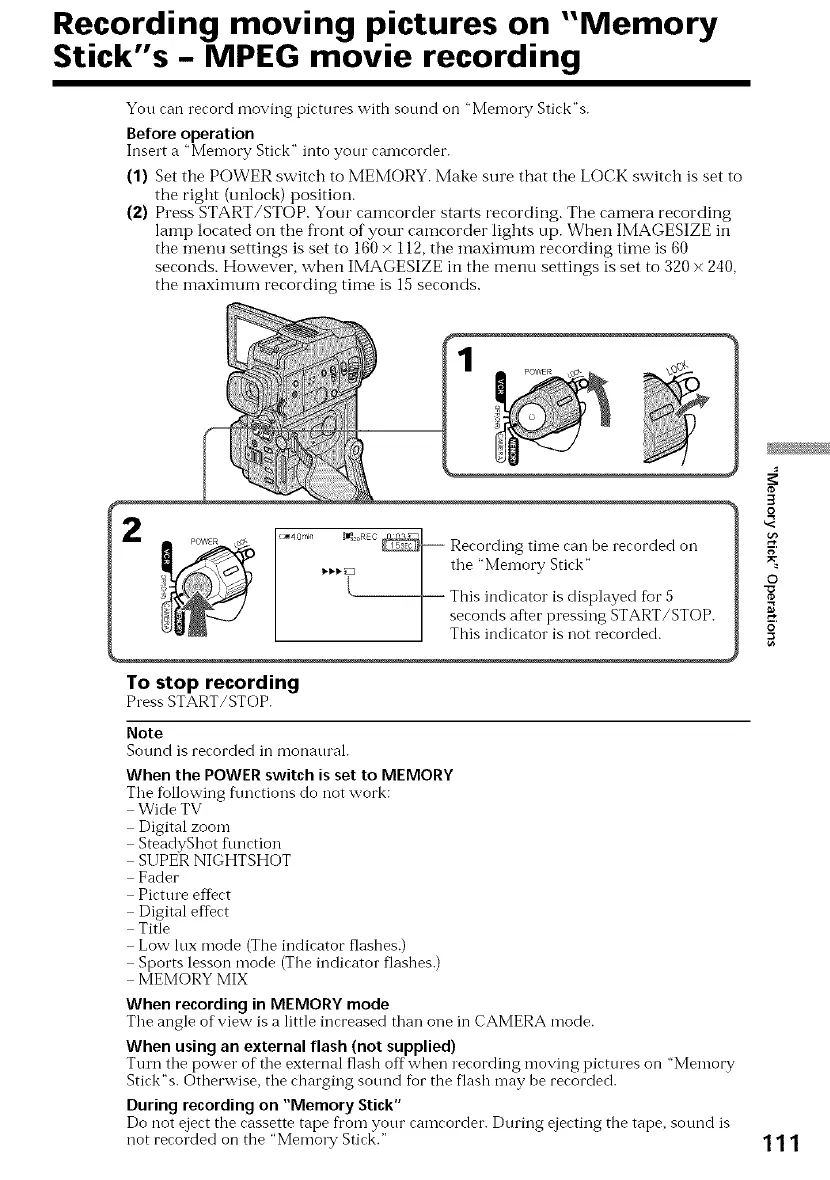
(1) Set the POWER switch to MEMORY. Make sure that the LOCK switch is set to
the right (unlock) position.
(2) Press START/STOP. Your camcorder starts recording. The camera recording
lamp located on the front of your camcorder lights up. When IMAGESIZE in
tile menu settings is set to 160 × 112, tile maximum recording time is 60
seconds. However, when IMAGESIZE in the menu settings is set to 320 x 240.
the maximum recording time is 15seconds.
!*40'nin _I_3e°RKC_ Recording tin-lecan be recorded on
_._._.? --] the "Men-lory Stick"
]_ This indicator is displayed fur 5
seconds after pressing START/STOP.
] This indicator is not recorded.
1o stop recording
Press START/STOP.
Note
Sound is recorded in monanral.
When the POWERswitch is setto MEMORY
Tile following f\mctions do not work:
Wide TV
Digital zoom
SteadyShot flmction
SUPER NIGHTSHOT
Fader
Picture effect
Digital effect
Title
Low lux mode (The indicator flashes.)
Sports lesson mode (The indicator flashes.)
MEMORY MIX
When recording in MEMORY mode
Tile angle ofview is a little increased than one in CAMERA mode.
When using an external flash (not supplied)
Turn the power of"the external flash offwhen recording moving picttues on "Memory
Stick"s. Otherwise, tile charging sound for the flash may be recorded.
During recordingon "Memory Stick"
Do not eject the cassette tape from your camcorder. During ejecting the tape, sound is
not recorded on the "Memo1T Stick."
3
o
g
©
o
111















 To Next Page