Recordin.g a picture from a mini DV tape
as a moving picture
Your camcorder can read moving picture data recorded on a mini DV tape and record it
as a moving picture on a "Memory Stick." Your camcorder can also take in moving
picture data through tile input connector and record it as a moving picture oil a
"Memory Stick."
Before operation
• Insert a recorded mini DV tape into yotu camcorder.
•Insert a "Memory Stick" into your camcorder.
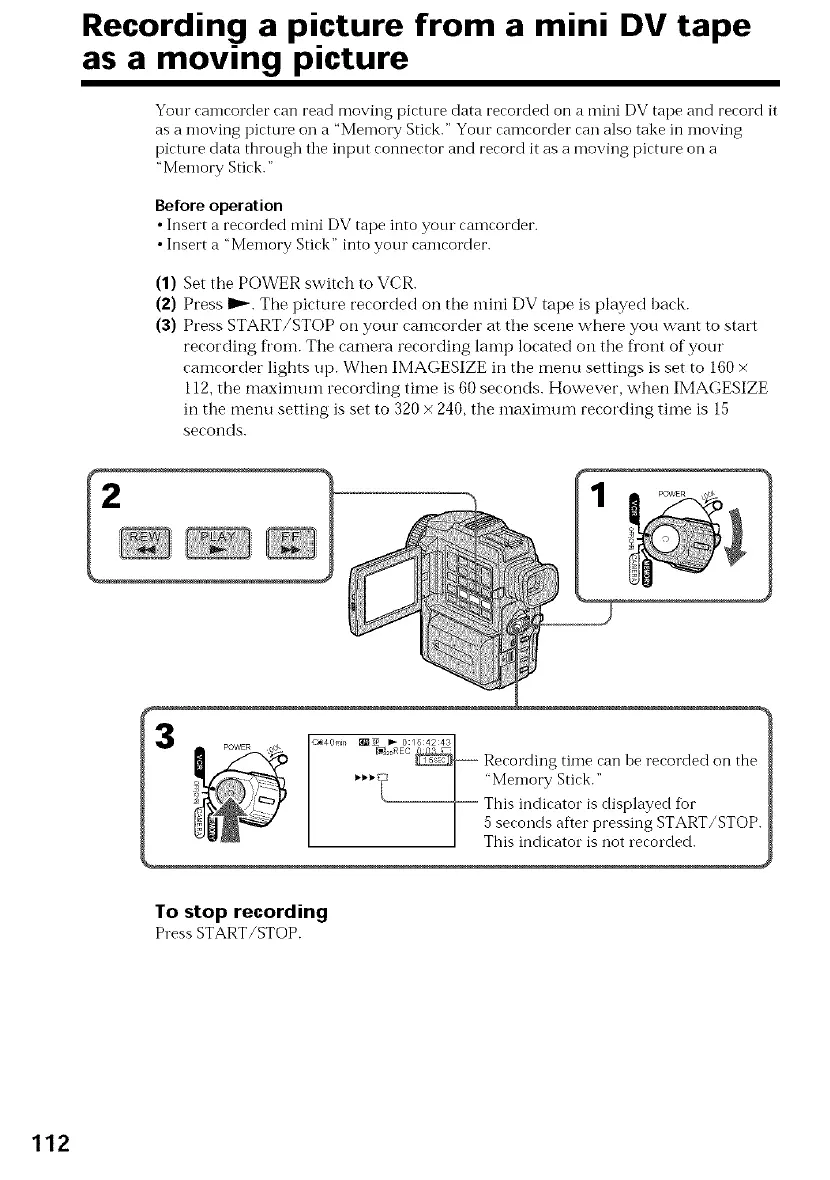
(1) Set the POWER switch to VCR.
(2) Press D_. The picture recorded on the mini DV tape is played back.
(3) Press START/STOP on your camcorder at the scene w,here you want to start
recording fi'om. The camera recording lamp located on the fi'ont of your
camcorder lights up. When IMAGESIZE in the menu settings is set to 160 ×
112, the maximum recording time is 60 seconds. However, when IMAGESIZE
in the menu setting is set to 320 x 240, the maximum recording time is 15
seconds.
2
3
POWER
<_4 Or'i}} _1_19P_ I_-REC0:/5 42 43/
........ 1
Recording time can )e recorded on the
_'_'_'_l: I "Memory Stick."
This indicator is displayed for
5 seconds after pressing START/STOP.
This indicator is not recorded.
To stop recording
Press START/STOP.
112















 To Next Page