Recording a picture
Note on the LOCK switch
When you slide the LOCK switch to the left, the POWER switch can no longer be set to
MEMORY accidentally. LOCK switch is set to the rigbt as a default setting.
To enable smooth transition
Transition between the last scene you recorded and the next scene is smooth as long as
you do not eject the cassette even if you turn offyour camcorder.
However, check the following:
Do not mix recordings in the SP mode and ones in the LP mode on one tape.
When you change the battery pack, set tile POWER switch to OFF (CHG).
When you use a tape with cassette memory, however, you can make the transition
smooth even after ejecting tile cassette if you use the END SEARCH function (p. 23).
If you leave your camcorder in the standby mode for 5 minutes while the cassette
is inserted
Your cameorder automatically ttnns off This is to save battery power and to prevent
battery and tape wear. To restmle tile standby mode, set tile POWER switch to OFF
(CHG), and to CAMERA again.
When you record in the SP and LP modes on one tape or you record some scenes
in the LP mode
Tbe playback picture inay be distorted o1"tile time code may not be written properly
between scenes.
Recording date and time
The recording date and time are not displayed while recording. However. they are
recorded automatically onto tile tape. To display the recording date and time, press
DATA CODE on the Remote Commander during playback.
(1) Set tbe POWER switch to OFF (CHG).
(2) Close tbe LCD panel.
(:3) Set tbe Holding Grip back to tbe original position.
(4) Eject the cassette.
(5) Remove the battery pack.
(6) Attach the battery terminal cover.
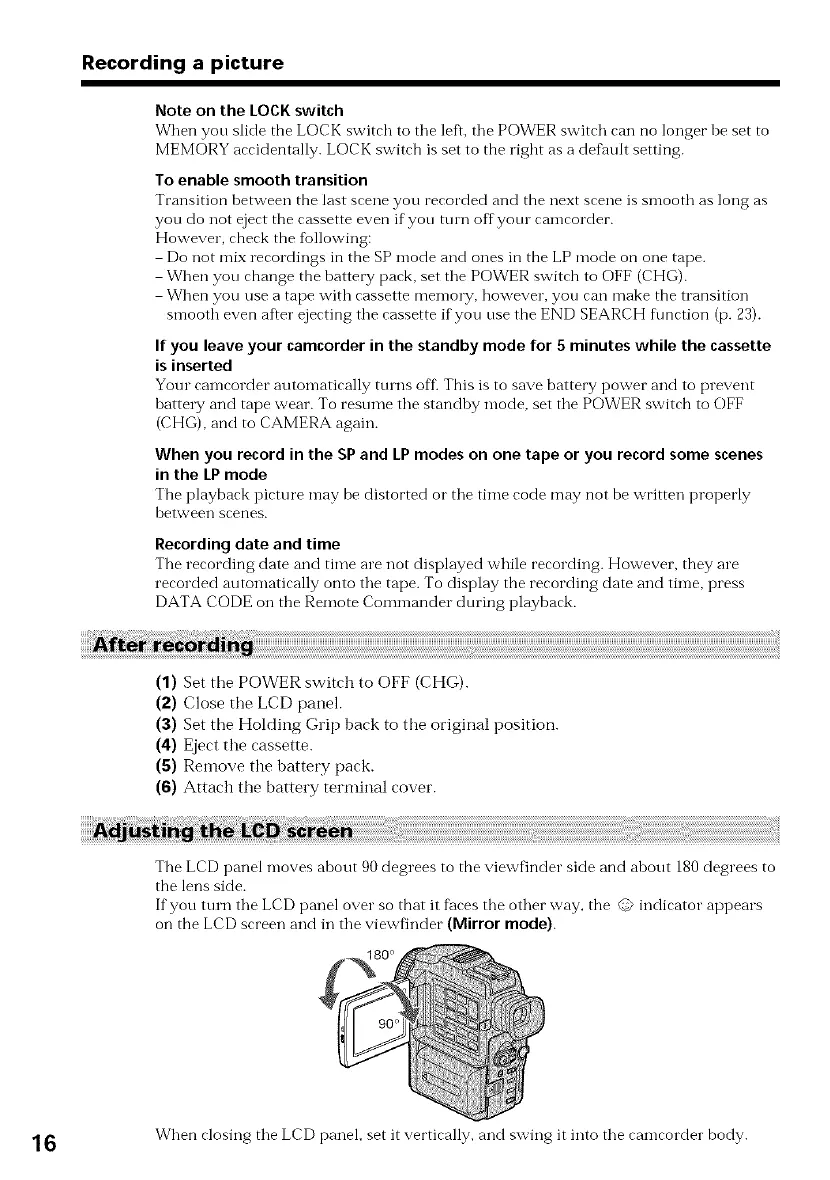
The LCD panel moves about 90 degrees to the viewfinder side and about 180degrees to
the lens side.
If you turn the LCD panel over so that it faces tbe other way, the @ indicator appears
on the LCD screen and in the viewfinder (Mirror mode).
16 When closing tile LCD panel, set it vertically, and swing it into tile camcorder body.















 To Next Page