Resetting the date and time
The default clock setting is set to Tokyo time for the models sold in Japan, and New
York time for other models.
If you do not use your camcorder for about 3 montbs, the date and time settings may be
released (bars may appear) because tile manganese lithium battery installed in your
camcorder will have been discharged (i7. 153).
First, set the year, then the month, the clay, the hour and then the minute.
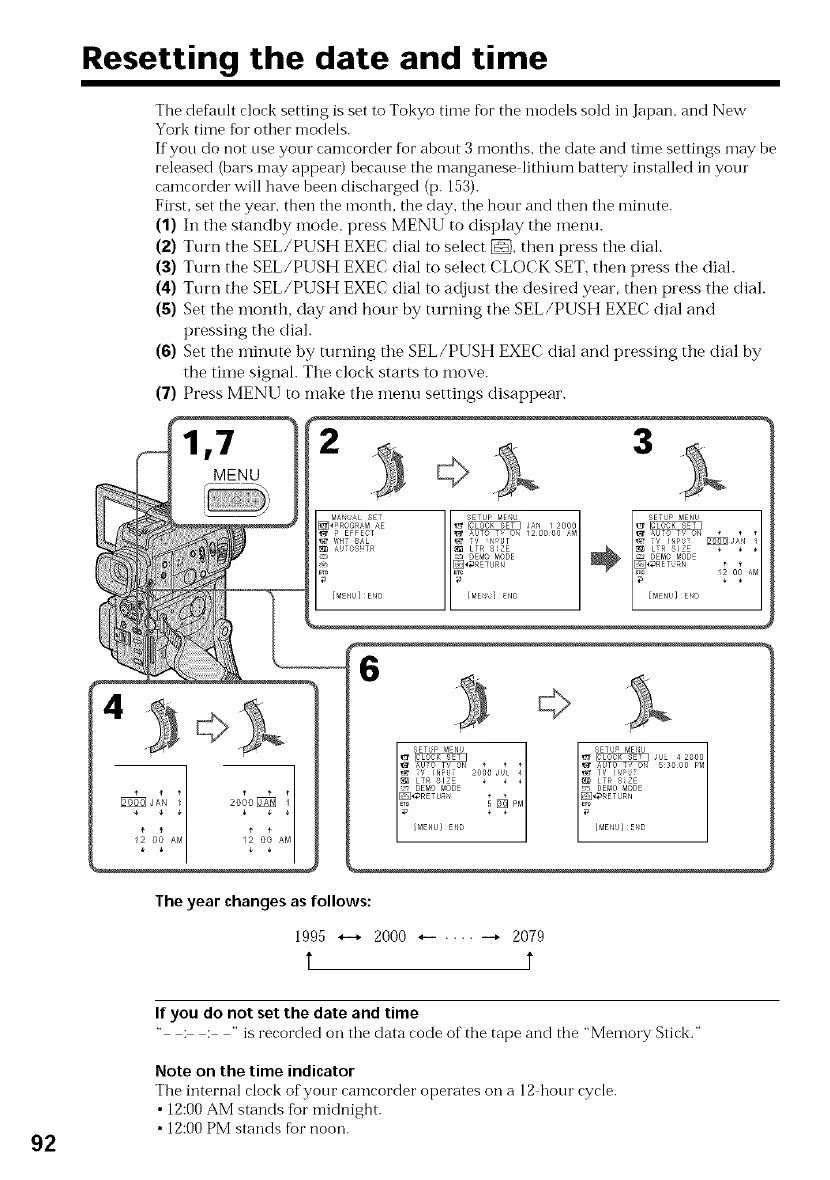
(1) In the standby mode, press MENU to display the inenu.
(2) Turn the SEL/PUSH EXEC dial to select _, then press the dial.
(3) Turn the SEL/PUSH EXEC dial to select CLOCK SET, then press the dial.
(4) Turn the SEL/PUSH EXEC dial to adjust the desired year, then press the dial.
(5) Set the inonth, day and hour by turning the SEL/PUSH EXEC dial and
pressing the dial.
(6) Set the minute by turning the SEL/PUSH EXEC dial and pressing the dial by
the time signal. The clock starts to move.
(7) Press MENU to make the menu settings disappear.
,7 3
MENU
6
/2 O0 AME2 O0
The year changes as follows:
1995 *--* 2000 *-- .... --* 2079
t t
92
If you do not set the date and time
" : : " is recorded on the data code of the tape and tbe "Memory Stick."
Note on the time indicator
The internal clock of your camcorder operates on a 12 hour cycle.
• 12:00 AM stands fbr midnight.
• 12:00 PM stands for noon.















 To Next Page