Recording an image from a mini DV tape as a still image
(1) Set the POWER switch to VCR and set DISPLAY in _ to LCD in the menu
settings.
(2) Play back the recorded tape, or turn tile TV on to see the desired program.
The image of the other equipment is displayed on the LCD screen or in the
viewfinder.
(3) Follow steps 3 and 4 on page 108.
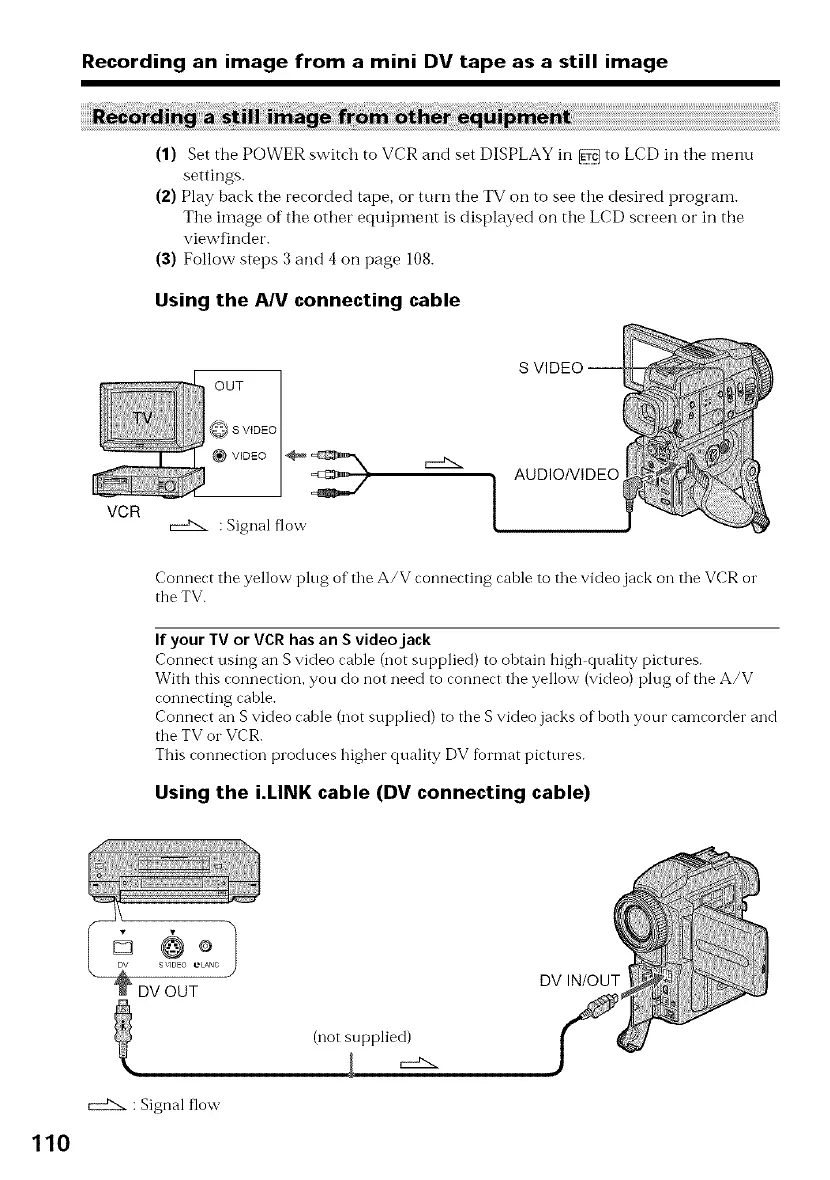
Using the AN connecting cable
VIDEO _ _ ,__N.. AUDIO/VIDEO
VCR _ : Signal flow [
Connect tbe yellow i_lug of tile A/V connecting cable to the video jack on the VCR or
the TV.
If your TV or VCR has an S videojack
Connect using an S video cable (not supplied) to obtain high quality pictures.
With this connection, you do not need to connect the yellow (video) plug of the A/V
connecting cahle.
Connect an S video cable (not supplied) to the S video jacks of both your camcorder and
the TV or VCR.
This connection produces higher quality DV fbrmat pictures.
Using the i.LINK cable (DV connecting cable)
110
_DV OUT DV IN/OUT
: Signal flow
(not supplied)















 To Next Page