Recording still images on "Memory Stick's
- Memory Photo recording
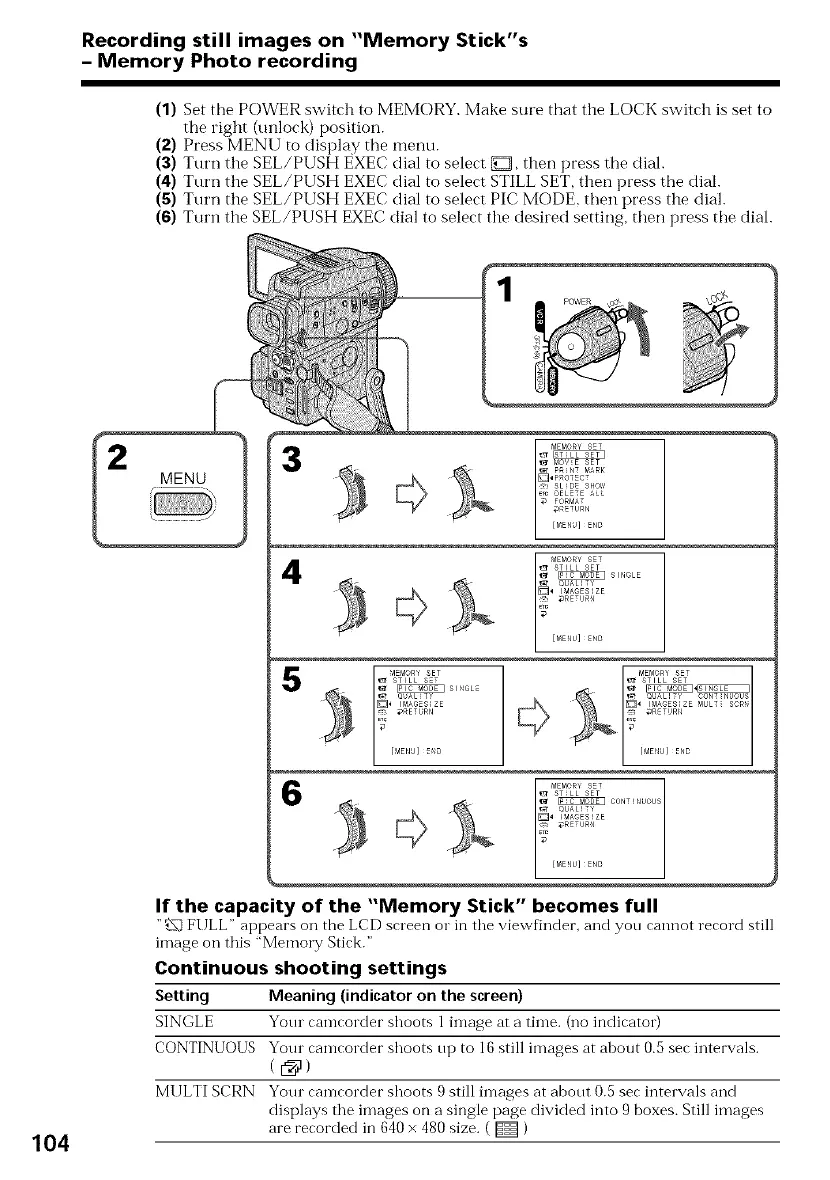
(1) Set the POWER switch to MEMORY. Make sure that the LOCK switch is set to
the right (unlock) position.
(2) Press MENU to display the menu.
(3) Turn the SEL/PUSH EXEC dial to select _, then press the dial.
(4) Turn the SEL/PUSH EXEC dial to select STILL SET, therl press the dial.
(5) Turn the SEL/PUSH EXEC dial to select PIC MODE, then press the dial.
(6) Turn the SEE/PUSH EXEC dial to select the desired setting, then press the dial.
3
4
_EP_ORY SET _EMORY SET
STILL SEt _ STILL SEt
_ OUAL_T_ _ OUALIT_ CONTINUOUS
_ I_AGESIZE " _4 IMAGESIZE MULT_ SCRN
_ _ETURN _ _ReTURN
6
104
If the capacity of the "Memory Stick" becomes full
"_1 FULL" appears on the LCD screen or in the viewfinder, and yon cannot record still
image on this "Memory Stick."
Continuous shooting settings
Setting Meaning (indicator on the screen)
SINGLE Yotu camcorder shoots 1 image at a time. (no indicator)
CONTINUOUS Your camcorder shoots up to 16 still images at about 0.5 sec intervals.
MULTI SCRN Your camcorder shoots 9 still images at about 0.5 sec intervals and
displays the images on a single page divided into 9 boxes. Still images
are recorded in 640 x 480 size. ( _ )















 To Next Page