Superimposing a still image in a "Memory Stick" on a moving
picture - MEMORY MIX
Before operation
• Insert a mini DV tape for recording into your camcorder.
• Insert a recorded "Memory Stick" into yore camcorder.
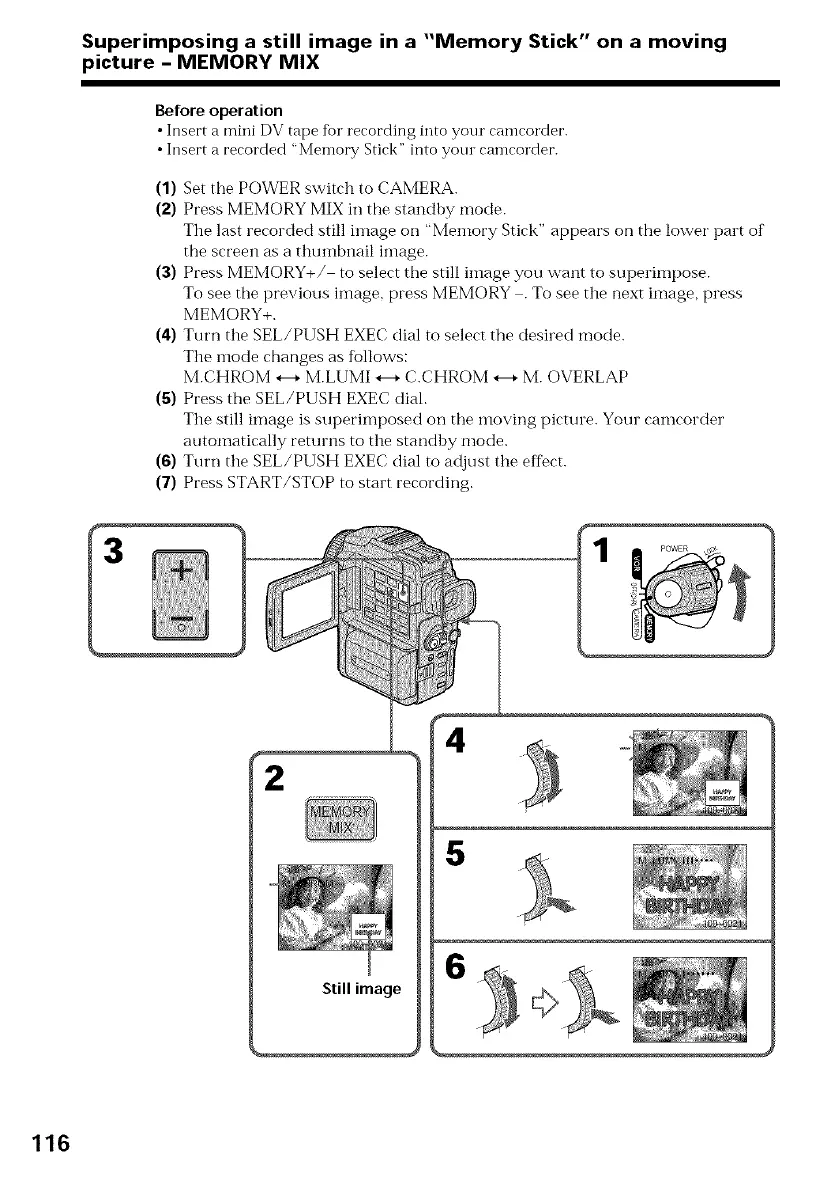
(1) Set the POWER switch to CAMERA.
(2) Press MEMORY MIX in the standby mode.
The last recorded still image on "Memory Stick" appears on the lower part of
the screen as a thumbi:ail image.
(3) Press MEMORY+/ to select the still image you want to superimpose.
To see the previous image, press MEMORY . To see the next image, press
MEMORY+.
(4) Turn the SEL/PUSH EXEC dial to select the desired mode.
The mode changes as follows:
M.CHROM *--, M.LUMI *--, C.CHROM *--_ M. OVERLAP
(5) Press the SEL/PUSH EXEC dial.
The still image is superimposed on the moving picture. Your camcorder
automatically returns to the standhy mode.
(6) Turn the SEL/PUSH EXEC dial to adjust the effect.
(7) Press START/STOP to start recording.
2
5
6
116















 To Next Page