Deleting images
You can delete all tile unprotected images in a "Memory Stick."
Before operation
Insert a "Memo1 T Stick" into your camcorder.
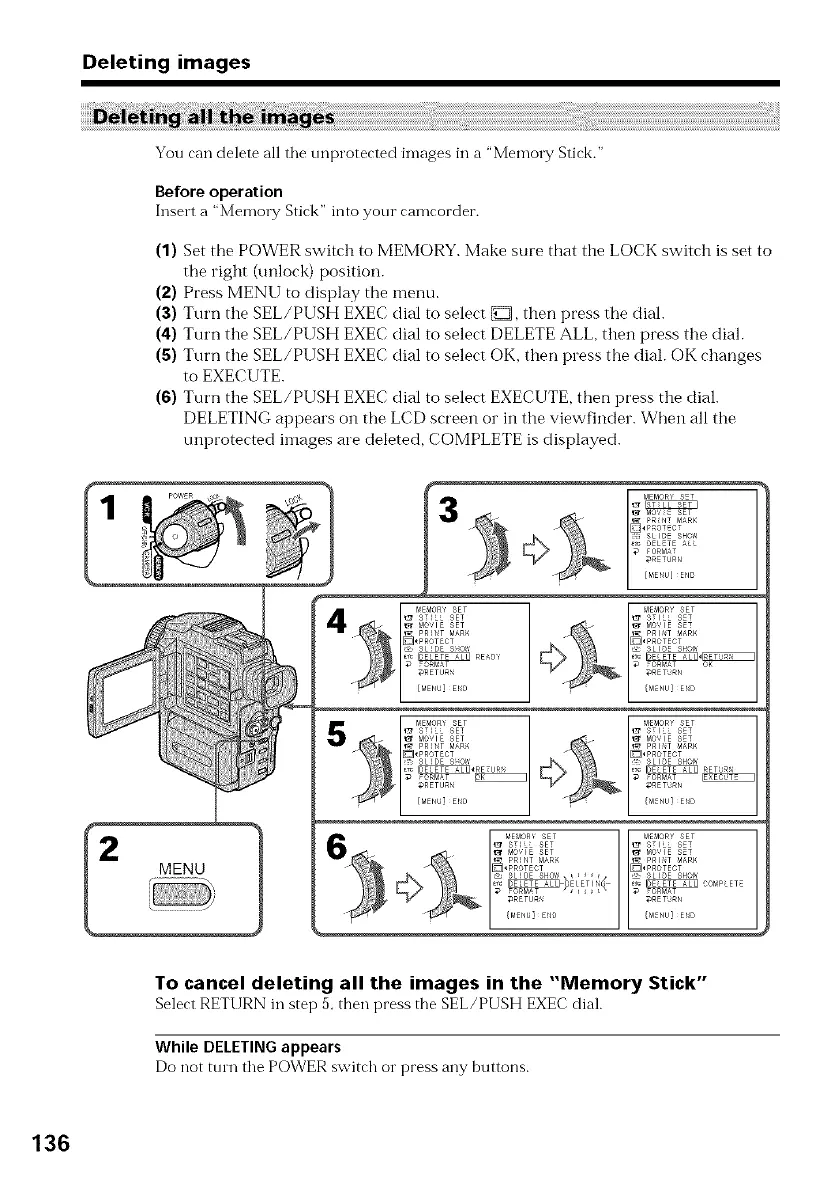
(1) Set the POWER switch to MEMORY. Make sure that the LOCK switch is set to
the right (unlock) position.
(2) Press MENU to display the menu.
(3) Turn the SEL/PUSH EXEC dial to select D, then press the dial.
(4) Turn the SEL/PUSH EXEC dial to select DELETE ALL, then press the dial.
(5) Turn the SEL/PUSH EXEC dial to select OK, then press the dial. OK changes
to EXECUTE.
(6) Turn the SEL/PUSH EXEC dial to select EXECUTE, then press the dial.
DELETING appears on the LCD screen or in the viewfinder. When all the
unprotected images are deleted, COMPLETE is displayed.
1
To cancel deleting all the images in the "Memory Stick"
SelectRETURN in step5, then press the SEL/PUSH EXECdial.
While DELETING appears
Do not turn the POWER switch or press any buttons.
136















 To Next Page