Recording a picture
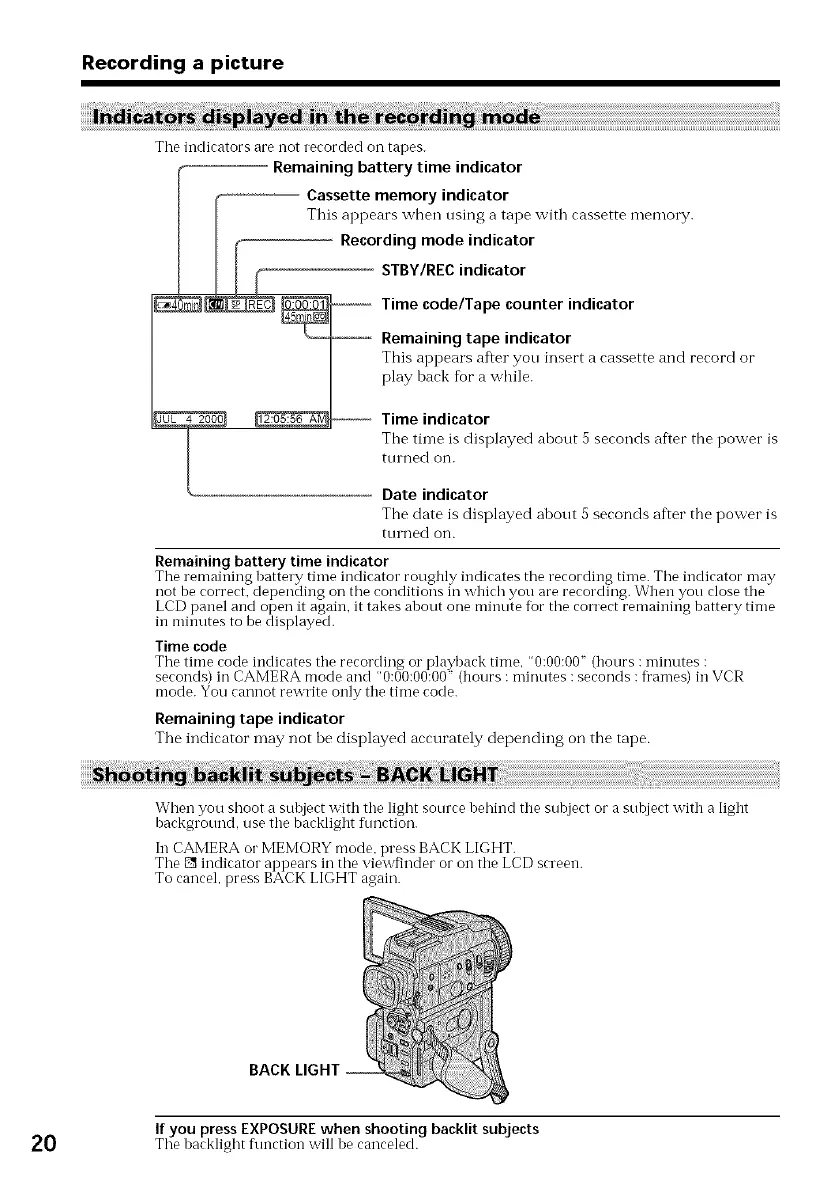
Tile indicators are not recorded on tapes.
Remaining battery time indicator
Cassette memory indicator
This appears when using a tape with cassette memory.
-- Recording mode indicator
STBY/REC indicator
Time code/Tape counter indicator
Remaining tape indicator
This appears after you insert acassette and record or
play back fbr a while.
Time indicator
F.
The tin-le is displayed about a seconds after tile power is
tUl ned on.
Date indicator
The date is displayed about 5 seconds af'.er the power is
turned on.
Remaining battery time indicator
The remaining battery time indicator roughly indicates the recording time. Tile indicator may
not be correct, depending on tile conditions in which you are recording. When you close tile
LCD panel and open it again, it takes about one minute for tile correct remaining battery time
in minutes to be displayed.
Time code
The time rode indicates tile recording or playback time, "0:00:00" (hours : minutes :
seconds) in CAMERA mode and "0:00:00:00" (hours : minutes :seconds : fl'ames) in VCR
mode. You cannot rewrite only tile time code.
Remaining tape indicator
The indicator may not be displayed accurately depending on the tape.
When you shoot a subject with tile light source behind tile subject or a subject with a light
background, use tile backlight fimction.
In CAMERA orMEMORYmode. press BACKLIGHT.
The [] indicator appears in the viewfinder or on tile LCD screen.
To cancel, press BACKLIGHT again.
BACK
If you press EXPOSURE when shooting backlit subjects
20 Tile backlight function will be canceled.















 To Next Page