Labeling a cassette
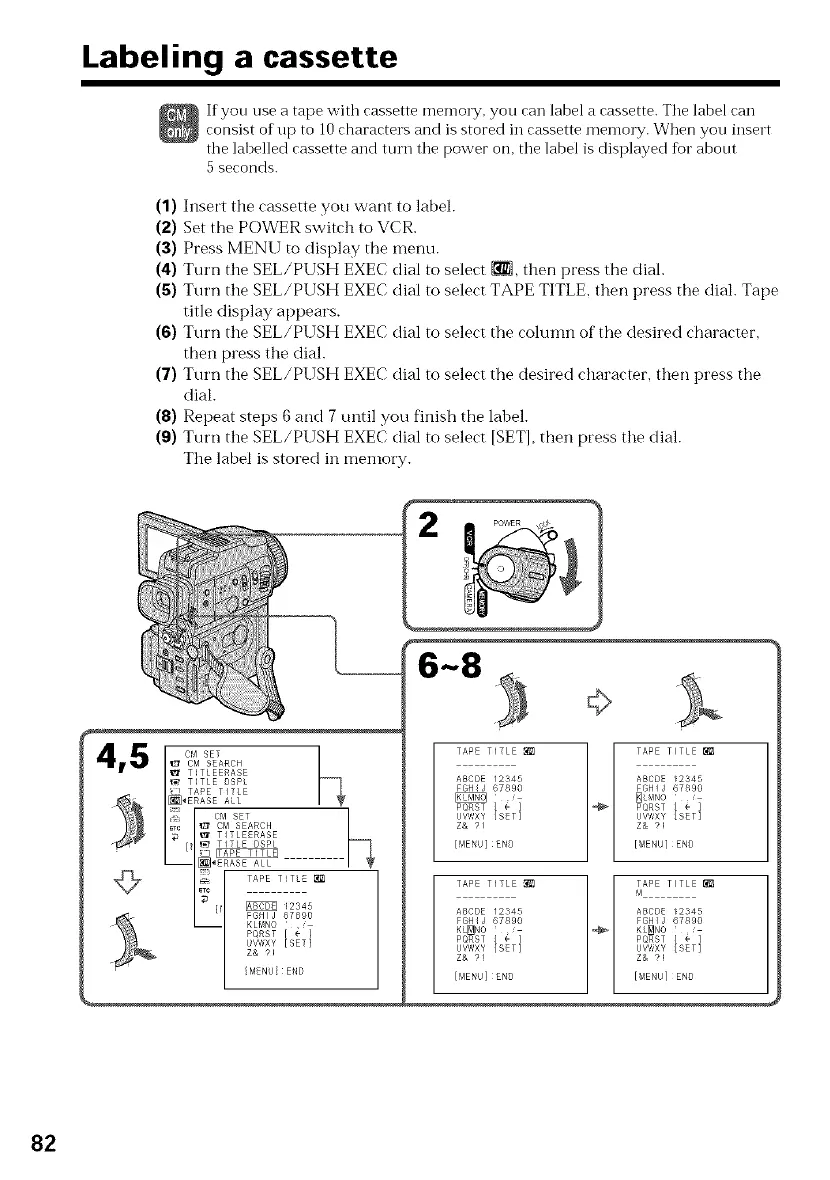
If yon use a tape with cassette memory, you can label a cassette. Tile label can
consist of up to l 0 characters and is stored in cassette memory. When you insert
tile labelled cassette and turn tile power on, tile label is displayed tor abont
5 seconds.
(1) Insert tile cassette you want to label.
(2) Set the POWER switch to VCR.
(3) Press MENU to display the menu.
(4) Turn tile SEL/PUSH EXEC dial to select _, then press the dial.
(5) Turn tile SEL/PUSH EXEC dial to select TAPE TITLE, then press the dial. Tape
title display appears.
(6) Turn tile SEL/PUSH EXEC dial to select the column of the desired character,
then press the dial.
(7) Turn tile SEL/PUSH EXEC dial to select the desired character, then press the
dial.
(8) Repeat steps 6 and 7 until you finish the label.
(9) Turn tile SEL/PUSH EXEC dial to select [SET], then press the dial.
Tile label is stored in memory.
6_8 _
TAPE TITLE _ _ TAPE TITLE
ABCDE 12345 ABCDE 12345
FGHIJ 67890 FGHIJ 67890
_LMNO
PQRST { e] PQRST [ • ]
U\/WXY [SET] UVWXY [SET]
Z& 91 Z& ?!
[MENU]END [MENU]END
TAPE TITLE _1_ l _APE TITLE
ABCDE 12345 ABCDE t2345
FGHIJ 67890 FGHIJ 67890
KL_NO _ KL_NO
PQRST [ e] PQRST [ • ]
U\/WXY [SET] UVWXY [SET]
Z& 91 Z& ?!
[MENU]END [MENU]END
82















 To Next Page